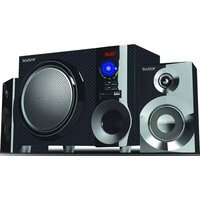
BT-215FD - Hi-Fi System Boytone - Free user manual and instructions
Find the device manual for free BT-215FD Boytone in PDF.


Pick your language and provide your email: we'll send you a specifically translated version.
| Product Type | Hi-Fi System |
| Brand | Boytone |
| Model | BT-215FD |
| Dimensions (W x H x D) | Approx. 30 x 20 x 10 cm |
| Weight | Approx. 2 kg |
| Power Supply | AC 110-240V, 50/60Hz |
| Power Consumption | 15W |
| Audio Output | 2 x 5W stereo speakers |
| Playback Media | CD, CD-R, CD-RW, USB, FM radio |
| Bluetooth | Yes, version 5.0 |
| FM Radio | Yes, with built-in antenna |
| USB Port | Yes, for MP3 playback |
| Headphone Jack | 3.5mm stereo |
| Remote Control | Yes, included |
| Display | LED display |
| Cleaning Instructions | Wipe with dry soft cloth; avoid liquids and abrasives |
| Safety Notes | Do not expose to moisture; unplug during storms |
| Spare Parts Availability | Contact Boytone customer service |
| Repairability | Refer to authorized service centers |
Frequently Asked Questions - BT-215FD Boytone
How do I pair the Bluetooth?
Turn on the system and press the Bluetooth button. Enable Bluetooth on your device, select 'BT-215FD' to connect.
Can I play CDs on this system?
Yes, it supports CD, CD-R, and CD-RW discs. Insert disc with label side up.
How to set the FM radio?
Press Source button to select FM. Use Tuning knob to scan stations. You can store presets by pressing Memory.
What is the power input?
The system uses AC 110-240V, 50/60Hz. Use the included power cord.
How to clean the system?
Unplug then wipe with a soft dry cloth. Do not use liquids or abrasive cleaners.
Does it have a USB port?
Yes, a USB port is located on the front for playing MP3 files from USB drives.
How to use the remote control?
Insert AAA batteries, point at the sensor. Use for volume, track skip, source selection, etc.
What is the audio output power?
The system delivers 2 x 5W stereo output.
Can I connect headphones?
Yes, via the 3.5mm headphone jack on the front or side.
How to store radio stations?
Tune to a station, then press and hold Memory button until channel number flashes. Use arrow keys to select preset number and press Memory again.
User questions about BT-215FD Boytone
0 question about this device. Answer the ones you know or ask your own.
Ask a new question about this device
No questions yet. Be the first to ask one.
Download the instructions for your Hi-Fi System in PDF format for free! Find your manual BT-215FD - Boytone and take your electronic device back in hand. On this page are published all the documents necessary for the use of your device. BT-215FD by Boytone.
USER MANUAL BT-215FD Boytone
Manual assistant
Powered by Anthropic
Waiting for your message
Product information
Brand : Boytone
Model : BT-215FD
Category : Hi-Fi System