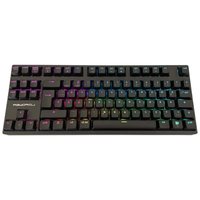
KEY-MECH-2-RGB-C-W - Keyboard LC-Power - Free user manual and instructions
Find the device manual for free KEY-MECH-2-RGB-C-W LC-Power in PDF.


Pick your language and provide your email: we'll send you a specifically translated version.
| Product Type | Mechanical Keyboard |
| Model | KEY-MECH-2-RGB-C-W |
| Brand | LC-Power |
| Connectivity | Wired USB 2.0 |
| Switch Type | Mechanical (likely Cherry MX or equivalent, Blue/Red/Brown) |
| Backlight | RGB per-key lighting |
| Key Rollover | N-key rollover (USB) |
| Dimensions (approx.) | 440 x 140 x 40 mm |
| Weight (approx.) | 1000 g |
| Cable Length | 1.8 m |
| Power Supply | USB powered (5V, 500 mA) |
| Compatible Operating Systems | Windows 7/8/10/11 |
| Anti-Ghosting | Full anti-ghosting support |
| Multimedia Keys | Dedicated multimedia keys (FN+) |
| Keycap Material | ABS plastic, laser-etched |
| Polling Rate | 1000 Hz |
| Maintenance | Clean with a soft, dry cloth; avoid liquids |
| Safety | Keep away from moisture and high temperatures |
| Spare Parts & Repairability | Keycaps can be replaced; internal switches are solderable (not hot-swap) |
| General Information | Designed for gaming and daily typing with durable mechanical switches |
Frequently Asked Questions - KEY-MECH-2-RGB-C-W LC-Power
What type of switches does the LC-Power KEY-MECH-2-RGB-C-W use?
This keyboard uses mechanical switches, likely from brands like Cherry MX, Kailh, or Outemu. Common variants include Blue (clicky), Red (linear), and Brown (tactile). Refer to the product packaging for the exact switch type.
Is the keyboard compatible with macOS or Linux?
The keyboard is designed for Windows, but it may work with macOS and Linux via USB connection. Some multimedia keys may require manual configuration.
How do I change the RGB lighting effects?
You can cycle through lighting modes by pressing the FN key combined with the Ins (or corresponding LED key). Detailed controls are in the user manual.
Can I use the keyboard while charging my devices?
No, this keyboard is wired only and does not have a USB pass-through port. It requires a single USB port for power and data.
Is the keyboard spill-resistant?
The keyboard is not explicitly rated as spill-resistant. Avoid contact with liquids to prevent damage.
How do I clean the keyboard?
Use a soft, slightly damp cloth to wipe the exterior. Do not use solvents. Remove keycaps carefully for deeper cleaning.
What is the warranty period?
LC-Power typically offers a 2-year warranty. Check your local retailer for exact terms.
Can I replace the switches or keycaps?
Keycaps can be replaced with standard Cherry MX compatible caps. The switches are soldered to the PCB, so replacement requires desoldering.
Does the keyboard support software for customization?
This model does not include dedicated software. Lighting and function controls are hardware-based via FN key combinations.
What is the size of the keyboard?
The keyboard is full-size with a numeric keypad. Dimensions are approximately 440 x 140 x 40 mm.
User questions about KEY-MECH-2-RGB-C-W LC-Power
0 question about this device. Answer the ones you know or ask your own.
Ask a new question about this device
No questions yet. Be the first to ask one.
Download the instructions for your Keyboard in PDF format for free! Find your manual KEY-MECH-2-RGB-C-W - LC-Power and take your electronic device back in hand. On this page are published all the documents necessary for the use of your device. KEY-MECH-2-RGB-C-W by LC-Power.
USER MANUAL KEY-MECH-2-RGB-C-W LC-Power

Manual assistant
Powered by Anthropic
Waiting for your message
Product information
Brand : LC-Power
Model : KEY-MECH-2-RGB-C-W
Category : Keyboard