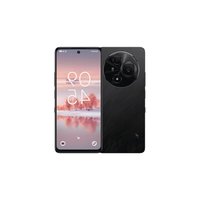
60 NXTPAPER - Smartphone TCL - Free user manual and instructions
Find the device manual for free 60 NXTPAPER TCL in PDF.


Pick your language and provide your email: we'll send you a specifically translated version.
| Product Type | Smartphone |
| Brand | TCL |
| Model | 60 NXTPAPER |
| Display | 6.6-inch NXTPAPER; 1080 x 2408 pixels |
| Processor | MediaTek Dimensity 6020 (7 nm) |
| RAM | 6 GB |
| Storage | 128 GB (expandable via microSD) |
| Rear Camera | 50 MP (main) + 2 MP (macro) + 2 MP (depth) |
| Front Camera | 8 MP |
| Battery | 5000 mAh (non-removable) |
| Charging | USB-C; 18W fast charging |
| Operating System | Android 13 (upgradable to 14) |
| Connectivity | 5G, Wi-Fi 802.11 a/b/g/n/ac, Bluetooth 5.0, NFC |
| Sensors | Fingerprint (side-mounted), accelerometer, proximity, compass |
| Dimensions | 164.2 x 75.3 x 8.2 mm |
| Weight | 198 g |
| Protection | IP52 splash resistance |
| SIM | Dual Nano-SIM |
| Care and Cleaning | Wipe with dry, soft cloth; avoid liquids |
| Safety | Use original charger; do not expose to extreme temperatures |
| Spare Parts & Repairability | Battery, screen, and back cover available through authorized service |
| General Information | User manual available in PDF via TCL support |
Frequently Asked Questions - 60 NXTPAPER TCL
What is NXTPAPER technology?
NXTPAPER is TCL's proprietary display technology that mimics the look of real paper, reducing eye strain while maintaining vibrant colors. It uses a unique multi-layer structure to reduce blue light and enhance readability in sunlight.
How long does the battery last on the TCL 60 NXTPAPER?
With a 5000 mAh battery, the TCL 60 NXTPAPER typically lasts a full day of moderate use, including browsing, social media, and video playback. Power-saving modes can extend usage further.
Is the TCL 60 NXTPAPER water-resistant?
The device has an IP52 rating, meaning it is protected against limited dust ingress and water splashes from any direction. It should not be submerged in water.
How can I update the software on my TCL 60 NXTPAPER?
Go to Settings > System > System Update to check for updates. Ensure you are connected to Wi-Fi for larger downloads. Updates are typically released over-the-air (OTA).
Does the TCL 60 NXTPAPER support expandable storage?
Yes, it has a dedicated microSD card slot supporting up to 1 TB of additional storage for photos, videos, and apps.
How do I use the fingerprint sensor?
The side-mounted fingerprint sensor is integrated into the power button. To set it up, go to Settings > Security > Fingerprint and follow the prompts to register your fingerprint.
What type of SIM card does the TCL 60 NXTPAPER use?
It uses Nano-SIM cards and supports dual SIM (dual standby). You can use two SIMs simultaneously, one for calls/data.
How can I clean the NXTPAPER display?
Use a soft, lint-free cloth slightly dampened with water (not wet). Avoid using alcohol, abrasive cleaners, or paper towels to prevent scratches.
Can I install a screen protector on the TCL 60 NXTPAPER?
Yes, but note that some screen protectors may affect the NXTPAPER's touch sensitivity or visual quality. It's recommended to use a protector designed for the device.
What is the camera performance like in low light?
The 50 MP main camera uses pixel binning to capture more light. Night mode enhances low-light shots by combining multiple exposures, but results may vary compared to flagship devices.
User questions about 60 NXTPAPER TCL
0 question about this device. Answer the ones you know or ask your own.
Ask a new question about this device
No questions yet. Be the first to ask one.
Download the instructions for your Smartphone in PDF format for free! Find your manual 60 NXTPAPER - TCL and take your electronic device back in hand. On this page are published all the documents necessary for the use of your device. 60 NXTPAPER by TCL.
USER MANUAL 60 NXTPAPER TCL

Manual assistant
Powered by Anthropic
Waiting for your message
Product information
Brand : TCL
Model : 60 NXTPAPER
Category : Smartphone