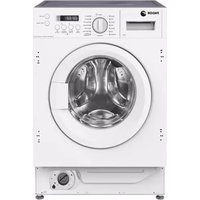
3FE-7514IT - Washing machine FAGOR - Free user manual and instructions
Find the device manual for free 3FE-7514IT FAGOR in PDF.


Pick your language and provide your email: we'll send you a specifically translated version.
| Product Type | Freestanding Washing Machine |
| Capacity | 7.5 kg |
| Maximum Spin Speed | 1400 rpm |
| Energy Class | A+++ |
| Washing Class | A |
| Spin Drying Class | B |
| Annual Energy Consumption | 195 kWh |
| Annual Water Consumption | 10500 L |
| Noise Level (Wash/Spin) | 58 dB / 76 dB |
| Dimensions (H x W x D) | 85 x 60 x 55 cm |
| Weight | 71 kg |
| Power Supply | 220-240 V, 50 Hz, 10 A |
| Programs | Cotton, Synthetics, Delicates, Quick 30', Wool, Hand Wash, Rinse & Spin, Drain |
| Additional Features | Delay Start, Child Lock, LED Display, Drum Clean |
| Drum Volume | 55 L |
| Water Connection | Cold water only |
| Door Opening Angle | 180° |
| Door Hinge | Left |
| Control Type | Electronic knob + buttons |
Frequently Asked Questions - 3FE-7514IT FAGOR
How do I install the washing machine?
Remove all packaging and transit bolts. Adjust the feet to level the machine. Connect the water inlet hose to a cold water tap and the drain hose to a standpipe or sink. Plug into a grounded outlet.
What should I do if the machine doesn't start?
Check that the door is fully closed, the water supply is on, and the machine is plugged in. Also ensure the program is selected and the start button is pressed.
How often should I clean the detergent drawer?
Clean the detergent drawer every 2-3 months by removing it and rinsing under warm water. Also clean the drawer compartment with a cloth.
Can I wash delicate fabrics in this machine?
Yes, use the Delicates program at low temperature (max 30°C) and reduce spin speed. Place delicate items in a laundry bag.
What does the 'Child Lock' feature do?
The Child Lock prevents accidental button presses during a cycle. Activate it by pressing and holding the Child Lock button for 3 seconds.
How do I clean the drain pump filter?
Open the lower front panel, unscrew the filter cap, and remove any debris. Place a towel to catch water. Clean and reinstall.
The machine is vibrating excessively. What can I do?
Ensure the transit bolts are removed, the machine is level, and the load is balanced. Overloading can cause vibration.
What does 'E10' error code mean?
E10 indicates a water supply problem. Check that the tap is open, the inlet hose is not kinked, and the filter in the valve is clean.
How do I use the Delay Start function?
Select your program, then press the Delay Start button to set the delay in hours (up to 24). The machine will start automatically so that it finishes at the set time.
Can I interrupt a cycle to add clothes?
Yes, for most programs you can press Start/Pause to unlock the door temporarily (if water level and temperature are safe). Add clothes and press Start again.
User questions about 3FE-7514IT FAGOR
0 question about this device. Answer the ones you know or ask your own.
Ask a new question about this device
No questions yet. Be the first to ask one.
Download the instructions for your Washing machine in PDF format for free! Find your manual 3FE-7514IT - FAGOR and take your electronic device back in hand. On this page are published all the documents necessary for the use of your device. 3FE-7514IT by FAGOR.
USER MANUAL 3FE-7514IT FAGOR



Manual assistant
Powered by Anthropic
Waiting for your message
Product information
Brand : FAGOR
Model : 3FE-7514IT
Category : Washing machine