
WORKCENTRE C2424 - Multifunction Printer XEROX - Free user manual and instructions
Find the device manual for free WORKCENTRE C2424 XEROX in PDF.


| Product Type | Color solid ink multifunction printer |
| Brand | Xerox |
| Model | WorkCentre C2424 |
| Main functions | Print, copy, color and black-and-white scan, network printing |
| Print speed | 24 pages per minute (color and B&W) |
| RAM | 256 MB standard, expandable up to 1 GB |
| Scan resolution | Up to 600 dpi |
| Paper capacity (tray 1) | 100 sheets |
| Paper capacity (tray 2) | 525 sheets |
| Optional trays | Trays 3 and 4, 525 sheets each |
| Automatic document feeder | Yes, duplex |
| Media types | Plain paper, transparencies, labels, envelopes, cards, photo paper, glossy paper, carbonless paper, custom sizes |
| Weight | Approximately 50 kg (without options) |
| Power supply | 100-240 V AC, 50-60 Hz |
| Network connectivity | Ethernet 10/100 Base-T, USB 2.0 |
| Management software | CentreWare IS, CentreWare MC, CentreWare Web |
| Maintenance and cleaning | Adding ink sticks, emptying waste tray, replacing maintenance kit, cleaning transfer belt, cleaning exposure glass |
| Consumables | Ink sticks (color and black), maintenance kit |
| Security | Menu lockout, password for color copy, emergency stop |
| Repairability | User-replaceable maintenance kit, online support PhaserSMART |
Frequently Asked Questions - WORKCENTRE C2424 XEROX
User questions about WORKCENTRE C2424 XEROX
0 question about this device. Answer the ones you know or ask your own.
Ask a new question about this device
Download the instructions for your Multifunction Printer in PDF format for free! Find your manual WORKCENTRE C2424 - XEROX and take your electronic device back in hand. On this page are published all the documents necessary for the use of your device. WORKCENTRE C2424 by XEROX.
USER MANUAL WORKCENTRE C2424 XEROX
PykoBODCTBO NOIb3OBaTeJIa
Novell NetWare. 6-40
1,2,3,4,5,6,1,2,3,4,5,6,1,2,3,4,5,6
Services NDPS/NEPS (Novell Distributed/Enterprise Print Services)
Support technique PhaserSMART
- Retirez le papier coincide.
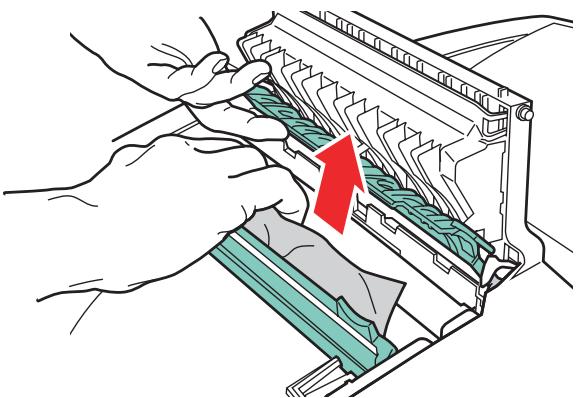
2424-021
Physical Specifications
Basic Unit:
Width: 53~cm (20.9 in.)
Depth: 66~cm (26.2 in.)
Height: 62~cm (24.4 in.)
Weight: 42kg (93 lbs.)
Optional 525-Sheet Feeder
Width: 42cm (16.5 in.)
Depth: 51cm (20.3 in.)
Height: 13cm (5.1 in.)
Optional Cart
Width: 50cm (19.7 in.)
Depth: 64~cm (25.2 in.)
Height: 36cm (14.2 in.)
Environmental Specifications
Temperature
Storage: -30^ to 60^ / -22^ to 140^
Operating: 10^ to 32^ / 50^ to 90^
Relative Humidity
Storage: 10% to 95%
Operating: 10% to 80%
Electrical Specifications
110-120 VAC, 60 Hz
220 VAC, 50 Hz
ENERGY STAR qualified system (ES Option)
Performance Specifications
Speed
Up to 24 pages per minute (ppm) print and copy
Up to 20 pages per minute (ppm) scan
Up to 18 pages per minute (ppm) document feeder
Controller Specifications
500 MHz processor
Hard Drive
40 GB Internal IDE hard disk
Memory
256 MB PC133 DRAM standard
Upgradable to a maximum of 1 GB
Resolution
2400 FinePoint print
Standard 300× 300 dpi scan resolution; 600× 600 dpi with 512 MB - 1 GB RAM
Page Description Languages (PDL)
PCL5c
Adobe PostScript 3
Residential Fonts
137 PostScript Type 1
81 PCL5c
Interfaces
Ethernet 10BaseT and 100BaseTx
Universal Serial Bus (USB 2.0)
Xerox has tested this product to electromagnetic emission and immunity standards. These standards are designed to mitigate interference caused or received by this product in a typical office environment.
FCC Regulations (United States)
This equipment has been tested and found to comply with the limits for a Class A digital device, pursuant to Part 15 of the FCC Rules. These limits are designed to provide reasonable protection against harmful interference when the equipment is operated in a commercial environment. This equipment generates, uses, and can radiate radio frequency energy. If it is not installed and used in accordance with these instructions, it may cause harmful interference to radio communications. Operation of this equipment in a residential area is likely to cause harmful interference in which case the user will be required to correct the interference at his/ her own expense.
If this equipment does cause harmful interference to radio or television reception, which can be determined by turning the equipment off and on, the user is encouraged to try to correct the interference by one or more of the following measures:
Reorient or relocate the receiver.
Increase the separation between the equipment and receiver.
- Connect the equipment into an outlet on a circuit different from that to which the receiver is connected.
Consult the dealer or an experienced radio/television technician for help.
Any changes or modifications not expressly approved by Xerox could void the user's authority to operate the equipment. To ensure compliance with Part 15 of the FCC rules, use shielded interface cables.
Canadian Regulations
This Class A digital apparatus complies with Canadian ICES-003.
Declaration of Conformity (European Union)
Warning
This is a class A product. In a domestic environment this product may cause radio interference in which case the user may be required to take adequate measures.
Xerox Corporation declares, under our sole responsibility, that the product to which this declaration relates is in conformity with the following standards and other normative documents:
Low Voltage Directive 73/23/EEC as Amended:
| EN 60950:2000 | "Safety of Information Technology Equipment including Electrical Business Equipment" |
Electromagnetic Compatibility Directive 89/336/EEC as Amended:
| EN 55022:1998 +A1:2000 +A2:2003 | "Information technology equipment - Radio disturbance characteristics - Limits and methods of measurement" |
| EN 55024:1998 +A1:2000 +A2:2003 | "Information technology equipment - Immunity characteristics - Limits and methods of measurement" |
| EN 61000-3-2:2000 | "Part 3-2: Limits - Limits for harmonic current emissions (equipment input current <= 16 A per phase)" |
| EN 61000-3-3:1995 +A1:2000 | "Part 3-3: Limits - Limitation of voltage changes, voltage fluctuations and flicker in public low-voltage supply systems for equipment with rated current <= 16 A per phase and not subject to conditional connection." |
This product, if used properly in accordance with the user's instructions, is neither dangerous for the consumer nor for the environment.
A signed copy of the Declaration of Conformity for this product can be obtained from Xerox.
Congress, by statute, has forbidden the copying of the following subjects under certain circumstances. Penalties of fine or imprisonment may be imposed on those guilty of making such copies.
Obligations or Securities of the United States Government, such as:
Certificates of Indebtedness
Coupons from Bonds
Silver Certificates
United States Bonds
Federal Reserve Notes
Certificates of Deposit
National Bank currency
Federal Reserve Bank Notes
Gold Certificates
Treasure Notes
Fractional Notes
Paper money
Bonds and obligations of certain agencies of the government, such as FHA
Bonds (US Savings Bonds may be photographed only for publicity purposes in connection with the campaign for the sale of such bonds.)
- Internal Revenue Stamps (If it is necessary to copy a legal document on which there is a canceled revenue stamp, this may be done provided the reproduction of the document is performed for lawful purposes.)
Postage Stamps, canceled or uncanceled (For philatelic purposes, postage stamps may be photographed provided the reproduction is black and white and less than 3/4 or more than 1 1/2 times the linear dimensions of the original.)
Postal Money Orders
■ Bills, checks, or drafts for money drawn by or on authorized officers of the United States
Stamps and other representatives of value, of whatever denomination, which may be or have been issued under any Act of Congress
Adjusted compensation Certificates for veterans of the World Wars
Obligations or Securities of any foreign government, bank, or corporation
Copyrighted material (unless permission of the copyright owner has been obtained or the copying falls within the fair use or library reproduction provisions of the copyright law). Further information of these provisions may be obtained from the Copyright Office, Library of Congress, Washington, DC 20559 (circular R21)
Certificates of Citizenship or Naturalization. (Foreign naturalization certificates may be photographed.)
Passports (Foreign passports may be photographed.)
Immigration papers
Draft Registration cards
Selective Service Induction papers which bear any of the following information:
Registrant's earnings or income
- Registrant's dependency status
Registrant's court record
Registrant's previous military service
- Registrant's physical or mental condition
Note
Exception: US Army and Navy discharge certificates may be photographed.
Badges, identification cards, passes or insinias carried by military or Naval personnel, or by members of the various Federal Departments and Bureaus, such as the FBI and Treasury (unless the photograph is ordered by the head of such Department or Bureau)
Copying of the following is also prohibited in certain states: automobile licences, drivers licenses, and automobile Certificates of Title. This list is not all-inclusive. In case of doubt, consult your attorney.
For Material Safety Data information regarding your WorkCentre C2424 Copier-Printer, go to www.xerox.com/office/msds. For the Customer Support Center phone numbers, see the information booklet entitled Supplies and Services Guide that came with your system.
F
Xerox operates a worldwide equipment takeback and reuse/recycle program. Contact your Xerox sales representative (1-800-ASK-XEROX) to determine whether this Xerox product is part of the program. For more information about Xerox environmental programs, visit www.xerox.com/environment.html.
If your product is not part of the Xerox program and you are managing its disposal, please note that the product contains lead, mercury, and other materials whose disposal may be regulated due to environmental considerations. The presence of lead and mercury is fully consistent with global regulations applicable at the time that the product was placed on the market. For recycling and disposal information, contact your local authorities. In the United States, you may also refer to the Electronic Industries Alliance at www.eiae.org.
Index
A
Accessoires, 1-6
Activation d'EtherTalk, 6-33
Activation de DHCP, 6-6
Activer/désactiver la page de
démarrage, 1-15
Activier/désactiver le mode Intelligent
Ready, 1-17
Adresse IP, 1-13, 6-6
court, 2-13, 2-17, 5-53, 7-11
Bac par défaut
types de support, 2-8
Bacs
infoSMART, 1-7, 7-58
BOOTP/DHCP, 6-7
bacs 2, 3 ou 4, 2-14, 5-16, 5-21, 5-25, 5-31, 5-35, 5-38, 5-42, 5-47
Copies assombries, 3-11
Copies éclaircies, 3-11
Support technique, 1-7, 1-14, 7-2
Windows 2000, Windows XP, Windows Server 2003, 6-20
Windows 98, Windows Me, 6-30
Windows NT 4.x, 6-25
DHCP activation, 6-6
DNS
non prises en charge, 2-7
stockage, 5-19
Etapes d'installation rapide Mac OS X, version 10.1, 6-34, 6-36
Unix (Linux), 6-45
Windows 2000, Windows XP, Windows Server 2003, 6-15
Windows 98, Windows Me, 6-28
Windows NT 4.x, 6-22
EtherTalk, 6-33
protocole, 6-4
totale, 2-2, 7-26, 7-32, A-3
installation, 6-5, 6-16, 6-28
installation sous Windows NT 4.x, 6-23
bac, 2-2, 2-16, 5-32, 5-39, 5-43, 5-46, 5-49
Lissaged'image,5-67
Livres copie, 3-18
Luminosite panneau de commande, 1-20
M
PrintingScout, 1-14, 7-3
Support technique, 1-7
Ordinateur
Papier special, 5-29
support technique, 7-58
Pilote
PrintingScout, 1-14, 7-3
Stockage des supports, 2-7
Support
pris en charge, 2-4
stockage, 2-7
Support technique, 1-7, 1-14, 7-2
Supports
non pris en charge, 2-7
Suppression