USER MANUAL ELLIPSE PRO 1600 IEC EATON
Installation and user manual
English - Français
Deutsch - Italiano
Espanol - Netherlands
Portugués - Eλληνικα
Polski - Cesky
Solvencina - Slovensko
Magyar -Türkce
PYCCKNI
Svenska - Suomi

2

3
/FR/DIN models
IEC models


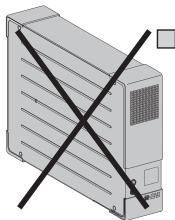
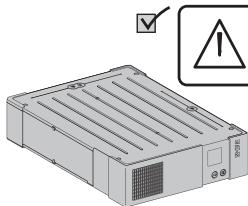
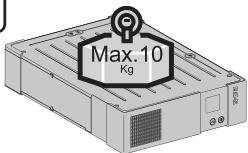
Caution!
EN • Before installing the Ellipse, read the booklet ③ containing the safety instructions that must be followed. Then follow the instructions given in this manual ②.
FR • Avant l'installation de Ellipse, dire le livre ③ qui presente les consignes de sécurité à respecter. Suivre ensuite les instructions duprésent manuel ②.
DE • Vor Installation des Ellipse die im Heft ③ genommen Sicherheitsvorschriftenlesen. Anschließlich die Anweisungen im vorliegenden Handbuch ② befolgen.
IT - Prima dell'installazione del Ellipse, leggere attendamente le istruzioni di sicurezza riportate sul libretto ③. In seguito, atteneri alle istruzioni riportate sul presente manuale ②.
ES - Antes de la instalación del Ellipse, leer el manual ③ que presente las instrucciones de seguridad a cumplir. A continuación, seguir las instrucciones del presente manual ②.
NL • Lees voordat u het Ellipse gaat installereren eerst de veiligheidsinstrumenties in boekje ③. Volg daarna de instructies van.Deze handleiding ②.
PT - Antes da instalacao do Ellipse, ler o caderno ③ onde constam as instruções de segurarca a respeitar. Depois, seguir as instruções do presente manual ②
EL · Pniv tvnyikataaon tou Ellipse, diaaote to qullaoio 3 TE sououe aqvaiaa Tnou pTei va npteite. Tnouvexia, akoloutheta Tc oynies xpnoans autou tou qullaoiou ②
PL • Przed zainstalowaniem Ellipse, nalezy przyeczytc instrukcje ③, ktoa zwiera niedzebdne zalecenia bezpieczene sta. Natestmie nalezy zapoznać sie z zaleceniami zawartymi w niniejszej instrukcji ②.
CS • Pred instataci zdroje Ellipse si prostudujte priručku ③ KDE Najdete bezpečnostni prédpisy, které je třeba dodržovat. Dále postupujte podlePokynu uvedenych v priručce ②.
SLPred instalaciou vypustky si precitajte knizku ③ ,v ktorej su uvedené bezpecnostné priazy, ktoré je potrebné dorzat. Potom postupujte podlaPokynov tejto priučy ②
SK • Preden instalirate Ellipse, preberite knjižico ③, v kateri so varnostna navodila, ki jih je treba upoštevati. Nato sledite navodilom tega priročnika ②.
HU -Az Ellipse telepitése elott olvassa el a ③ -es konyvet, mely a betartandóBiztonsági eloirásokat tartalmazza. Ezután kovesse a jelen, ② -os kezikonyv utasitásait.
TR • Ellipse'in tesisatini yapmadan-once, uyulacgguvenlkitalimatlarini gosteren ③ sayili kitapciigi okuyunuz. Dana sonra isbu ② sayili ei kitabindaki talimatlara uyunuz.
RU · Ipeed yctahOBKOI NcToCHNka Becnepe6oHOrO PtTAnHg (ASI) npouHTaTe IHCTpyKUHIO 3 c npaBILAMn NO TeXHnke 6e3OpAChOCTn, KOTOpbIe He06xOJIMo Co6HOnaTb. 3aTeM cJeDyIte Yka3AHm HactoJIeTO pykoBOdCTBa 2.
AR
② 1
SV • Innan installation av Ellipse, läs instruktionsmanualen ③ innehällande sökerhetsinstruktionerna och följ sedan dem. Följ sedan instruktionerna som ges i denna manua ②.
FI • Lue nämä ohjeet ennen Ellipse asennusta turvallisuusohjeet 3 ja käytöohjeet 2.
Quick start
A
FR/DIN
IEC
B
650/850
C
D
Register warranty at: powerquality.eaton.com
Battery disposal and safety
- Caution. Battery service life is reduced by 50% for every ten degrees above 25^ .
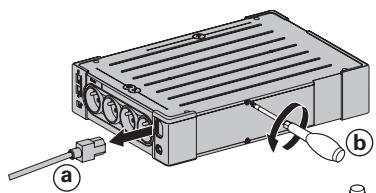
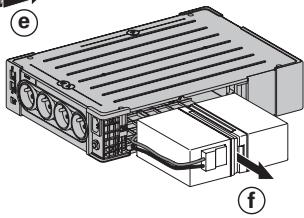
- The battery must be replaced exclusively by qualified personnel (risk of shock), with new battery approved by Eaton to ensure correct operation of the UPS.
- The battery must be disposed of in accordance with applicable regulations. To remove the battery, shut down the UPS (button ⑥ OFF), remove the power cord and proceed as indicated below "Battery change".
Battery change

650/850
- Warning: take care not to inverse the polarity + (red) and - (black) when connecting the battery as this will destroy the device.
1200/1600


Technical characteristics
| Ellipse PRO | 650 | 850 | 1200 | 1600 |
| • UPS power | 650 VA / 400 W | 850 VA / 510 W | 1200 VA / 750 W | 1600 VA / 1000 W |
| • Nominal input voltage | 165 V - 264 V, adjustable to 150 V - 284 V |
| • Input frequency | 50/60 Hz (46 - 70 Hz working range) |
| • Voltage/frequency of battery backup outlets 19 in battery mode | 220 V / 230 V / 240 V +15 % -20 % (50/60 Hz ± 1 Hz) |
| • Total output current for all outlets | 10 A max |
| • Output current of battery backup outlets 19 | 3 A max | 3.6 A max | 5.5 A max | 7.3 A max |
| • Leakage current | 0.4 mA |
| • Input protection | 10 A resettable circuit breaker |
| • Transfer time | 5 ms typical |
| • Telephone/Data surge protection | Tel, ISDN, ADSL, Ethernet |
| • Sealed lead-acid battery | 12 V, 7 Ah | 12 V, 9 Ah | 2x12V, 7 Ah | 2x12V, 9 Ah |
| • Automatic battery test | Once a week |
| • Average battery life | 4 years typical, depending on temperature and number of discharge cycles |
| • Operating temperature | 0 to 35 °C |
| • Storage temperature | -25 °C to +55 °C |
| • Operating relative humidity | 0 to 85 % |
| • Operating elevation | 0 to 2000 m |
| • Safety standards | IEC 62040-1, CE certified |
| • Electromagnetic compatibility standards | IEC 62040-2, C1* |
| • Warranty | 3 years |
| • Dimensions (mm/inch) | 260 x 82 x 285 / 10.24 x 3.23 x 11.22 | 275 x 82 x 390 / 10.83 x 3.23 x 15.35 |
| • Weigth (kg/lb) | 6.9 / 15.2 | 7.3 / 16.1 | 9.7 / 21.4 | 11.5 / 25.4 |
(*) Warning: Output cables should not exceed 10m length.
Performances tested according to IEC 61643-1 (class 3) standard for 8 / 20~ s surge wave
| AC input source protection, Ellipse PRO: | 650 | 850 | 1200 | 1600 |
| • Uoc (common mode / differential mode) | 6 kV / 2 kV |
| • Up (common mode / differential mode) | 1.5 kV / 1 kV |
| • In | 3 kA |
| Dielectric isolation | |
| • AC Ground | 1500 Vac, 50 Hz |
| • AC /TEL | 3000 Vac, 50 Hz |
| • Tel / Ground | 1000 Vac, 50 Hz |
| Temporary overvoltage (TOV) | |
| • Uc | 250 Vac |
| • Ut | 430 Vac |
| Energy dissipation | 405 Joules |
1. Operating conditions
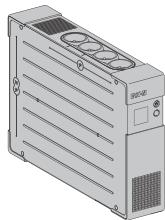
- This product is an Uninterruptible Power Supply (UPS) for computers and their peripherals, television sets, stereo systems and video recorders... It must not be used to supply other electrical equipment (lighting, heating, household appliances, etc.).
- UPS can be installed in horizontal, vertical position, or placed in Rack 2U (optional kit).
2.Description
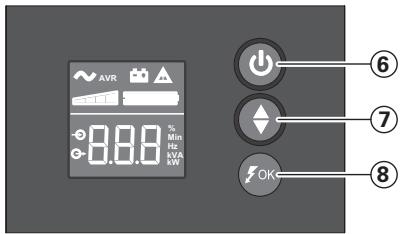
⑥ ON/OFF button for the battery backup outlets
⑦ Scroll down
⑧ ASR LED
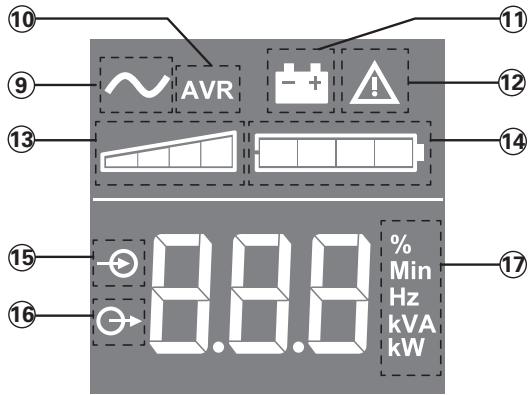
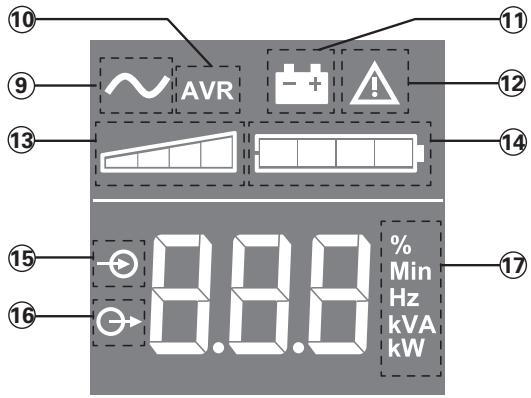
LCD
9UPS ON
10 AVR mode
1 Battery mode
12 Internal fault
13 Output load level
14 Battery level
15 Input measurements
16 Output measurements
17 Measuring unit
Outlets
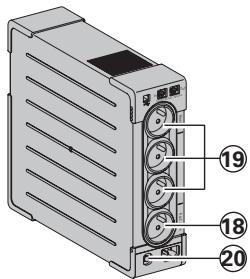
650/850
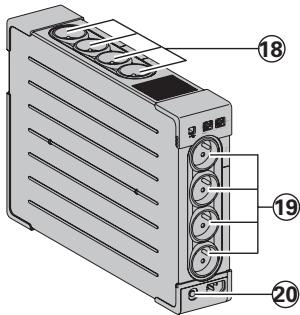
1200/1600
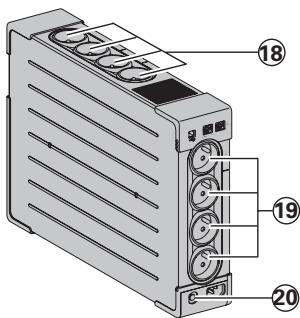
Surge protection outlets
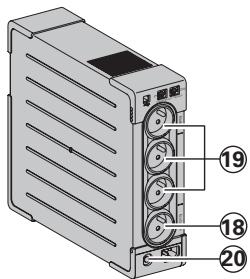
19 Battery backup outlets
20 Protection (circuit breaker)
3. UPS connections
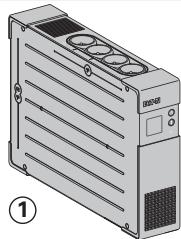
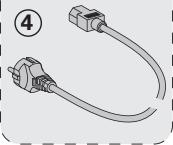
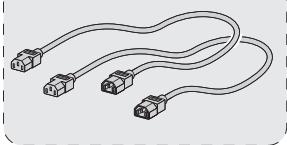
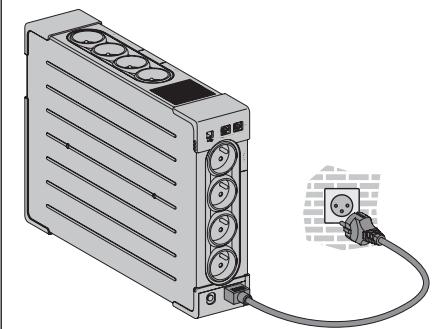
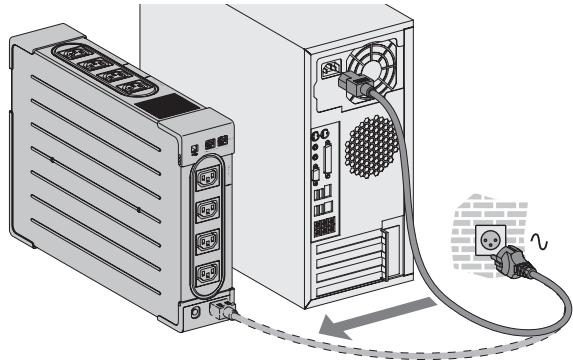
- Connect the UPS ① to the AC-power system via a wall outlet with an earth connector, using the supplied cord ④ for a UPS with FR/DIN sockets or with the supply cord of your computer for a UPS with IEC sockets (see figure A).
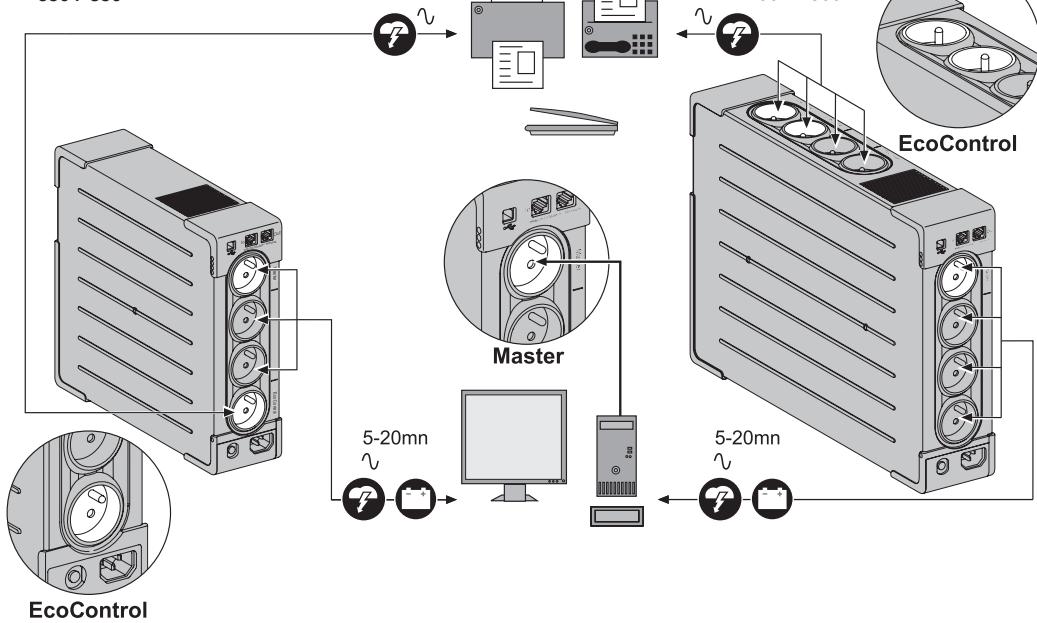
- Plug critical equipment (computer, monitor, modem, etc.) into the outlets 19 providing battery backup power and surge protection (see figure B), taking care not to exceed the rated current indicated in amperes.
- Other devices (printer, scanner, fax, etc.) can be connect to the surge protection outlets [18] (see figure B). The surge protection outlets are not backed up by battery power in the event of a power outage.
Optional Internet modem / Network connection:
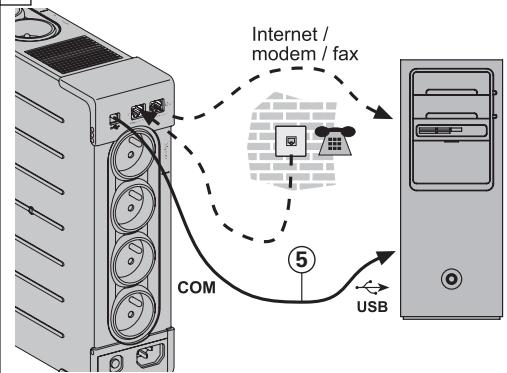
A modem or Ethernet data line can be protected against surges by connecting it via the UPS. Connect the existing device cable between the wall outlet and the UPS, and use a similar cable between the UPS and the device, as indicated in figure C (cable not supplied).
Optional USB connection:
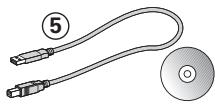
The UPS device can be connected to the computer using the USB cable (5) supplied (see figure C).
The software is available on the CD-ROM ⑤ or Eaton UPS Companion software is downloadable from powerquality.eaton.com.
Register for the warranty on powerquality.eaton.com.
4. Master and EcoControl outlets operating procedure
In order to limit energy consumption of peripherals (scatterer, printer) in standby mode, the Ellipse PRO is equipped with EcoControl outlets that are dependent on the Master outlet. When the main device supplied by the Master outlet (computer) is shut down, the EcoControl outlets are automatically deactivated and the peripherals shut down.
This function (deactivated by default) is validated and configured using the configuration tool integrated in the software.
Note: when the function is activated, do not connect critical applications to EcoControl outlets.
Threshold setup
A default setup ensures the correct operation of the EcoControl function. However, depending on the consumption of the main load, the trigger threshold of the EcoControl function may have to be modified using the configuration software supplied with the UPS:
- First, make sure that the function is activated in the "EcoControl Function" tab of the configuration tool.
- If the peripherals connected to the EcoControl outlets do not switch off when the main load is not in normal operation (ex: when in standby mode), the detection threshold value must be set to High.
- If the rated consumption level of the main load is low and the EcoControl outlets shut down when the main load is operating normally, the detection threshold value must be set to Low.
5. UPS setting through the LCD
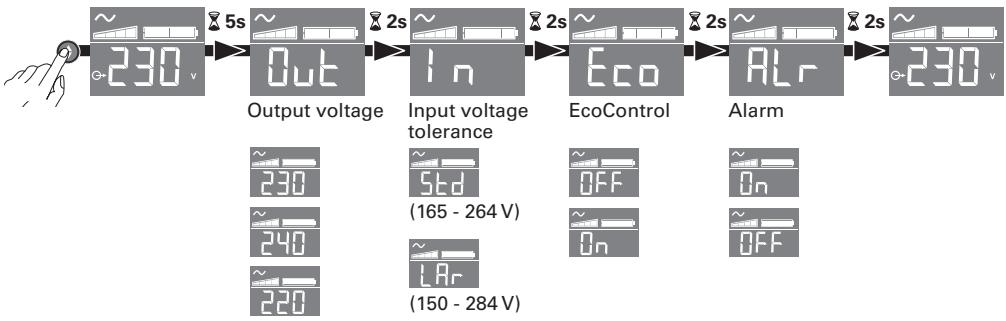
Release scroll down button to select menu

Example of setting
Save the new value
- LCD shut off if no activity for 3 minutes.
6. Operation
Battery charge
The UPS charges the battery as soon as it is connected to the AC outlet, whether button ⑥ is pressed or not. When used for the first time, the battery will only provide its maximum performance after it has been charged for 8 hours. It is recommended that the UPS be permanently connected to the AC power supply to ensure the best possible performance.
Switching-on the UPS
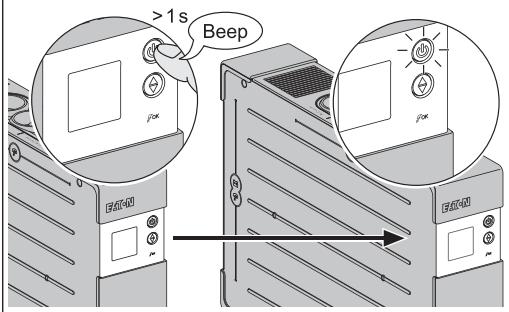
Press button 6 for about 1 second.
Surge protection outlets 8 without battery backup
Equipment connected to these outlets is supplied as soon as the AC cord ④ is plugged in. They are not affected by button ⑥.
Battery backup outlets 19
Equipment connected to these outlets is supplied as soon as button ⑥ turns green (see figure D).
These outlets can be turned on even if the UPS is not connected to AC power (button ⑥ flashes).
AC-power disturbance
- If AC power is disturbed or fails, the UPS continues to operate on battery power. Button ⑥ flashes green. In normal mode, the audible alarm beeps every ten seconds, then every three seconds when the end of battery backup time is near. In silent mode, the audible alarm simply beeps once when the UPS transfers to battery power.
- If the power outage lasts longer than the battery backup time, the UPS shuts down and automatically restarts when power is restored. Following a complete discharge, a few hours are required to recharge the battery back to full backup time.
Surge protection:
All outlets include surge protection.
Shutdown of the battery backup outlets 19
Press button 6 for more than two seconds.
7. Troubleshooting
(For further information, visit the www.powerquality.eaton.com site or contact after-sales support.)
| Problem | Diagnostic | Solution |
| 1 | • The battery backup outlets 19 are not supplied with power. | • Button 6 is not lighted on. | • Press button 6 and check that it turns green. |
| 2 | • The connected devices are not supplied when AC power fails. | • The devices are not connected to the battery backup outlets 19. | • Connect the devices to the battery backup outlets 19. |
| 3 | • AC power is available, but the UPS operates on battery power. | • Circuit breaker 20, located at the rear of the UPS, has been tripped by an overload on the UPS output. | • Disconnect excess equipment and reset the circuit breaker 20 by pressing the corresponding button. |
| 4 | • Green button 6 flashes and audible alarm beeps every 3 seconds. | • The UPS battery backup outlets 19 are overloaded. | • Disconnect excess equipment connected to the battery backup outlets 19. |
| 5 | • Fault sign 12 appear on the LCD panel and audible alarm beeps continuously. | • A fault has occurred on the UPS. The battery backup outlets 19 are no longer supplied. | • Call after-sales support. |
| 6 | • Green LED 8 is off and the filtered outlets 18 are supplied. | • Surge protection is no longer provided. | • Call after-sales support. |
| 7 | • EcoControl outlets keep powered when main application (Master outlet) is stopped. | • EcoControl function is not activated or not properly set. | • Activate or set properly EcoControl function using the software provided with the product. |
Oboyn Yypw KpuoTaalawv (LCD)
9 Tpaoodotiko adialaeiTTnCS TApoxich (TIX) EVEpyOTIOJmEvo
10 TUTOS AETOUPYIaC autOpauo puOHTn taONs (AVR)
11 TUTOS AETIOUPYIAS μTATAPIAS
12 EoWTeipkn
13 Eππεδo φορτίου εξόδου
14 Σταθμη μπαταρίας
15 Metpnoeic Eiopoow
16 MTePnOeIc EKPOwV
17 Mováða μετρησς
Esoo
650/850
1200/1600
18 'Egooi ouotmuoT PPOOtaiaC ato UTEpTaeic
19 'Eeooi eepipkiN ts tataias
20 SuaTma Tpoataiac (autoatoa oikoknttn)
3. EuVδεση της ΠΧΔ
- SuvðeOte Tny NXA ① OTO nλεKtpiK ðiktuo Εε EVToiμενn TiPiZα με γεiωη, xρησιοπTiOιwVtac Tn Tiapexóμεvo Kaλwδio ④ yia εva NXΔ με TiPIεζc FR/DIN n με to Kaλwδio TPO TpopoδoTe iTov UTIoλoyiσtn oac yi μia NXΔ με TiPIεζc IEC (βλ. εikóva A).
- SuvéOTE TIC πριες UTIOLOVIOTI, ΘΟΥΝΙ, Μύντεμ... ΕΤΡΙΕς ΠΟΥ ΦΟΤηρίζΟVTAI ΑΤΟ ΜΤΑΤΑ Αβί 19 KAI προστATEUOVVTAI ΑΤΟ UTEPΤΑΕς (βλ. εΙΚΟνΑ B), προεχοντας ΑΜΥ ΦΠΕρβεITE TA ΕυδεδεΙγμενΑ ΑΜΤΕρ ΠΕΥΜΑΟς.
AoiTc suaKeuec (EKTUWTnC, aapwnC, qaK. ) mTropovv va uovdeoov otic edoouc Tou auotnmuos Tpootaiaac ato utepaeeis 8B. EIOVA B). OI eooi Tou ouotnmuoc Tpoataiaac ato uteptaoei dev utoatnpiovtai atto Ixu μTatapiac o TEPITTOWI diakottnc peuatoC.
Ipoaipetikn ouvdoon Movteu Internet / diktou
H ypaumn tou movteu n to iktuO Ethernet mnpouv va npoataeouv anto tny utepaon ouvoevotac ta atneuthetaic stny NXA. Ia to oktto auto, ouvdeote apevo ts ny trica toixou otny NXA ME TO KAwio TNS Ouakeun TPO TEAEVE VA PPoataeouete KAI apetepou TNY XAD OE autn tn Ouakeun Me Tn Bontheia Taipopooiou kawoiou, OTWCS paivetai OTNV Eikova C (TO KAwio Dv pexeTai).
PpOaipTeikn ouvSeon USB:
To paoobotikó adiaaleiTTNS paoxnC (Xx) μTIopevi va uovbθeI OTov UTOLOYIOTH xpoioTIOIWVtAc To kawio (5) USB TPOU TAPexTai (Bλ. EIKOVA C).
To loyioikó δiatiδεtai σTO CD-ROM 5 n μtiopeite va kaTeβáσεte to loyioikó tnc Eaton UPS Companion aTRO TNI δieúθuvon powerquality.eaton.comor.
EyypaqieTc yia tyn eyyunon stn diuovan powerquality.eaton.com.
4. Tpontos eToupyia wv Tpiizwv Master kai EcoControl
Tia tov TEPiopiOIO TcN KatavalwAnc EvpeyIac TwV TEPiPepeIakWv (oapWTnS, EKTUTWtNCS) Otn λεIToupyia avamovns, To Ellipse PRO diaθETeI πipizec EcoControl Tnou εgaptwvtaatro Tnv pia Master (βλETTE EIKOVA B). Otav n kupia εpapoyn Tnou TpoopodoteiTai aTTO NTV piciMaster (uTLOyoiTc) diakOTTaI, oPiCEc EcoControl aTVEpyoiouVTa autouatakaiakiokTTetAI n λεIToupyia TwV TEPiPepeIakWv.
H EtiKupwon kai n TapaeptoToinon autns tnc aeitoupyias (Eg opiaou aTeevpytoiuev) TpaayatotoieiTai e To evyaleio diaoppwoan trou evai EvwaatwEv oTo loiyoiko.
4. Procedure obslugi gniazda Master i EcoControl
Bce BbIXOdbI BKJIIOUaIOT 3aIITy OT nepeHaIpaJKeHnI.
OTKJIIOUeHHe PO3eTOK, O6ecneueHHbIX pe3epBbIM NITaHnEM OT 6aTapen 19 DepeKaTb KHOJky 6 60onee 2-x ceKyHd.
7. YctpaHHeHne HEnCnpaBHOCTe
EcoControl 9 Master 2
6 1 j k jll j jll j jll j jll j jll j jll j jll j jll j jll j jll j jll j jll j jll j jll j jll j jll j jll j jll j jll j jll j jll j jll j jll j jll j jll j jll j jll j jll j jll
UPS
jbjodjbjd ⑥ jjjde b
.(Djll jil) jll jll jll jll jll jll jll jll jll jll jll jll jll jll jll jll jll jll jll jll jll jll jll jll jll jll jll jll jll jll jll jll jll jll jll jll jll jll jll jll jll jll jll jll jll jll jll jll jll jll jill jll jill jill jill jill jill jill jill jill jill jill jill jill jill jill jill jill jill jill
yjlll lslb yJlal UPS jLjI JALI acl lal jdl llll jlll 1 6 2000 1000000000000000000000000000000000000000000000000000000000000000000000000000
aalal aalal al
ailll aibll iia 1
19 业
5. Stalla in UPS via LCD