
5S550I - Inverter EATON - Free user manual and instructions
Find the device manual for free 5S550I EATON in PDF.


User questions about 5S550I EATON
0 question about this device. Answer the ones you know or ask your own.
Ask a new question about this device
Download the instructions for your Inverter in PDF format for free! Find your manual 5S550I - EATON and take your electronic device back in hand. On this page are published all the documents necessary for the use of your device. 5S550I by EATON.
USER MANUAL 5S550I EATON
Installation and user manual
English - Français
Deutsch - Italiano
Espanol - Netherlands
Portugues - Eληνικα
Polski - Cesky
Solvencina - Slovensko
Magyar - Türkce
PYCCKN
Svenska - Suomi

(2)

(3)

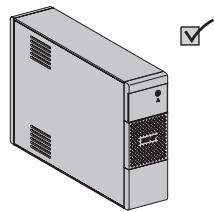
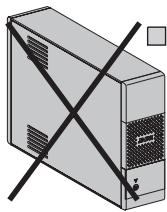
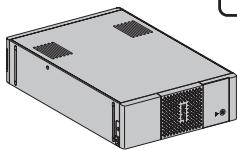
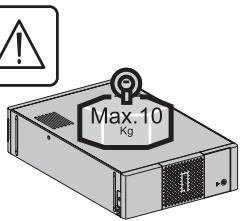
Caution!
EN • Before installing the Eaton 5S, read the booklet (3) containing the safety instructions that must be followed. Then follow the instructions given in this manual (2).
FR • Avant l'installation de Eaton 5S, dire le livre ③ qui presente les consignes de sécurité à respecter. Suivre ensuite les instructions duprésent manuel ② .
DE • Vor Installation des Eaton 5S die im Heft (3) genommen Sicherheitsvorschriften setzen. Anschließlich die Anweisungen im vorliegenden Handbuch (2) befolgen.
IT - Prima dell'installazione del Eaton 5S, leggere attendamente le istruzioni di sicurezza riportate sul libretto ③. In seguito, atteneri alle istruzioni riportate sul presente manuale ②.
ES - Antes de la instalación del Eaton 5S, leer el manual (3) que presente las instrucciones de seguridad a cumplir. A continuación, seguir las instrucciones del presente manual (2).
NL • Lees Voordat u het Eaton 5S gaat installereren eerst de veiligheidsinstrumenties in boekje ③ Volg daarna de instructies van deze handleiding ②
PT - Antes da instalacao do Eaton 5S, ler o caderno ③ onde constam as instruções de seguranca a respeitar. Depois, seguir as instruções do presente manual ②
EL ·Пив тпуEVYiKaTAtaOn Tou Eaton 5S,diαaTe To φuλAio ③ με Tiζ Μιβouλεσ αοφαλεiaç Ttou TπeTI vα TnpεITE. Ση συνέχεια,akolouθηατεTiC Μηγες xρησας autoù Tou φuλAoiou ②.
PL • Przed zainstalowaniem Eaton 5S,NSEZY przeczytac instrukcje ③ ,ktra zaiera niedzebne zalecenia bezpieczene sta. Nastepnie selezy zapoznac sie z zaleceniami zwartymi w niniejszej instrukcji ②
CS • Pred instataci zdroje Eaton 5S si prostudujte piriucku ③ kde najdete bezpecnostni predpisy, ktere je treba dodržovat. Dale postupujte podlePokynu uvedenych v priruce ②
SL • Pred instaláciou vypustky si prećitajte knízku ③, v ktojure su uvedené bezpečnostné príkazy, ktoré je potrebné dodrža. Potom postupujte podlaPokynov tejto príručky ②.
SK • Preden instalirate Eaton 5S, preberite knjižico (3), v kateri so varnostna navodila, ki jih je treba upoštevati. Nato sledite navodilom tega priročnika (2).
HU - Az Eaton 5S telepitése elott olvassa el a ③ -es konyvet, mely a betartandoBiztonsagi eloirasokat tartalmazza. Ezután kovesse a jelen, ② -os kezikonyv utasitásait.
TR • Eaton 5S'in tesisatini yapmadan-once, uyulacakgüvenlkitalmatarini gosteren (3) sayili kitapçi okuyunuz. Dana sonra isbu (2) sayili ei kitabindaki talimatlara uyunuz.
RU · Ipeed yctahOBkoI NcToHnka BecepebeHOrO PtTAnHra (ASI) npOnTaTe IHCTpyKUHIO 3 c npaBnAmn NO TeXnKe 6e3oNaChOCTN, KOtOpIe Heo6xOJIMO co6bHDoA.3aTeM CneJeTy eKa3aHnM HactoJIeO pyKOBOdCTBa 2).
AR 1 5
SV • Innan installation av Eaton 5S, läs instruktionsmanualen ⓷ innehållande sakerhetsinstruktionerna och följ sedan dem. Följ sedan instruktionerna som ges ienna manua ⓶.
FI • Lue nämä ojheet ennen Eaton 5S asennusta turvallisuusohjeet ③ ja käyttoohjeet ②.
Quick start

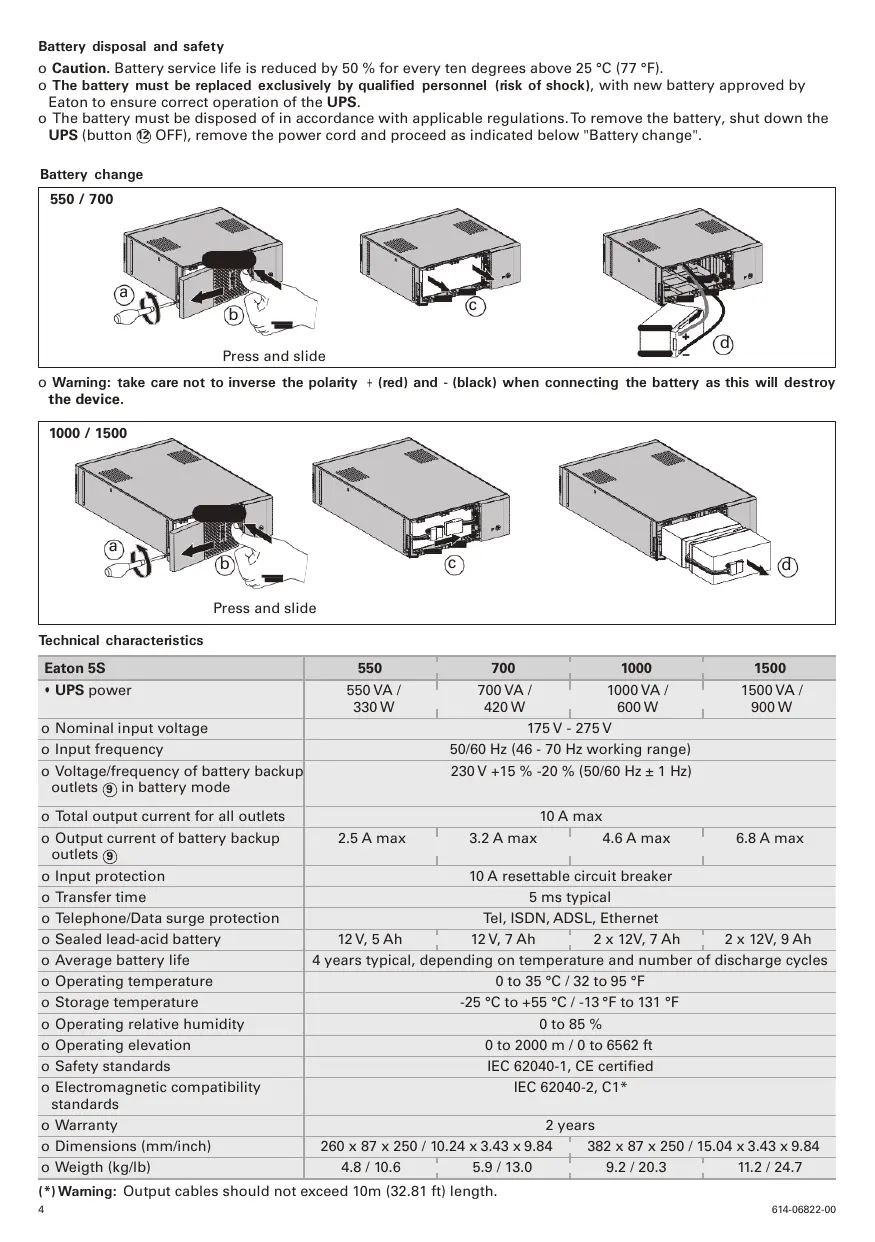
Battery disposal and safety
o Caution. Battery service life is reduced by 50% for every ten degrees above 25^ (77^)
o The battery must be replaced exclusively by qualified personnel (risk of shock), with new battery approved by Eaton to ensure correct operation of the UPS.
o The battery must be disposed of in accordance with applicable regulations. To remove the battery, shut down the UPS (button ② OFF), remove the power cord and proceed as indicated below "Battery change".
Battery change
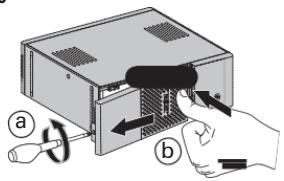
550/700
Press and slide
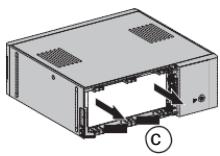
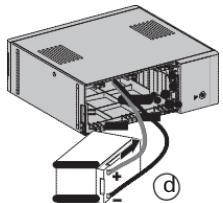
o Warning: take care not to inverse the polarity ^+ (red) and - (black) when connecting the battery as this will destroy the device.
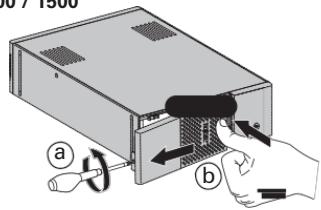
1000/1500
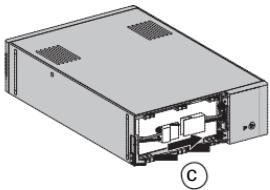
Press and slide
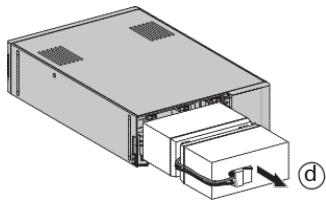
Technical characteristics
| Eaton 5S | 550 | 700 | 1000 | 1500 |
| • UPS power | 550 VA /330 W | 700 VA /420 W | 1000 VA /600 W | 1500 VA /900 W |
| o Nominal input voltage | 175 V - 275 V | |||
| o Input frequency | 50/60 Hz (46 - 70 Hz working range) | |||
| o Voltage/frequency of battery backupoutlets ⑨ in battery mode | 230 V +15 % -20 % (50/60 Hz ± 1 Hz) | |||
| o Total output current for all outlets | 10 A max | |||
| o Output current of battery backupoutlets ⑨ | 2.5 A max | 3.2 A max | 4.6 A max | 6.8 A max |
| o Input protection | 10 A resettable circuit breaker | |||
| o Transfer time | 5 ms typical | |||
| o Telephone/Data surge protection | Tel, ISDN, ADSL, Ethernet | |||
| o Sealed lead-acid battery | 12 V, 5 Ah | 12 V, 7 Ah | 2 x 12V, 7 Ah | 2 x 12V, 9 Ah |
| o Average battery life | 4 years typical, depending on temperature and number of discharge cycles | |||
| o Operating temperature | 0 to 35 °C / 32 to 95 °F | |||
| o Storage temperature | -25 °C to +55 °C / -13 °F to 131 °F | |||
| o Operating relative humidity | 0 to 85 % | |||
| o Operating elevation | 0 to 2000 m / 0 to 6562 ft | |||
| o Safety standards | IEC 62040-1, CE certified | |||
| o Electromagnetic compatibilitystandards | IEC 62040-2, C1* | |||
| o Warranty | 2 years | |||
| o Dimensions (mm/inch) | 260 x 87 x 250 / 10.24 x 3.43 x 9.84 | 382 x 87 x 250 / 15.04 x 3.43 x 9.84 | ||
| o Weigth (kg/lb) | 4.8 / 10.6 | 5.9 / 13.0 | 9.2 / 20.3 | 11.2 / 24.7 |
(*) Waming: Output cables should not exceed 10m (32.81 ft) length.
1. Operating conditions
- This product is an Uninterruptible Power Supply (UPS) for computers and their peripherals, television sets, stereo systems and video recorders... It must not be used to supply other electrical equipment (lighting, heating, household appliances, etc.).
2. UPS connections
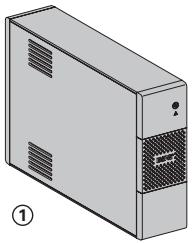
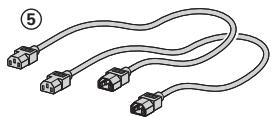
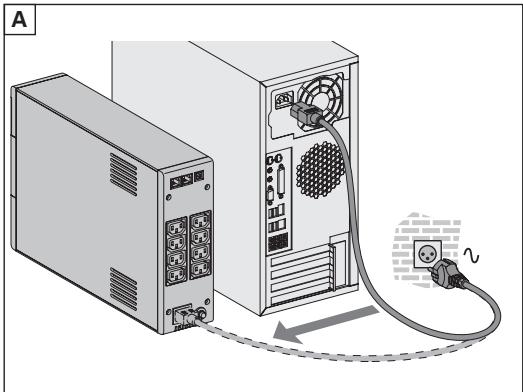
- Connect the UPS (1) to the AC-power system via a wall outlet with an earth connector, using the input cord of your computer (see figure A).
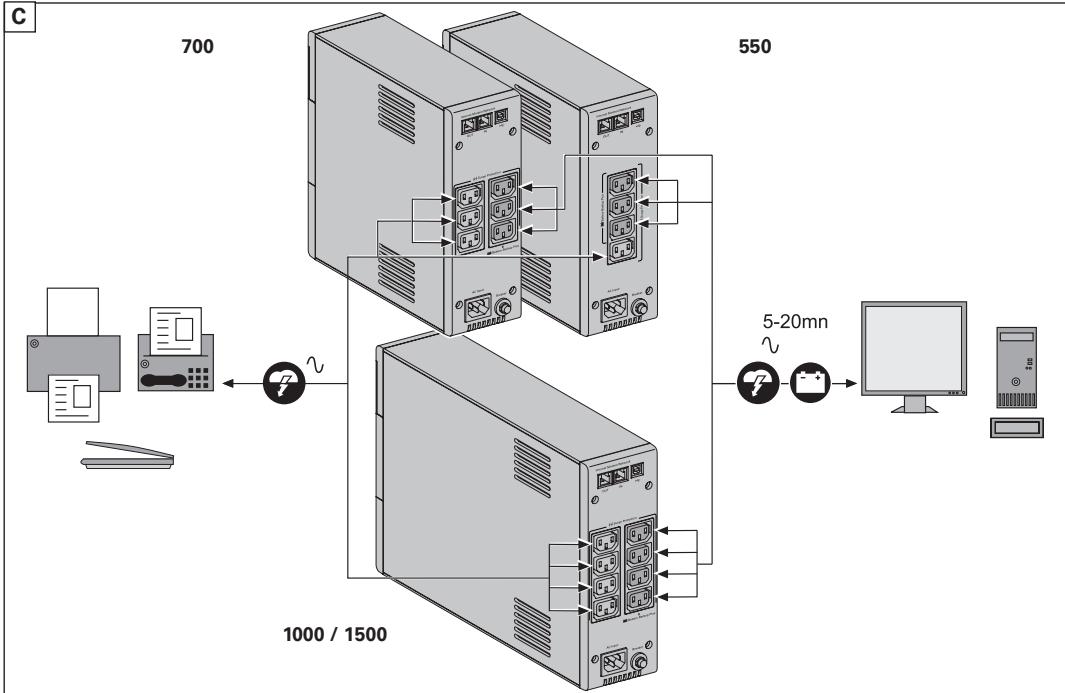
- Plug critical equipment (computer, monitor, modem, etc.) into the outlets (9) providing battery backup power and surge protection (see figure C), taking care not to exceed the rated current indicated in amperes.
- Other devices (printer, scanner, fax, etc.) can be connect to the surge protection outlets (8) (see figure C). The surge protection outlets are not backed up by battery power in the event of a power outage.
- Optional Internet modem / Network connection:
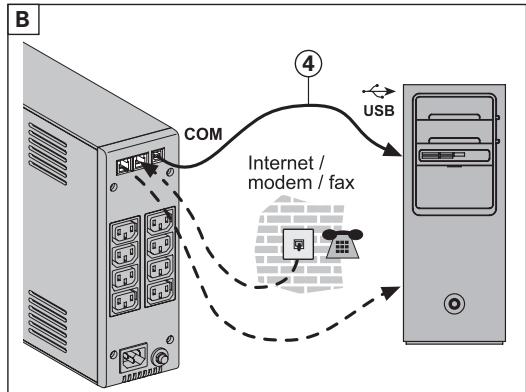
A modem or Ethernet data line can be protected against surges by connecting it via the UPS. Connect the existing device cable between the wall outlet and the UPS, and use a similar cable between the UPS and the device, as indicated in figure B (cable not supplied).
- Optional USB connection:
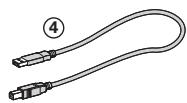
The UPS device can be connected to the computer using the USB cable 4 supplied (see figure B).
Eaton UPS Companion software is downloadable from powerquality.eaton.com.
Register for the warranty on powerquality.eaton.com.
3. Operation
- Battery charge: The UPS charges the battery as soon as it is connected to the AC outlet, whether button 12 is pressed or not. When used for the first time, the battery will only provide its maximum performance after it has been charged for 8 hours. It is recommended that the UPS be permanently connected to the AC power supply to ensure the best possible performance.
- Switching-on the UPS: press button 12 for about 1 second.
- Surge protection outlets (8) without battery backup: Equipment connected to these outlets is supplied as soon as the input AC cord is plugged in. They are not affected by button 12.
- Battery backup outlets (9): Equipment connected to these outlets is supplied as soon as button 12 turns green (see figure D). These outlets can be turned on even if the UPS is not connected to AC power (button 12 flashes).
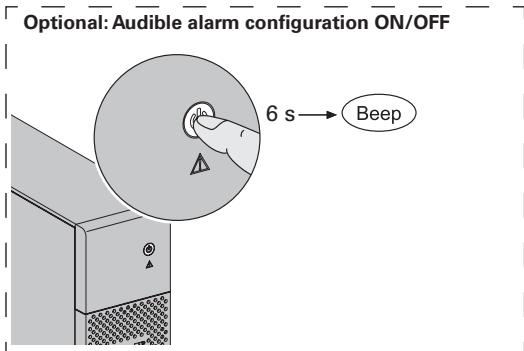
- AC-power disturbance: If AC power is disturbed or fails, the UPS continues to operate on battery power. Button 12 flashes green. In normal mode, the audible alarm beeps every ten seconds, then every three seconds when the end of battery backup time is near. In silent mode, the audible alarm simply beeps once when the UPS transfers to battery power.
- If the power outage lasts longer than the battery backup time, the UPS shuts down and automatically restarts when power is restored. Following a complete discharge, a few hours are required to recharge the battery back to full backup time.
- Surge protection: All outlets include surge protection.
- Shutdown of the battery backup outlets (9): Press button 12 for more than two seconds.
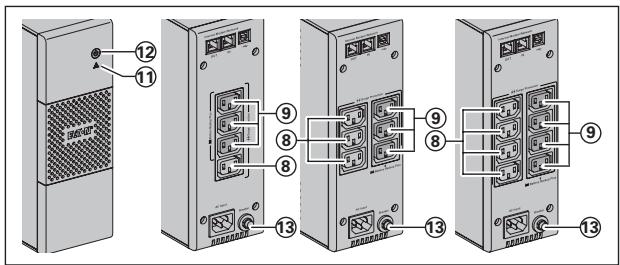
⑧: Surge protection outlets.
9: Battery backup outlets.
(1) : LED ON indicate a UPS fault.
12:ON/OFF button for the battery backup outlets.
13:Protection(circuit breaker).
Troubleshooting (For further information, visit the www.powerquality.eaton.com site or contact after-sales support.)
| Problem | Diagnostic | Solution | |
| 1 | ·The battery backup outlets ⑨ are not supplied with power. | ·Button 12 is not lighted on. | ·Press button 12 and check that it turns green. |
| 2 | ·The connected devices are not supplied when AC power fails. | ·The devices are not connected to the battery backup outlets ⑨. | ·Connect the devices to the battery backup outlets ⑨. |
| 3 | ·AC power is available, but the UPS operates on battery power. | ·Circuit breaker 13, located at the rear of the UPS, has been tripped by an overload on the UPS output. | ·Disconnect excess equipment and reset the circuit breaker 13 by pressing the corresponding button. |
| 4 | ·Green button 12 and red LED 11 are on and audible alarm beeps every 2 seconds. | ·The UPS battery backup outlets ⑨ are overloaded. | ·Disconnect excess equipment connected to the battery backup outlets ⑨. |
| 5 | ·Red LED 11 is on and the audible alarm beeps continuously. | ·A fault has occurred on the UPS. The battery backup outlets ⑨ are no longer supplied. | ·Call after-sales support. |
12 jll jll jll jll jll jll jll jll jll jll jll jll jll jll jll jll jll jll jll jll jll jll jll jll jll jll jll jll jll jll jll jll jll jll jll jll jll jll jll jll jll jll jll jll jll jll jll jll jll jll jelljelljelljelljelljelljelljelljelljelljelljelljelljelljelljelljelljelljelljelljelljelljelljelljelljelljelljelljelljelljelljelljelljelljelljelljelljelljelljelljelljelljelljelljelljelljelljelljelljelljell jll jll jll jll jll jll jll jll jll jll jll jll jll jll jll jll jll jll jll jll jll jll jll jll jll jll jll jll jll jll jll jll jll jll jll jll jll jll jll jll jll jll jll jll jll jll jll jll jll jill l l l l l l l l l l l l l l l l l l l l l l l l l l l l l l l l l l l l l l l l l l l l l l l l l l l l l l l l l l l l l l l l l l l l l l l l l l l l l l l l l l l l l l l l l l l l l l l l l l l l lll
aill aill i 1000
aBbBaaBbaa 9
11
UPS
aBb 21
.
(,)laal
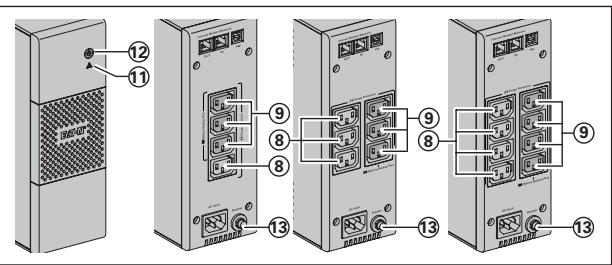
(..)
| الحامب | الإستعمال | الإستعمال | الإستعمال |
| الله�� محيى نهان و 12 رزر بعس • . محيى نهان | .12 رزر بعس • | .94 محيى نهان بعس • | 1 |
| الله�� محيى نهان و 12 رزر بعس • . محيى نهان | .94 محيى نهان بعس • | .94 محيى نهان بعس • | 2 |
| الله�� محيى نهان و 12 رزر بعس • . محيى نهان | .94 محيى نهان بعس • | .94 محيى نهان بعس • | 3 |
| الله�� محيى نهان و 12 رزر بعس • . محيى نهان | .94 محيى نهان بعس • | .94 محيى نهان بعس • | 4 |
| الله�� محيى نهان و 12 رزر بعس • . محيى نهان | .94 محيى نهان بعس • | .94 محيى نهان بعس • | 5 |