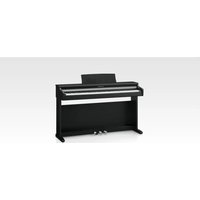
CN17 - Piano KAWAI - Free user manual and instructions
Find the device manual for free CN17 KAWAI in PDF.


Pick your language and provide your email: we'll send you a specifically translated version.
| Product Type | Digital Piano |
| Brand | Kawai |
| Model | CN-17 |
| Number of Keys | 88 |
| Key Action | Responsive Hammer Compact (RHC) |
| Sound Source | Harmonic Imaging (HI) |
| Maximum Polyphony | 192 notes |
| Number of Sounds | 19 |
| Reverb | 4 types |
| Internal Recorder | 1 track, 2 songs |
| Metronome | Yes, with tempo adjustment |
| Pedals | Damper (half-pedal), Soft, Sostenuto |
| Speakers | 2x12cm (full range), 2x5cm (tweeter) |
| Power Output | 20W + 20W |
| USB MIDI | Yes (USB Type B) |
| Headphone Jacks | 2 (1/4" and mini jack) |
| Dimensions (WxDxH) | 1360 x 405 x 860 mm |
| Weight | 42 kg |
| Power Consumption | 15 W |
| Auto Power Off | Yes (adjustable) |
| Finish | Satin Black |
| Included Accessories | Music rest, AC adapter (PS-129), headphone hook |
| Cleaning | Use a dry, soft cloth; avoid liquids and abrasive cleaners |
| Safety | Use only the provided AC adapter; keep away from moisture |
Frequently Asked Questions - CN17 KAWAI
How do I transpose the keyboard?
Press the FUNCTION button repeatedly until 'Transpose' appears, then use the VALUE keys to adjust the transposition in semitones.
How can I connect the piano to a computer?
Use a USB cable (Type B to Type A) to connect the USB MIDI port on the piano to your computer. Install the necessary drivers if required, and select the piano as a MIDI device in your software.
How do I record my playing?
Press the RECORD button to start recording. Play your piece, then press STOP to end. Press PLAY to listen. The internal recorder saves up to 2 songs on a single track.
How can I adjust the touch sensitivity?
Press the FUNCTION button repeatedly until 'Touch' appears, then use the VALUE keys to select from four types: Light, Normal, Heavy, and Constant.
How should I clean the piano keys?
Use a dry, soft cloth to wipe the keys. For stubborn dirt, dampen the cloth slightly with water and wipe gently. Do not use alcohol, solvents, or abrasive cleaners.
Can I use headphones with the CN-17?
Yes, the piano has two headphone jacks: a 1/4 inch and a mini jack. Plugging in headphones automatically mutes the speakers, allowing private practice.
Does the CN-17 have Bluetooth?
No, the Kawai CN-17 does not include Bluetooth functionality. For wireless connectivity, consider using an external Bluetooth MIDI adapter connected to the USB port.
What is the warranty period for the CN-17?
Standard warranty is typically 5 years for the piano and 1 year for the AC adapter. Check your local dealer for exact terms and conditions.
How do I reset the piano to factory settings?
Turn off the piano, then hold down the FUNCTION and PLAY buttons simultaneously while turning the power on. Continue holding until the display shows 'Reset'. Release the buttons, then press PLAY to confirm.
Can I connect external pedals?
The CN-17 has a dedicated pedal jack for a damper pedal (included). Additional pedals (soft, sostenuto) can be connected via optional pedal units that plug into the 1/4 inch jacks provided on the back.
User questions about CN17 KAWAI
0 question about this device. Answer the ones you know or ask your own.
Ask a new question about this device
No questions yet. Be the first to ask one.
Download the instructions for your Piano in PDF format for free! Find your manual CN17 - KAWAI and take your electronic device back in hand. On this page are published all the documents necessary for the use of your device. CN17 by KAWAI.
USER MANUAL CN17 KAWAI
Manual assistant
Powered by Anthropic
Waiting for your message
Product information
Brand : KAWAI
Model : CN17
Category : Piano