
PLA1498 - Air conditioner Sheffield - Free user manual and instructions
Find the device manual for free PLA1498 Sheffield in PDF.
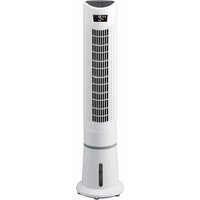


| Brand | Sheffield |
| Model | PLA1498 |
| Product Type | Portable Air Conditioner |
| Cooling Capacity | 10,000 BTU (approx. 2.9 kW) |
| Heating Capacity | Not available (cooling only) |
| Power Supply | 115 V / 60 Hz |
| Rated Power Consumption | 1050 W |
| Dimensions (W x H x D) | 18 x 28 x 14 inches (approx.) |
| Weight | 65 lbs (approx. 29.5 kg) |
| Airflow Rate | 200 CFM (approx.) |
| Noise Level | 55 dB (low) / 65 dB (high) |
| Functions | Cooling, Fan, Dehumidifier, Sleep Mode, Timer |
| Remote Control | Included (battery not included) |
| Filter Type | Washable mesh filter |
| Refrigerant | R-32 |
| Maintenance | Clean filter every 2 weeks; drain tank when full |
| Safety Features | Overheat protection, auto shut-off, tip-over switch |
| Spare Parts Available | Remote control, filter, drain plug, exhaust hose |
| Repairability Index | 7.5 / 10 (estimated) |
| User Manual Included | Yes (digital download available) |
Frequently Asked Questions - PLA1498 Sheffield
User questions about PLA1498 Sheffield
0 question about this device. Answer the ones you know or ask your own.
Ask a new question about this device
Download the instructions for your Air conditioner in PDF format for free! Find your manual PLA1498 - Sheffield and take your electronic device back in hand. On this page are published all the documents necessary for the use of your device. PLA1498 by Sheffield.
USER MANUAL PLA1498 Sheffield
living well, everyday

EVAPORATIVE AIR COOLER
CONTENTS
02 Welcome 03 Package Contents 03 Technical Specifications 04 Important Safety instructions 06 Assembly and parts 07 Instructions 09 Cleaning and Maintenance
WELCOME
Congratulations on choosing to buy a Sheffield product.
All products brought to you by Sheffield are manufactured to the highest standards of performance and safety, and, as part of our philosophy of customer service and satisfaction, are backed by our comprehensive 24 Month warranty.
We hope you will enjoy using your purchase for many years to come.
PACKAGE CONTENTS
1 x Evaporative Cooler 1 x Remote Control 1 x Ice Pack 1 x Instruction Manual 1 x Warranty Card
Confirm all parts before disposing of carton. Safely dispose of all plastic bags and other packaging components. They may be potentially dangerous to children.
TECHNICAL SPECIFICATIONS
Model: PLA1498
Rated voltage: 220-240V~50-60Hz
Power consumption: 55W
Protection class: II
Climatic Class: T
Dimensions HxWxD: 25 x 25.5 x 98cm
Weight: 5Kg
Speed modes: High, mid, Low
Wind Modes: normal, natural, sleep mode
Oscillation: 80
Timer: Up to 9 Hour
Tank: 3L
Carefully read this manual before using this appliance.
- Ensure that you know how the appliance functions and how to operate it.
- Maintain the appliance in accordance with the instructions to ensure that it functions properly.
- Keep this manual with the appliance. If the appliance is to be used by a third party, this instruction manual must be supplied with it.
- The safety instructions do not by themselves eliminate any danger completely and proper accident prevention measures must always be used.
- No liability can be accepted for any damage caused by non-compliance with these instructions or any other improper use or mishandling.
Do not use this appliance if it has been dropped or damaged in any way, or if the supply cord is damaged.
Intended Use
- Indoor domestic use only: this appliance is intended for indoor domestic use only. Do not use it outdoors. Do not use in moving vehicles or boats.
- Intended Purpose: Do not use the appliance for anything other than its intended purpose, and only use it as described in this manual.
- Accessories: Do not use any accessories with the appliance that are not supplied or specifically recommended.
When using electric appliances always observe safety regulations where applicable to reduce the risk of fire, electric shock and personal injury.
Always check that the power supply corresponds to the voltage on the rating plate.
Supply Cord and Plug
Always unplug from mains supply when not in use. Do not abuse or damage the power cord. If the supply cord is damaged, it must be replaced by the manufacturer or its service agent or a similarly qualified person in order to avoid a hazard. Do not let the supply cord touch hot surfaces.
When cleaning, moving or putting the Fan away, switch off the appliance and always pull out the plug from the socket (pull on the plug, not the cable).
Do not place the electrical cord under a cover. Place the cord in an area where there is no risk of tripping.
Double Insulation Safety
This appliance is double insulated for your protection. Do Not attempt to repair a double insulated appliance. Return to the supplier or qualified technician for repair.
Use and Environment
The appliance must be placed on a flat surface in a position where the fan will not touch any obstructions when oscillating.
Use and Environment
Do not leave unattended while in use. Do not use outdoors. Do not let the cord hang over the edge of any table or bench top.
This appliance is not intended to be operated by means of an external timer or separate remote-control system.
The Fan is designed exclusively for private use and is not suitable for commercial or industrial use. Do not use the appliance for anything other than its intended purpose and only use it as described in this manual.
Do not operate the fan in an area where gasoline is used or stocked, painting or such flammable liquids.
Do not use this appliance for any purpose other than those stated in this manual.
NOTE: Do not move the appliance whilst it is in use.
Unplug the Fan from the power socket when moving the Fan from one location to another, or when removing the grills for cleaning.
Ensure the Fan is standing on a stable surface and completely assembled before operation.
Supervision
This appliance is not intended for use by persons (including children) with reduced physical, sensory or mental capabilities, or lack of experience and knowledge, unless they have been given supervision or instruction concerning use of the appliance by a person responsible for their safety. Children should be supervised to ensure that they do not play with the appliance.
Damaged or Dropped
Always inspect your appliance before use. Check parts are correctly attached. Do not use this appliance if it has been damaged, dropped, left outdoors or dropped in water. Return it to an authorised service dealer for examination and repair.
Water
Do not immerse the base of the appliance or its supply cord in water. Do not use with wet hands or use in damp situations such as bathrooms.
Do not place the Fan next to an open window; Rain splashing on the Fan could cause an electric shock hazard.
Do not pour water onto or into the unit.
Do not knock or move the unit once water has been added to the tank. If the unit is knocked over whilst the water tank is full, switch off at the mains immediately and disconnect the plug. Do not switch the unit back on until it has dried for at least 24 hours. Serious damage may occur if the unit is still wet when it is turned on again.
When adding water, do not exceed the MAX level.
When the environment's humidity level is high, choose the normal mode.
CAUTION: To prevent damage to the appliance do not use alkaline cleaning agents when cleaning, use a soft cloth and a mild detergent.
Warning - There is a risk of injury from the rotating Fan blades!
- Do not insert fingers, pencils or any other object through the grid and into the rotating blade while the Fan is working. Do not let children put any objects into the front case.
- Wait until the appliance is at a standstill and has been unplugged before removing grids. When switched off, the blades will continue running briefly.

CAUTION: Do not ingest battery, Chemical Burn Hazard – Keep batteries away from children.
The remote control supplied with this product contains a Lithium coin/button cell battery. If the coin/button cell battery is swallowed, it can cause severe internal burns in just 2 hours and can lead to death.
- Keep new and used batteries away from children.
- Always completely secure the battery compartment, if the battery compartment does not close securely, stop using the product, remove the batteries and keep it away from children.
- If you think batteries might have been swallowed or placed inside any part of the body, seek immediate medical attention.
- The battery must be removed from the appliance before it is scrapped; the battery is to be disposed of safely, including keeping them away from children; even used cells may cause injury.
ASSEMBLY AND PARTS

- Control Panel
- LED Display
- Air outlet/Wind guide
- Water level indicator
- Handle

- Air filter / Water filter
- Power cord
- Water tank door
- Water outlet
- Remote control
INSTRUCTIONS
Before first Use
- Remove all packaging materials.
- Remove any stickers or labels from the appliance. (Except the rating label!)
- Ensure the Fan is standing on a solid stable surface before operation.
- Adding water: Remove the plug, open the water tank cover and add clean tap water to the tank. The water level is visible via the water level indicator on the front of the unit.
IMPORTANT: Do not overfill the water and keep within the MIN and MAX indicated levels. Always refit the cover after water has been added.


Operation
ATTENTION! Before every use, inspect the device for any signs of mechanical damage. Inspect the power cord. If the power cord is damaged, do not plug the appliance in.
Control Panel
![graph TD A["MODE"] --> B["SWING"] C["TIMER"] --> D["ION"] E["ON/OFF"] --> F["CPEED"] G["STOP"] --> H["TIME"]](/content/2026/07/1454591/images/29845d14cf51054ff3cbdb6708ca81932099a1b38154cf5a06f2e76c1e76a289.jpg)
Control Panel

Remote Control

Display Screen
This Air Cooler can be operated by the control panel located at the top of the unit or using a remote control.
1. Power ON/OFF button
Press the ON/OFF button to turn on or off the Air Cooler. Power indicator light on LED display will light up accordingly.
2. SPEED button
Press this button to adjust the required Air Cooler speed to Low, Mid or High Speed.
3. COOL/HUMIDIFY button
Press this button to activate COOL/HUMIDITY function, LED display indicator light will be on. If no water is detected within 10 seconds, the alarm will sound 4 times (3 short and 1 longer-sound). The system will automatically turn off this function.
4. MODE button
This button is used to select NORMAL, NATURAL or SLEEP mode.
NORMAL mode: unit operates in selected Air Cooler speed of low, mid or high.
NATURAL mode: unit operates according to computerized intervals of changing speed.
SLEEP mode: unit operates according to computerized intervals of changing speeds.
There is no MODE button on remote control. The selected mode indicator will light up accordingly on LED display.
5. TIMER button
This button allows you to set your Air Cooler to turn off according to a specific time. Press the timer button continually to set the timer off function between 1 and 9 hours. Each press of the TIMER button increases the TIME by an increment of 1 hour. The number of hours selected will be shown on the LED Display.
6. SWING button
Press this button to start or stop the swing or oscillation function.
7. ION Button
Press this button to start or stop the ION function. LED display indicator light will be on.
8. Remote control
a. The remote control requires 1 x CR2032 size battery.
b. Open the battery compartment by sliding the cover down and insert the battery according to the polarity indicated in the battery compartment.
c. Remote control operations are identical to the functions on the control panel, except for the MODE function that is displayed on the control panel but on the remote control. Point the remote control towards the unit and press the appropriate button. The remote control will operate up to 5 meters from the unit.
Important
- Never insert fingers, pencils or any other object through the grill when the Fan is operating.
- Unplug the Fan from the power supply when moving it from one location to another location.
- Unplug the Fan from the power supply when removing the grills for cleaning.
- Do not use the Fan with a solid state speed control device.
CLEANING and MAINTENANCE
Regular maintenance of your product will keep it in safe and proper working order.
Before Cleaning
- When not in use or before cleaning, always disconnect the appliance from the mains supply.
- Never immerse the motor unit in water or any other fluid, nor rinse it under the tap. Use only a moist cloth to clean the motor unit.
- Empty the water reservoir by loosening the plug of the water drainage outlet. Ensure you have a container under the drain to collect the water or empty the unit outside. You may have to empty the water collector a few times.
Care and Cleaning
• Using a soft, damp cloth, carefully clean the exterior surface of the product. - Do not allow water or other liquids to run into the interior of the product, as this could create a fire and/or electrical hazard. - We also recommend periodic cleaning of this unit by lightly running a vacuum cleaner nozzle over the guards to remove any dust or dirt that may have accumulated inside or on the unit. - Do not use spray cleaners. - When cleaning the water tank, first drain the water inside. Remove any dirt and dust and wipe dry. - Ensure the Air Cooler is switched off from the supply mains before removing the guard.

Cleaning the Filter
The filter is supplied assembled and can be removed for cleaning as required. It is recommended that the filter be cleaned once a week.
- Press the clips at the top of the protective panel and remove the panel from the appliance.
- Remove the filter. Use a vacuum cleaner to remove dust.
- Place the filter and the protective panel.
Note: The sponge is located at the base of the protective panel.

Important: Do not attempt to service this appliance. If it is faulty in any way, please follow the instructions on the enclosed warranty card.
Notice: Never use rough scouring pads or abrasive cleansers on any plastic or metal parts as the surface may be damaged.
Store in a Safe Place
When not in use, store your appliance and all its accessories and instruction manual in a safe and dry place.



- EVAPORATIVE AIR COOLER
- CONTENTS
- WELCOME
- PACKAGE CONTENTS
- TECHNICAL SPECIFICATIONS
- INTENDED USE
- SUPPLY CORD AND PLUG
- DOUBLE INSULATION SAFETY
- USE AND ENVIRONMENT
- SUPERVISION
- DAMAGED OR DROPPED
- WATER
- ASSEMBLY AND PARTS
- INSTRUCTIONS
- BEFORE FIRST USE
- OPERATION
- POWER ON/OFF BUTTON
- SPEED BUTTON
- COOL/HUMIDIFY BUTTON
- MODE BUTTON
- TIMER BUTTON
- SWING BUTTON
- ION BUTTON
- REMOTE CONTROL
- IMPORTANT
- CLEANING AND MAINTENANCE
- BEFORE CLEANING
- CARE AND CLEANING
- CLEANING THE FILTER
- STORE IN A SAFE PLACE
Brand : Sheffield
Model : PLA1498
Category : Air conditioner