USER MANUAL XP100 SONIM
XP100
Quick Start Guide
sonim®
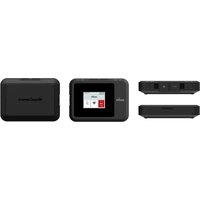
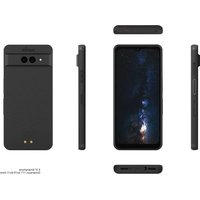
INBOX COMPONENTS:


NOT INCLUDED:


The power delivered by the charger must be between min 0.425 Watts required by the radio equipment, and max 5.0 Watts in order to achieve the maximum charging speed.
CONTENTS
English 7
Hrvatski 10
čeština 13
Dansk 16
Eesti 19
Soumi 22
Français 25
Deutsch 28
Greek 31
Hungarian 34
Italian 37
Latvian.... 40
Lithuanian 43
Dutch 46
Norwegian 49
Polish 52
Portuguese 55
Serbian 58
Slovak 61
Spanish 64
Swedish 67
Romanian 70
Russian 73

GETTING STARTED
1.

2.

3.4.


Please read this manual carefully to ensure proper use of this device and to prevent personal injury, fire or explosions. A comprehensive user guide, including warranty information, is available at www.sonimtech.com. Please visit the site before using your Sonim device.

- Although this device is highly durable, avoid striking, throwing, crushing, puncturing or bending it.
- If the device's casing or display is damaged, emits smoke or shows signs of burning, immediately discontinue use and have it repaired by a Sonim-certified service agent.
- Do not use the device if it or its battery appears swollen.
- Use only Sonim-approved batteries and chargers specifically designed for this product.
- If the device is used in saltwater, rinse it thoroughly afterwards to prevent salt corrosion.
- Do not attempt to disassemble the device or its accessories.
- Do not turn on the device in areas where the use of mobile phones is prohibited or where it may cause interference or pose a danger.
• Children should not use the device and its accessories without adult supervision. - For individuals with medical implants, maintain a distance of at least 15 cm from the device. During phone calls, keep the device on the side opposite the implant. - Consult your doctor and Sonim customer service to ensure that using your Sonim device will not interfere with your medical equipment. - Turn off your device in blasting areas and wherever signs instruct you to turn off "two-way radios" or "electronic devices" to avoid interfering with blasting operations. - Power off the device in any area with a potentially explosive atmosphere and follow all displayed signs and instructions. These areas may include locations where it is advised to turn off vehicle engines. - Always adhere to device usage guidelines in hospitals and healthcare facilities and turn off the device near medical equipment. - Consult with airline staff regarding restrictions on the use of wireless devices onboard the aircraft. - Do not operate the device outside its recommended temperature range or store it outside the storage temperature range specified by Sonim.
Sonimtech hereby declares that this radio equipment complies with Directive 2014/53/EU and the relevant regulations of the United Kingdom. For further information regarding RoHS and REACH compliance, and European standards, the full text of the EU Declaration of Conformity is available on the following website: www.sonimtech.com/products/devices/xp100
EMC STATEMENT:
This product has demonstrated EMC compliance under conditions that included the use of compliant peripheral devices and shielded cables between system components. It is crucial that you use compliant peripheral devices and shielded cables to reduce the possibility of causing interference to radios, televisions and other electronic devices.
This device has been tested and meets CE (EU) limits for Radio Frequency exposure. To ensure exposure levels remain at or below CE-tested levels, carry this device at least 5 mm (in the EU) away from your body. Please refer to the product's User Manual for detailed information on the measured SAR values.

The symbol on the device (and any included batteries) indicates that this product should not be discarded as unsorted waste. It must be sent to separate collection facilities for recovery and recycling.

PREVENTION OF HEARING DAMAGE:
To prevent possible hearing damage, do not listen at high volume levels for extended periods.
Sonim Technologies Inc.
4445 Eastgate Mall, Suite 200,
San Diego, CA 92121,
United States.
Tel: +1-833-697-6646 (1-833-MY-SONIM)
www.sonimtech.com
BATTERY
The battery in your phone is not fully charged. We recommend charging the phone for two (2) hours before use.
CHARGER
The power delivered by the charger must be between min 0.425 watts, as required by the radio equipment, and max 5.0 watts to achieve the maximum charging speed.
The charger is not included.
WARRANTY
Sonim Technologies provides a 3-year warranty on the phone (battery warranty varies). Please register within 30 days of purchase at www.sonimtech.com/register to receive product information and updates. For more information related to the warranty, please contact your service provider.
SUPPORT
Web: sonimtech.com/support/online-support/xp100-support/
Technical Support: support@sonimtech.com
Request for warranty or RMA support: RMA@sonimtech.com
Phone: For local contact numbers and hours of operation, please visit our website at sonimtech.com/support/contact-support/
Download a User Guide from:
sonimtech.com/support/online-support/xp100-support/
4445 Eastgate Mall, Suite 200,
San Diego, CA 92121,
United States of America
Tel.: +1-833-697-6646 (1-833-MY-SONIM)
www.sonimtech.com
BATTERY
The battery in the phone is not fully charged. We recommend charging the phone for 2 hours before use.
CHARGER
The power supplied by the charger must be between min 0.425 W required for the radio equipment and max 5.0 W to achieve the maximum charging speed.
Web: sonimtech.com/support/online-support/xp100-support/
Technical support: support@sonimtech.com
Warranty claim or RMA support request:
RMA@sonimtech.com
Phone: For local contact numbers and business hours, visit our website at sonimtech.com/support/contact-support/
Download the user manual from:
sonimtech.com/support/online-support/xp100-support/
4445 Eastgate Mall, Suite 200,
San Diego, CA 92121,
USA.
Tel: +1-833-697-6646 (1-833-MY-SONIM)
www.sonimtech.com
BATTERY
Net: sonimtech.com/support/online-support/xp100-support/
Technical support: support@sonimtech.com
Warranty or RMA support requests:
RMA@sonimtech.com
sonimtech.com/support/online-support/xp100-support/
SAFETY INFORMATION
4445 Eastgate Mall, Suite 200,
San Diego, CA 92121,
USA.
Tel: +1-833-697-6646 (1-833-MY-SONIM)
www.sonimtech.com
BATTERY
Web: sonimtech.com/support/online-support/xp100-support/
Technical support: support@sonimtech.com
Warranty or RMA support requests:
RMA@sonimtech.com
sonimtech.com/support/online-support/xp100-support/
SAFETY INFORMATION
4445 Eastgate Mall, Suite 200,
San Diego, CA 92121,
Web: sonimtech.com/support/online-support/xp100-support/
Technical support: support@sonimtech.com
sonimtech.com/support/online-support/xp100-support/
SAFETY INFORMATION
4445 Eastgate Mall, Suite 200,
San Diego, CA 92121,
United States.
Phone: +1-833-697-6646 (1-833-MY-SONIM)
www.sonimtech.com
BATTERY
sonimtech.com/support/online-support/xp100-support/
4445 Eastgate Mall, Suite 200,
San Diego, CA 92121,
United States
Tel.: +1-833-697-6646 (1-833-MY-SONIM)
www.sonimtech.com
BATTERY
sonimtech.com/support/online-support/xp100-support/
SAFETY INSTRUCTIONS
4445 Eastgate Mall, Suite 200,
San Diego, CA 92121,
Web: sonimtech.com/support/online-support/xp100-support/
4445 Eastgate Mall, Suite 200,
San Diego, CA 92121,
NPA
Tel.: +1 833 69 76646 (+1 833 MY SONIM)
www.sonimtech.com
BATTERY
sonimtech.com/support/online-support/xp100-support/
sonimtech.com/support/online-support/xp100-support/
4445 Eastgate Mall, Suite 200,
San Diego, CA 92121,
United States.
Tel: +1-833-697-6646 (1-833-MY-SONIM)
www.sonimtech.com
BATTERY
Web: sonimtech.com/support/online-support/xp100-support/
sonimtech.com/support/online-support/xp100-support/
4445 Eastgate Mall, Suite 200,
San Diego, CA 92121,
United States.
Tel: +1-833-697-6646 (1-833-MY-SONIM)
www.sonimtech.com
BATTERY
Web: sonimtech.com/support/online-support/xp100-support/
sonimtech.com/support/online-support/xp100-support/
www.sonimtech.com/products/devices/xp100
EMS NOTICE
4445 Eastgate Mall, Suite 200,
San Diego, CA 92121,
Website: sonimtech.com/support/online-support/xp100-support/
Technical support: support@sonimtech.com
sonimtech.com/support/online-support/xp100-support/
4445 Eastgate Mall, Suite 200,
San Diego, CA 92121,
United States
Tel: +1-833-697-6646 (1-833-MY-SONIM)
www.sonimtech.com
BATTERY
Web: sonimtech.com/support/online-support/xp100-support/
Technical support: support@sonimtech.com
sonimtech.com/support/online-support/xp100-support/
4445 Eastgate Mall, Suite 200,
San Diego, CA 92121,
United States.
Tel: +1-833-697-6646 (1-833-MY-SONIM)
www.sonimtech.com
BATTERY
Web: sonimtech.com/support/online-support/xp100-support/
Technical support: support@sonimtech.com
sonimtech.com/support/online-support/xp100-support/
www.sonimtech.com/products/devices/xp100
EMC DECLARATION:
4445 Eastgate Mall, Suite 200,
San Diego, CA 92121,
USA.
Phone: +1-833-697-6646 (1-833-MY-SONIM)
www.sonimtech.com
BATTERY
Web: sonimtech.com/support/online-support/xp100-support/
sonimtech.com/support/online-support/xp100-support/
4445 Eastgate Mall, Suite 200,
San Diego, CA 92121,
United States.
Tel: +1-833-697-6646 (1-833-MY-SONIM)
www.sonimtech.com
BATTERY
Online: sonimtech.com/support/online-support/xp100-support/
sonimtech.com/support/online-support/xp100-support/
4445 Eastgate Mall, Suite 200,
San Diego, CA 92121,
United States.
Tel.: +1-833-697-6646 (1-833-MY-SONIM)
www.sonimtech.com
BATTERY
Web: sonimtech.com/support/online-support/xp100-support/
sonimtech.com/support/online-support/xp100-support/
4445 Eastgate Mall, Suite 200,
San Diego, CA 92121,
Web: sonimtech.com/support/online-support/xp100-support/
sonimtech.com/support/online-support/xp100-support/
www.sonimtech.com/products/devices/xp100
EMC DECLARATION:
4445 Eastgate Mall, Suite 200,
San Diego, CA 92121,
United States.
Tel: +1-833-697-6646 (1-833-MY-SONIM)
www.sonimtech.com
BATTERY
Web: sonimtech.com/support/online-support/xp100-support/
sonimtech.com/support/online-support/xp100-support/
4445 Eastgate Mall, Suite 200,
San Diego, CA 92121,
United States.
Tel: +1-833-697-6646 (1-833-MY-SONIM)
www.sonimtech.com
BATTERY
Web: sonimtech.com/support/online-support/xp100-support/
Technical support: support@sonimtech.com
sonimtech.com/support/online-support/xp100-support/
4445 Eastgate Mall, Suite 200,
San Diego, CA 92121,
USA.
Tel: +1-833-697-6646 (1-833-MY-SONIM)
www.sonimtech.com
BATTERY
Web: sonimtech.com/support/online-support/xp100-support/
Technical support: support@sonimtech.com
Warranty or RMA support requests:
RMA@sonimtech.com
sonimtech.com/support/online-support/xp100-support/
4445 Eastgate Mall, Suite 200,
San Diego, CA 92121,
United States.
Tel: +1-833-697-6646 (1-833-MY-SONIM)
www.sonimtech.com
BATTERY
Web: sonimtech.com/support/online-support/xp100-support/
Technical support: support@sonimtech.com
sonimtech.com/support/online-support/xp100-support/
4445 Eastgate Mall, Suite 200,
San Diego, CA 92121,
USA.
Tel.: +1-833-697-6646 (1-833-MY-SONIM)
www.sonimtech.com
BATTERY
sonimtech.com/support/online-support/xp100-support/
sonim®
© 2024 Sonim Technologies, Inc.