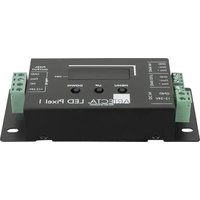
LED Pixel 1 - LED Lighting Artecta - Free user manual and instructions
Find the device manual for free LED Pixel 1 Artecta in PDF.


Pick your language and provide your email: we'll send you a specifically translated version.
| Product Type | Pixel LED Controller/Effect Light |
| Model | LED Pixel 1 |
| Brand | Artecta |
| Dimensions (L x W x H) | 150 mm x 100 mm x 45 mm |
| Weight | 0.5 kg |
| Power Supply | DC 12V, 2A |
| Input Voltage | AC 100-240V, 50/60 Hz (via included adapter) |
| Power Consumption | 24W max |
| Control Protocol | DMX512 (3-pin XLR) |
| DMX Channels | 3 or 4 (selectable) |
| Control Modes | DMX, Standalone, Master/Slave |
| Number of Pixels | 1 pixel (RGB or RGBW) |
| Color Support | 16.7 million colors via RGB mixing |
| Beam Angle | 120 degrees |
| Operating Temperature | -20°C to 40°C |
| Housing Material | Aluminum alloy, black finish |
| Mounting | Bracket included, floor or truss mount |
| IP Rating | IP20 (indoor use only) |
| Included Accessories | Power adapter, DMX cable, user manual |
| Warranty | 2 years |
Frequently Asked Questions - LED Pixel 1 Artecta
How do I connect the Artecta LED Pixel 1 to a DMX controller?
Connect a standard 3-pin XLR cable from the controller's output to the DMX IN port on the LED Pixel 1. Set the desired DMX address using the DIP switches (refer to manual for address settings). Ensure the terminator is used on the last device.
What power adapter does the LED Pixel 1 require?
The device requires a DC 12V, 2A power adapter. Only use the included adapter or a certified equivalent to avoid damage.
Can I use the LED Pixel 1 outdoors?
No, the LED Pixel 1 has an IP20 rating and is designed for indoor use only. Exposure to moisture or dust may cause malfunction.
How do I reset the LED Pixel 1 to factory settings?
To reset, press and hold the MODE button for 5 seconds until the LED blinks rapidly. Release the button; the device will reboot with default settings.
What is the maximum cable length for DMX control?
For reliable DMX signal, keep cable length under 300 meters (1000 feet). Use high-quality cable and add a terminator at the end of the chain.
Can I daisy-chain multiple LED Pixel 1 units?
Yes, you can daisy-chain up to 32 units using the DMX IN/OUT ports. Ensure each unit has a unique DMX address and the last unit has a terminator.
How do I clean the LED Pixel 1?
Disconnect power and use a soft, dry cloth to wipe the housing. Do not use abrasive cleaners or liquids. Keep ventilation slots free of dust.
What does the status LED indicate?
A steady green LED indicates normal operation. Blinking red means no DMX signal. Blinking green means standby mode. Refer to manual for detailed codes.
Is the LED Pixel 1 compatible with sound-activated modes?
Yes, in standalone mode, the device can respond to sound via its built-in microphone. Set the mode to Sound Active using the control panel.
What should I do if the device does not power on?
Check the power adapter connection and ensure the outlet is live. Verify the adapter voltage matches 12V DC. If still off, contact support with proof of purchase.
User questions about LED Pixel 1 Artecta
0 question about this device. Answer the ones you know or ask your own.
Ask a new question about this device
No questions yet. Be the first to ask one.
Download the instructions for your LED Lighting in PDF format for free! Find your manual LED Pixel 1 - Artecta and take your electronic device back in hand. On this page are published all the documents necessary for the use of your device. LED Pixel 1 by Artecta.
USER MANUAL LED Pixel 1 Artecta
Manual assistant
Powered by Anthropic
Waiting for your message
Product information
Brand : Artecta
Model : LED Pixel 1
Category : LED Lighting