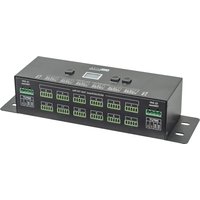
LED Dim-12 - Lighting Artecta - Free user manual and instructions
Find the device manual for free LED Dim-12 Artecta in PDF.


Pick your language and provide your email: we'll send you a specifically translated version.
| Product Type | LED Dimmer Controller |
| Number of Channels | 12 |
| Input Voltage | 100-240V AC, 50/60Hz |
| Output Voltage | 12V DC |
| Max Load per Channel | 5A |
| Total Max Load | 60A |
| Control Protocol | DMX512, RDM |
| DMX Connectors | 3-pin XLR (male in, female out) |
| Output Connectors | Screw terminals |
| Dimensions (W x D x H) | 483 x 133 x 44 mm (1U) |
| Weight | 1.5 kg |
| Cooling | Passive, convection |
| Protection Features | Overload, short circuit, over temperature |
| Fuse | Replaceable, 5x20mm |
| Mounting | 19" rack mount or wall mount |
| Operating Temperature | 0°C to 40°C |
| Certifications | CE, RoHS |
| Power Consumption (idle) | < 10W |
| Manual Included | Yes, PDF download available |
Frequently Asked Questions - LED Dim-12 Artecta
How do I set the DMX address for the LED Dim-12?
Use the DMX address DIP switches on the front panel. Each channel corresponds to a unique starting address. Refer to the manual for binary addressing.
Can I use this dimmer with non-dimmable LED drivers?
No, this dimmer is designed for PWM dimming of constant-voltage LED strips or fixtures with compatible dimmable drivers.
What is the maximum cable length for DMX?
Up to 300 meters with proper termination. Use 120 ohm DMX cable and a terminator at the end of the chain.
Does the unit support RDM?
Yes, the LED Dim-12 supports RDM (Remote Device Management) for configuration and monitoring via DMX.
How do I reset to factory defaults?
Press and hold the reset button on the rear panel for 5 seconds until all LEDs blink rapidly.
Can I dim non-LED loads like incandescent bulbs?
This unit is optimized for 12V LED loads. For incandescent bulbs, verify power rating does not exceed channel capacity.
What is the dimming curve?
The default curve is linear. Optional curves (square law, log) can be selected via RDM or DIP switch settings.
Why are some channels not responding?
Check DMX addressing and ensure the console is sending data. Verify that the DMX terminator is installed if the unit is at the end of the chain.
How do I clean the device?
Use a dry, soft cloth. Do not use solvents or sprays. Ensure power is disconnected before cleaning.
Is the LED Dim-12 rack mountable?
Yes, it fits a standard 19-inch rack with 1U height. Supplied with rack ears and screws.
User questions about LED Dim-12 Artecta
0 question about this device. Answer the ones you know or ask your own.
Ask a new question about this device
No questions yet. Be the first to ask one.
Download the instructions for your Lighting in PDF format for free! Find your manual LED Dim-12 - Artecta and take your electronic device back in hand. On this page are published all the documents necessary for the use of your device. LED Dim-12 by Artecta.
USER MANUAL LED Dim-12 Artecta
Manual assistant
Powered by Anthropic
Waiting for your message
Product information
Brand : Artecta
Model : LED Dim-12
Category : Lighting