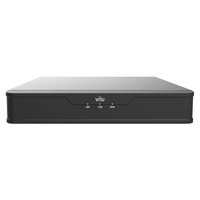
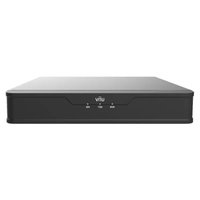
NVR301-04X - VCR UniView - Free user manual and instructions
Find the device manual for free NVR301-04X UniView in PDF.


Pick your language and provide your email: we'll send you a specifically translated version.
| Product Type | Network Video Recorder (NVR) |
| Brand | UniView |
| Model | NVR301-04X |
| Channels | 4 channels (4 PoE ports) |
| Maximum Recording Resolution | 8 MP per channel |
| Compression Format | H.265+/H.265/H.264 |
| Video Output | 1x HDMI (up to 4K), 1x VGA |
| Audio In/Out | 1x RCA in, 1x RCA out |
| Storage Capacity | Up to 10 TB (1 SATA HDD, not included) |
| Network Interface | 1x Gigabit Ethernet (RJ-45) |
| PoE Standard | IEEE 802.3af/at, total PoE budget 60W |
| Power Supply | DC 48V, 1.5A (included) |
| Power Consumption | ≤ 10 W (without HDD and PoE load) |
| Dimensions (W x D x H) | 260 mm x 240 mm x 44 mm |
| Weight (without HDD) | Approx. 1.2 kg |
| Operating Temperature | -10°C to 55°C |
| Operating Humidity | 10% to 90% (non-condensing) |
| Maintenance & Cleaning | Disconnect power before cleaning; use dry cloth; avoid liquids and aerosols. |
| Security Features | Password protection, IP address filtering, system logs, HTTPS support |
| Spare Parts & Repairability | Hard drive replacement (user-accessible); power adapter, remote control, mounting screws provided. Contact support for other repairs. |
| General Information | Supports ONVIF, remote viewing via mobile app (UniView Plus), and up to 4 users simultaneously |
Frequently Asked Questions - NVR301-04X UniView
How do I set up the NVR301-04X for the first time?
Connect the NVR to your network via Ethernet, attach a monitor to the HDMI port, power it on, and follow the Quick Setup Wizard on screen. You will be prompted to create an admin password and configure IP cameras.
Can I use third-party IP cameras with this NVR?
Yes, the NVR supports ONVIF protocol, which allows connection of many third-party IP cameras. Ensure they are ONVIF-compliant and on the same subnet.
How do I access the NVR remotely?
Install the UniView Plus mobile app (iOS/Android) or use the web browser interface. You will need to enable remote access in the NVR menu (Network > DDNS or P2P) and register a device ID.
What is the maximum hard drive size I can install?
The NVR supports a single 3.5-inch SATA hard drive with maximum capacity of 10 TB. The drive is not included and must be purchased separately.
How long does the NVR retain recordings?
Recording retention depends on hard drive size, number of cameras, recording quality, and motion detection settings. For example, a 1 TB drive recording 4x 2MP cameras continuously at 15 fps may store about 10-15 days.
Why are my cameras not being detected?
Ensure cameras are connected to the PoE ports (ports 1-4) and powered on. Check that the camera is ONVIF-compliant and the IP address is in the same subnet as the NVR (default 192.168.1.x). Reboot the NVR and try automatic discovery.
Can I use PoE injectors instead of the NVR's built-in PoE?
Yes, you can use external PoE injectors or switches. However, the NVR's PoE ports are designed for direct camera connections. If using injectors, connect the camera to the injector, then the injector to the NVR's non-PoE LAN port.
How do I reset the admin password?
Press and hold the Reset button on the back panel for 10 seconds while the NVR is powered on. This resets the password to default (empty) and restores network settings. You will need to set a new password upon next login.
What are the recommended maintenance practices?
Regularly check the hard drive health via the NVR interface, keep the firmware updated, clean the device exterior with a dry cloth, and ensure adequate ventilation around the unit to prevent overheating.
Does the NVR support backup to USB or cloud?
Yes, you can backup recorded video to a USB flash drive or external HDD via the USB ports. For cloud backup, the NVR supports FTP and some third-party cloud services (e.g., Google Drive) via network settings.
User questions about NVR301-04X UniView
0 question about this device. Answer the ones you know or ask your own.
Ask a new question about this device
No questions yet. Be the first to ask one.
Download the instructions for your VCR in PDF format for free! Find your manual NVR301-04X - UniView and take your electronic device back in hand. On this page are published all the documents necessary for the use of your device. NVR301-04X by UniView.
USER MANUAL NVR301-04X UniView

Manual assistant
Powered by Anthropic
Waiting for your message
Product information
Brand : UniView
Model : NVR301-04X
Category : VCR