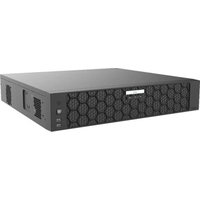
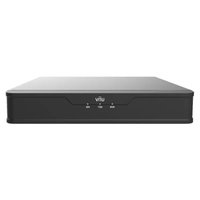
NVR508-64B - VCR UniView - Free user manual and instructions
Find the device manual for free NVR508-64B UniView in PDF.


Pick your language and provide your email: we'll send you a specifically translated version.
| Product Type | 64-Channel Network Video Recorder (NVR) |
| Model | NVR508-64B |
| Brand | UniView |
| Dimensions (W x D x H) | 440 mm x 320 mm x 44 mm (1U Rackmount) |
| Weight | Approx. 2.0 kg (4.4 lbs) |
| Power Supply | 12V DC, 5A (external adapter) |
| Power Consumption | ≤ 15W (without HDD) |
| Video Input | 64 IP camera channels (up to 8MP each) |
| Recording Resolution | Up to 4K @ 30fps per channel |
| Storage | 2 SATA III HDD/SSD slots (up to 10TB each) |
| Network Interface | 1x Gigabit Ethernet (RJ45) |
| Audio | 1x RCA input, 1x RCA output (G.711) |
| Outputs | HDMI (4K), VGA (1080p) |
| USB Ports | 2x USB 2.0 |
| Protocols Supported | ONVIF, RTSP, HTTP; compatible with major IP cameras |
| Remote Access | Via web, mobile app (UniView View), CMS |
| Recording Mode | Continuous, scheduled, motion detection, alarm |
| Playback | Multi-channel sync, search by time/event, smart playback |
| Operating Temperature | -10°C to 55°C (14°F to 131°F) |
| Maintenance | Clean with dry cloth; avoid liquids; ensure ventilation |
| Safety | Use only supplied power adapter; do not open casing; avoid humidity |
| Spare Parts / Repairability | HDD user-replaceable; fan replacement; contact UniView support for other parts |
| General Information | Designed for professional surveillance; supports H.265+/H.264 compression |
Frequently Asked Questions - NVR508-64B UniView
How many IP cameras can I connect to the NVR508-64B?
The NVR508-64B supports up to 64 IP cameras simultaneously.
What is the maximum storage capacity?
It has two SATA III slots supporting up to 10TB each, for a total of up to 20TB.
Can I record in 4K resolution?
Yes, each channel can record at up to 4K (8MP) at 30fps depending on camera settings.
How do I access the NVR remotely?
Use the UniView View mobile app or web browser via the NVR's IP address. Ensure port forwarding is configured.
What recording modes are available?
Modes include continuous, scheduled, motion detection, and alarm-triggered recording.
Is the NVR compatible with third-party cameras?
Yes, it supports ONVIF and RTSP protocols, so many third-party IP cameras can be added manually.
How do I perform a factory reset?
Press and hold the reset button on the rear panel for about 10 seconds until the system reboots.
What should I do if the NVR overheats?
Ensure proper ventilation around the unit, clean the fan filter, and check ambient temperature does not exceed 55°C.
Can I replace the hard drive myself?
Yes, the HDDs are user-replaceable. Open the case, disconnect cables, and install SATA drives up to 10TB.
Does the NVR support audio recording?
Yes, it has 1 audio input and 1 audio output (RCA), and supports G.711 audio encoding for compatible cameras.
User questions about NVR508-64B UniView
0 question about this device. Answer the ones you know or ask your own.
Ask a new question about this device
No questions yet. Be the first to ask one.
Download the instructions for your VCR in PDF format for free! Find your manual NVR508-64B - UniView and take your electronic device back in hand. On this page are published all the documents necessary for the use of your device. NVR508-64B by UniView.
USER MANUAL NVR508-64B UniView

Manual assistant
Powered by Anthropic
Waiting for your message
Product information
Brand : UniView
Model : NVR508-64B
Category : VCR