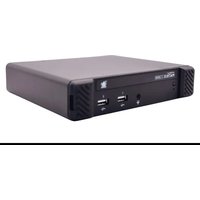
ADDERView Matrix C1100 - Network Equipment Adder - Free user manual and instructions
Find the device manual for free ADDERView Matrix C1100 Adder in PDF.


Pick your language and provide your email: we'll send you a specifically translated version.
| Product Type | KVM Matrix Switch |
| Brand | Adder |
| Model | ADDERView Matrix C1100 |
| Ports | 8 Computer Ports, 4 User Ports |
| Video Resolution | Up to 1920x1200 @ 60Hz |
| Dimensions (W x D x H) | 430 x 200 x 44 mm (1U rackmount) |
| Weight | 3.5 kg |
| Power Supply | 100-240V AC, 50/60Hz, 0.5A |
| Power Consumption | 25W maximum |
| Supported Operating Systems | Windows, Linux, macOS, Unix |
| Connections | VGA, USB, Audio |
| Rack Mountable | Yes, 1U |
| Control Methods | Front panel buttons, OSD, RS-232 |
| Security | Port locking, OSD password protection |
| Maintenance | Firmware upgrade via USB, cleaning with dry cloth |
| Spare Parts & Repairability | Internal power supply, fan; contact Adder support for repairs |
| Package Contents | Matrix switch, power cord, rack mount ears, user manual |
| Warranty | 2 years limited |
Frequently Asked Questions - ADDERView Matrix C1100 Adder
How do I connect my computers to the ADDERView Matrix C1100?
Connect each computer to one of the computer ports using VGA and USB cables. Ensure the computer's video output is set to a supported resolution.
Can I use this matrix with different operating systems?
Yes, the C1100 supports Windows, Linux, macOS, and Unix. No additional drivers are required for basic KVM functionality.
How do I switch between computers?
You can switch using the front panel buttons, the on-screen display (OSD) menu, or external control via RS-232.
What is the maximum video resolution supported?
The matrix supports resolutions up to 1920x1200 @ 60Hz.
Does it support audio switching?
Yes, the C1100 has audio inputs and outputs for each port, allowing audio to follow the video switch.
Can I mount the device in a rack?
Yes, it comes with rack mount ears and occupies 1U of rack space.
How do I update the firmware?
Firmware updates can be performed via a USB port on the unit. Download the latest firmware from Adder's support website and follow the instructions.
What security features does it have?
It includes port locking and an OSD password to prevent unauthorized access.
What is the power consumption?
Maximum power consumption is 25W. It uses a standard IEC power cable.
Where can I find the user manual?
The manual is available for download on notice-facile.com in PDF format. You can also request a translated version by selecting your language and providing your email.
User questions about ADDERView Matrix C1100 Adder
0 question about this device. Answer the ones you know or ask your own.
Ask a new question about this device
No questions yet. Be the first to ask one.
Download the instructions for your Network Equipment in PDF format for free! Find your manual ADDERView Matrix C1100 - Adder and take your electronic device back in hand. On this page are published all the documents necessary for the use of your device. ADDERView Matrix C1100 by Adder.
USER MANUAL ADDERView Matrix C1100 Adder
Manual assistant
Powered by Anthropic
Waiting for your message
Product information
Brand : Adder
Model : ADDERView Matrix C1100
Category : Network Equipment