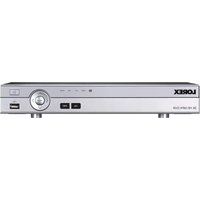
DV8082 - Digital Video Recorder Lorex - Free user manual and instructions
Find the device manual for free DV8082 Lorex in PDF.


Pick your language and provide your email: we'll send you a specifically translated version.
| Product Type | 8-Channel Digital Video Recorder (DVR) |
| Dimensions | 10.2 x 8.7 x 1.7 inches (259 x 221 x 43 mm) |
| Weight | 2.5 lbs (1.13 kg) |
| Power Supply | DC 12V, 2A |
| Video Inputs | 8 BNC connectors |
| Video Outputs | HDMI, VGA |
| Audio | 1 audio input, 1 audio output |
| Recording Resolution | Up to 1080p (1920x1080) at 15fps per channel |
| Video Compression | H.264 |
| Internal Storage | Supports up to 2TB SATA HDD (not included) |
| Network | 10/100 Mbps Ethernet port |
| USB Ports | 2 USB 2.0 ports |
| Mobile App | Lorex Secure, Circle View |
| Operating Temperature | 14°F to 122°F (-10°C to 50°C) |
| Key Functions | Motion detection, scheduled recording, remote viewing, playback |
| Maintenance | Keep ventilation slots clean, avoid dust accumulation |
| Safety | Use only provided power adapter; do not expose to moisture |
| Spare Parts | Replacement power adapter, remote control, USB mouse |
| Repairability | User-replaceable hard drive; professional service for other repairs |
| General | FCC compliant, RoHS certified |
Frequently Asked Questions - DV8082 Lorex
How do I set up the Lorex DV8082 DVR for the first time?
Connect the DVR to a monitor via HDMI or VGA, attach cameras to BNC inputs, plug in power, and follow the on-screen Quick Start Guide. Ensure an Ethernet connection for remote access.
Can I view the cameras remotely on my smartphone?
Yes, download the Lorex Secure or Circle View app. Add the DVR by scanning the QR code on the device or entering the UID number. Ensure the DVR is connected to the internet.
How do I play back recorded footage?
Press the Playback button on the remote or front panel. Use the calendar to select a date and timeline to choose time. You can export clips via USB.
How do I set up motion detection?
Go to Main Menu > Camera > Motion Detection. Enable it for each channel, adjust sensitivity and area, and set action like email alerts or recording.
Why am I not receiving motion alerts?
Check that motion detection is enabled for the desired cameras. Verify email settings under Network > Email and ensure the DVR has internet access. Also check alert schedules.
How do I install an internal hard drive?
Power off and unplug the DVR. Remove the top cover screws, connect SATA cable and power cable to the drive, secure it in the mounting bay, and replace the cover. Then format the drive from the menu.
What is the default username and password?
The default username is admin and password is 000000 (six zeros). For security, change these in System > User after first login.
How do I reset the DVR to factory settings?
Go to Main Menu > System > Default and select Factory Default. Confirm to reset. Alternatively, use the reset button on the back panel (press for 10 seconds).
How do I update the firmware?
Download the latest firmware from Lorex support site. Save it to a USB drive. Insert into DVR, go to Main Menu > System > Upgrade, select the file, and follow prompts. Do not power off during update.
Can I use third-party cameras with this DVR?
The DV8082 supports analog cameras with BNC connectors. It may work with some HD-TVI cameras, but compatibility is not guaranteed. For best results, use Lorex-branded cameras.
User questions about DV8082 Lorex
0 question about this device. Answer the ones you know or ask your own.
Ask a new question about this device
No questions yet. Be the first to ask one.
Download the instructions for your Digital Video Recorder in PDF format for free! Find your manual DV8082 - Lorex and take your electronic device back in hand. On this page are published all the documents necessary for the use of your device. DV8082 by Lorex.
USER MANUAL DV8082 Lorex


Manual assistant
Powered by Anthropic
Waiting for your message
Product information
Brand : Lorex
Model : DV8082
Category : Digital Video Recorder