
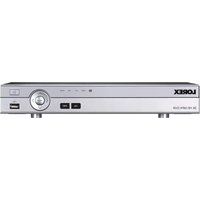
DV8163 - Digital Video Recorder Lorex - Free user manual and instructions
Find the device manual for free DV8163 Lorex in PDF.


Pick your language and provide your email: we'll send you a specifically translated version.
| Product Type | Digital Video Recorder (DVR) |
| Model | DV8163 |
| Brand | Lorex |
| Dimensions | 10.2 x 8.1 x 1.7 inches (259 x 206 x 43 mm) |
| Weight | 3.3 lbs (1.5 kg) |
| Power Supply | 12V DC, 2A |
| Supported Cameras | Up to 8 analog or IP cameras |
| Video Output | HDMI, VGA |
| Recording Resolution | 1080p (1920 x 1080) |
| Storage | Supports up to 2 internal SATA drives (max 10TB each) |
| Network | Ethernet (RJ-45), Wi-Fi optional via USB adapter |
| Audio | 1-channel audio input, 1-channel audio output |
| Remote Access | via Lorex Cloud app (iOS/Android) or web browser |
| Motion Detection | Yes, configurable zones and sensitivity |
| Alarm I/O | 4 inputs, 1 relay output |
| Operating Temperature | 32°F to 104°F (0°C to 40°C) |
| Maintenance | Keep vents clean; update firmware regularly; backup recordings |
| Safety | Use only included power adapter; avoid moisture; do not block vents |
| Spare Parts & Repairability | Contact Lorex support or authorized service center |
| Manual Languages | English, French, Spanish (downloadable) |
Frequently Asked Questions - DV8163 Lorex
How do I reset my Lorex DV8163 to factory default?
To reset to factory defaults, press and hold the Reset button on the back panel for 10 seconds while the DVR is powered on. All settings will revert to original.
What is the maximum hard drive capacity for DV8163?
The DV8163 supports up to two internal SATA hard drives, each up to 10TB, for a total of 20TB storage.
Can I view my cameras remotely?
Yes, you can view live and recorded footage using the Lorex Cloud app on iOS or Android, or via a web browser on your computer.
What type of cameras are compatible with DV8163?
The DVR is compatible with analog (CVBS) and HD-TVI cameras up to 1080p resolution. Some IP cameras may also work with additional configuration.
How do I update the firmware?
Download the latest firmware from the Lorex support website, save it to a USB drive, insert the USB into the DVR, and navigate to Menu > System > Upgrade to install.
Why is my DVR beeping?
A beeping sound typically indicates a hard drive error or video loss. Check the system logs via Menu > Information > Logs for details.
Can I export recorded video?
Yes, you can export footage to a USB flash drive or external hard drive via the Backup option in the playback menu. Supported formats include AVI and H.264.
How many cameras can I connect?
The DV8163 supports up to 8 cameras total. You can mix analog and HD-TVI cameras.
What should I do if the DVR does not power on?
First, check the power cable and adapter. Ensure the outlet is working. If using a power strip, try a direct wall outlet. If still no power, contact Lorex support.
Is the DV8163 compatible with Wi-Fi cameras?
The DVR itself does not have built-in Wi-Fi. However, you can add a USB Wi-Fi adapter (sold separately) to connect to a wireless network for remote access.
User questions about DV8163 Lorex
0 question about this device. Answer the ones you know or ask your own.
Ask a new question about this device
No questions yet. Be the first to ask one.
Download the instructions for your Digital Video Recorder in PDF format for free! Find your manual DV8163 - Lorex and take your electronic device back in hand. On this page are published all the documents necessary for the use of your device. DV8163 by Lorex.
USER MANUAL DV8163 Lorex


Manual assistant
Powered by Anthropic
Waiting for your message
Product information
Brand : Lorex
Model : DV8163
Category : Digital Video Recorder