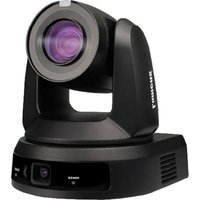
VC-TR61 - Surveillance Camera Lumens - Free user manual and instructions
Find the device manual for free VC-TR61 Lumens in PDF.


Pick your language and provide your email: we'll send you a specifically translated version.
| Product Type | PTZ Surveillance Camera |
| Image Sensor | 1/2.8" Progressive Scan CMOS |
| Resolution | 1920 x 1080 (Full HD) |
| Optical Zoom | 30x |
| Pan Range | 360° continuous |
| Tilt Range | -5° to 90° |
| Minimum Illumination | 0.05 lux (color), 0.01 lux (B/W) |
| Video Compression | H.265 / H.264 / MJPEG |
| Network Interface | 10/100/1000 Mbps Ethernet |
| Power Supply | PoE+ (IEEE 802.3at) or 24V AC |
| Power Consumption | Max 30W |
| Dimensions (W x H x D) | 185 x 185 x 320 mm |
| Weight | Approx. 3.5 kg |
| IP Rating | IP66 (weatherproof) |
| Operating Temperature | -40°C to 60°C |
| Storage | MicroSD card slot (up to 256 GB) |
| Audio | Built-in microphone, audio line in/out |
| Alarm I/O | 1 input, 1 output |
| Protocols | ONVIF, RTSP, HTTP, HTTPS |
| Maintenance | Clean lens with soft dry cloth; check cables regularly |
| Safety | Use only certified PoE injector or power adapter |
| Spare Parts | Contact Lumens support for replacement parts |
| General Information | Compatible with Lumens Control Systems and third-party VMS |
| Warranty | 2 years limited warranty |
Frequently Asked Questions - VC-TR61 Lumens
How do I connect the VC-TR61 to my network?
Connect the camera to your switch or router using an Ethernet cable. Ensure the switch supports PoE+ or use the included 24V AC adapter. The camera will obtain an IP via DHCP. Use the Lumens Discovery Tool to find its IP address.
What is the default IP address and login credentials?
Default IP is 192.168.0.100. Username is admin and password is admin. Change the password immediately for security.
Can I use the camera outdoors?
Yes, the VC-TR61 has an IP66 rating, making it suitable for outdoor use. Ensure all cable connections are properly sealed to maintain weather resistance.
How do I perform a factory reset?
Press and hold the reset button (located on the bottom of the camera) for 10 seconds using a paperclip. The camera will reboot and restore factory settings.
What storage options are available?
The camera supports a MicroSD card (up to 256 GB) for local recording. It can also record to an NVR or FTP server via network.
How do I adjust the PTZ position?
Use the web interface or an ONVIF-compatible client. You can control pan, tilt, and zoom manually or set preset positions.
Why is the video feed not displaying?
Check network connectivity, IP address, and ensure the camera is powered. Also verify that your browser supports H.265/H.264. Try using RTSP in a media player like VLC.
Can I mount the camera on a ceiling or wall?
Yes, the camera includes a mounting bracket. It can be mounted on a ceiling or wall using the provided screws. Ensure the surface can support 3.5 kg.
How do I clean the camera lens?
Use a soft, dry microfiber cloth. Gently wipe the lens in circular motions. Do not use harsh chemicals or abrasive materials.
What protocols does the camera support for integration?
The camera supports ONVIF Profile S, RTSP, HTTP, and HTTPS. It can be integrated with most third-party VMS and NVRs that support ONVIF.
User questions about VC-TR61 Lumens
0 question about this device. Answer the ones you know or ask your own.
Ask a new question about this device
No questions yet. Be the first to ask one.
Download the instructions for your Surveillance Camera in PDF format for free! Find your manual VC-TR61 - Lumens and take your electronic device back in hand. On this page are published all the documents necessary for the use of your device. VC-TR61 by Lumens.
USER MANUAL VC-TR61 Lumens


Manual assistant
Powered by Anthropic
Waiting for your message
Product information
Brand : Lumens
Model : VC-TR61
Category : Surveillance Camera