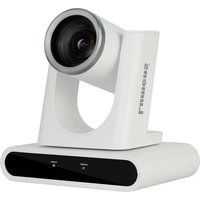
VC-R30 - Surveillance Camera Lumens - Free user manual and instructions
Find the device manual for free VC-R30 Lumens in PDF.


Pick your language and provide your email: we'll send you a specifically translated version.
| Product Type | Surveillance Camera |
| Brand | Lumens |
| Model | VC-R30 |
| Dimensions (W x H x D) | Approx. 120 mm x 120 mm x 150 mm |
| Weight | Approx. 600 g |
| Power Supply | DC 12V or PoE (IEEE 802.3af) |
| Image Sensor | 1/2.8" CMOS, 2 Megapixels |
| Resolution | 1920 x 1080p at 30 fps |
| Lens | 3.6 mm fixed lens |
| Night Vision | Up to 30m IR distance |
| Video Compression | H.264 / H.265 |
| Audio | Built-in microphone |
| Connectivity | Ethernet RJ45 |
| Storage | MicroSD card up to 128 GB |
| Mounting | Ceiling or wall mount |
| Operating Temperature | -10°C to 50°C |
| Weather Rating | Indoor use only |
| Main Functions | Motion detection, privacy masking, two-way audio |
| Cleaning | Clean lens with dry soft cloth |
| Spare Parts & Repairability | Contact Lumens support for accessories and repairs |
Frequently Asked Questions - VC-R30 Lumens
How do I reset the Lumens VC-R30 camera to factory defaults?
Locate the reset button on the camera (usually near the network port). Press and hold for 10 seconds until the LED flashes. The camera will reboot with default settings.
What is the default IP address of the VC-R30?
The default IP address is typically 192.168.1.100. However, if your network uses DHCP, the camera will obtain an IP automatically. Use the Lumens Discovery Tool to find the camera on your network.
Can the VC-R30 be used outdoors?
No, the VC-R30 is designed for indoor use only. Exposure to rain or extreme temperatures may damage the camera.
How to connect the camera to Wi-Fi?
The VC-R30 supports wired Ethernet only. For wireless connectivity, you need a separate Wi-Fi bridge or powerline adapter.
What is the maximum microSD card size supported?
The camera supports microSD cards up to 128 GB. Ensure the card is formatted as FAT32 or exFAT before use.
How to enable motion detection alerts?
Access the camera's web interface, navigate to the 'Event' or 'Alarm' settings, and enable motion detection. You can set sensitivity and notification methods (e.g., email, FTP).
Does the VC-R30 support ONVIF?
Yes, the camera is ONVIF Profile S compliant, allowing integration with third-party NVRs and software.
How to view the camera remotely?
Forward the necessary ports (e.g., HTTP 80, RTSP 554) on your router and access via the public IP or use the free Lumens DDNS service.
What is the warranty period for the VC-R30?
Lumens offers a standard 2-year limited warranty. Check with your retailer for specific terms.
Why is the camera showing a black screen?
Possible causes: incorrect power supply, damaged cable, or IR cut filter malfunction. Check connections and try accessing the camera via the web interface to adjust exposure settings.
User questions about VC-R30 Lumens
0 question about this device. Answer the ones you know or ask your own.
Ask a new question about this device
No questions yet. Be the first to ask one.
Download the instructions for your Surveillance Camera in PDF format for free! Find your manual VC-R30 - Lumens and take your electronic device back in hand. On this page are published all the documents necessary for the use of your device. VC-R30 by Lumens.
USER MANUAL VC-R30 Lumens


Manual assistant
Powered by Anthropic
Waiting for your message
Product information
Brand : Lumens
Model : VC-R30
Category : Surveillance Camera