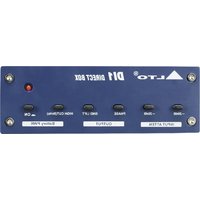
DI1 - Processor ALTO - Free user manual and instructions
Find the device manual for free DI1 ALTO in PDF.


Pick your language and provide your email: we'll send you a specifically translated version.
| Product Type | Digital Signal Processor (Audio Effects Processor) |
| Dimensions (W x D x H) | 483 mm x 200 mm x 44 mm (19" rack mount, 1U) |
| Weight | 2.5 kg |
| Power Supply | 100-240 V AC, 50/60 Hz, 20 W |
| Number of Channels | 2 stereo channels (4 balanced inputs) |
| Analog Inputs | 4 x XLR/TRS combo jacks (bal/unbal) |
| Analog Outputs | 2 x XLR balanced, 2 x TRS balanced |
| Digital I/O | 1 x AES/EBU (XLR), 1 x S/PDIF (RCA) |
| Sample Rate | 48 kHz, 96 kHz (selectable) |
| Bit Depth | 24-bit |
| Frequency Response | 20 Hz - 20 kHz (±0.5 dB) |
| Dynamic Range | 114 dB (A-weighted) |
| THD+N | < 0.005% |
| Onboard Processing | EQ, compression, reverb, delay, multi-effects |
| Presets | 100+ factory presets, 50 user programmable |
| Control Interface | OLED display, 4 push encoders, 12 dedicated buttons |
| MIDI | In/Out/Thru (5-pin DIN) |
| USB | 1 x Type B for firmware updates and preset management |
| Operating Temperature | 0°C to 45°C |
| Maintenance | Clean with dry cloth; avoid liquids and solvents |
| Safety | Do not expose to rain or moisture; use only with included power cord |
| Spare Parts and Repairability | Contact authorized service center; no user-serviceable parts inside |
| General Information | Designed for live sound and studio applications; rack ears included |
Frequently Asked Questions - DI1 ALTO
How do I connect the ALTO DI1 to my mixer?
Use balanced XLR cables from the outputs of the DI1 to the line inputs of your mixer. For input, connect your instrument or mic to the combo jacks on the front panel.
Can I use the DI1 as a standalone effects unit?
Yes, the DI1 can operate standalone without a computer. Select a preset using the encoders and adjust parameters directly on the front panel.
How do I reset the unit to factory defaults?
Press and hold the Preset and Utility buttons simultaneously while powering on. The display will show 'Factory Reset' confirmation.
What is the maximum input level?
The maximum input level is +24 dBu for balanced inputs. Avoid exceeding this to prevent distortion.
Does the DI1 support MIDI control?
Yes, via the 5-pin DIN connectors. You can send program change and control change messages to recall presets or adjust parameters.
How do I update the firmware?
Download the latest firmware from the ALTO website. Connect the DI1 to your computer via USB and run the update utility. Do not power off during the process.
My DI1 will not power on. What should I check?
First verify the power cord is securely connected to both the unit and a working outlet. Check the fuse located near the power inlet; replace with same type if blown.
Can I use the DI1 with unbalanced gear?
Yes, the combo jacks accept TRS (balanced) and TS (unbalanced) plugs. For unbalanced connection, use a TS cable; the unit will automatically handle the signal.
What presets are available?
The DI1 includes over 100 factory presets covering reverb, delay, chorus, flanger, compression, and more. You can also create and store up to 50 user presets.
How do I clean the unit?
Disconnect power. Use a soft, dry cloth to wipe the exterior. Do not use any cleaning agents or moisture on the panel.
User questions about DI1 ALTO
0 question about this device. Answer the ones you know or ask your own.
Ask a new question about this device
No questions yet. Be the first to ask one.
Download the instructions for your Processor in PDF format for free! Find your manual DI1 - ALTO and take your electronic device back in hand. On this page are published all the documents necessary for the use of your device. DI1 by ALTO.
USER MANUAL DI1 ALTO
Manual assistant
Powered by Anthropic
Waiting for your message
Product information
Brand : ALTO
Model : DI1
Category : Processor