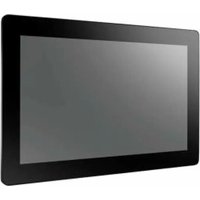
IDP31-156W - Monitor Advantech - Free user manual and instructions
Find the device manual for free IDP31-156W Advantech in PDF.


Pick your language and provide your email: we'll send you a specifically translated version.
| Product Type | Industrial Panel Mount Monitor |
| Brand | Advantech |
| Model | IDP31-156W |
| Display Size | 15.6 inches |
| Resolution | 1920 x 1080 (Full HD) |
| Brightness | 300 cd/m² |
| Contrast Ratio | 1000:1 |
| Viewing Angle (H/V) | 178° / 178° |
| Backlight | LED |
| Touchscreen | Optional (projected capacitive) |
| Inputs | VGA, DVI-D, HDMI, DisplayPort |
| USB Ports | 2x USB 2.0 (for touch) |
| Power Supply | 12V DC, external adapter |
| Power Consumption | ≤ 30W (typical) |
| Operating Temperature | 0°C to 50°C |
| Storage Temperature | -20°C to 60°C |
| Humidity | 10% to 90% (non-condensing) |
| Dimensions (W x H x D) | 396 x 250 x 45 mm (without stand) |
| Weight | Approx. 3.5 kg |
| Mounting | Panel mount (VESA 75 x 75 mm) |
| Certifications | CE, FCC, UL |
| Maintenance | Clean with soft dry cloth; avoid abrasive cleaners |
| Safety | Use only approved power adapter; do not expose to moisture |
| Repairability | Spare parts available via Advantech service centers |
| Warranty | 2 years limited |
Frequently Asked Questions - IDP31-156W Advantech
How do I connect the IDP31-156W monitor to my computer?
Use an appropriate video cable (VGA, DVI, HDMI, or DisplayPort) to connect from your computer's output to the monitor's input. For touch functionality, also connect the USB cable.
What is the native resolution of the IDP31-156W?
The native resolution is 1920 x 1080 (Full HD). For best image quality, set your computer to this resolution.
Does the monitor support touch input?
The IDP31-156W is available with an optional projected capacitive touchscreen. Check your model or consult the specifications.
How do I clean the screen?
Use a soft, lint-free cloth slightly dampened with water or a mild screen cleaner. Avoid direct spraying on the screen and never use abrasive cleaners.
What power supply does the monitor require?
The monitor requires a 12V DC power supply via the included external adapter. Do not use an incompatible adapter.
Can I mount the monitor on a wall or panel?
Yes, the monitor supports VESA 75 x 75 mm mounting for panel or wall installation. Suitable mounting hardware is not included.
What should I do if the monitor does not display any image?
Check that the power cable is securely connected and the monitor is turned on. Verify the video cable is connected to the correct input and the computer is outputting to the monitor (e.g., via display settings).
Is the IDP31-156W suitable for outdoor use?
The monitor is designed for indoor use only. Operating temperature is 0°C to 50°C, but it is not weatherproof.
How do I access the on-screen display (OSD) menu?
Use the buttons on the monitor (usually located on the bottom edge) to navigate brightness, contrast, and other settings. Refer to the user manual for detailed button functions.
Where can I find the user manual?
The user manual is available for free download on notice-facile.com in PDF format. You can also request a translated version via email.
User questions about IDP31-156W Advantech
0 question about this device. Answer the ones you know or ask your own.
Ask a new question about this device
No questions yet. Be the first to ask one.
Download the instructions for your Monitor in PDF format for free! Find your manual IDP31-156W - Advantech and take your electronic device back in hand. On this page are published all the documents necessary for the use of your device. IDP31-156W by Advantech.
USER MANUAL IDP31-156W Advantech
Manual assistant
Powered by Anthropic
Waiting for your message
Product information
Brand : Advantech
Model : IDP31-156W
Category : Monitor