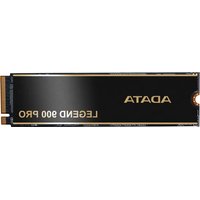
LEGEND 900 PRO - SSD ADATA - Free user manual and instructions
Find the device manual for free LEGEND 900 PRO ADATA in PDF.


Pick your language and provide your email: we'll send you a specifically translated version.
| Product Type | Solid State Drive (SSD) |
| Interface | PCIe 4.0 x4, NVMe 1.4 |
| Form Factor | M.2 2280 |
| Capacity | 1 TB (2 TB also available) |
| NAND Flash | 3D NAND TLC |
| Sequential Read | Up to 7400 MB/s |
| Sequential Write | Up to 6800 MB/s |
| Random Read (4K) | Up to 1000K IOPS |
| Random Write (4K) | Up to 800K IOPS |
| Dimensions (L x W x H) | 80 x 22 x 2.15 mm |
| Weight | 8 g |
| Operating Temperature | 0°C to 70°C |
| Storage Temperature | -40°C to 85°C |
| Power Consumption (Active) | 5.5 W typical |
| Power Consumption (Idle) | 0.5 W typical |
| Warranty | 5 years limited |
| Software | ADATA SSD Toolbox for monitoring and management |
| Security | AES 256-bit encryption |
| Compliance | RoHS, CE, FCC |
| Maintenance & Cleaning | No user maintenance required; keep away from moisture and static. |
| Spare Parts & Repairability | No user-serviceable parts; contact ADATA support for issues. |
Frequently Asked Questions - LEGEND 900 PRO ADATA
How do I install the ADATA LEGEND 900 PRO SSD?
The SSD is an M.2 2280 form factor. Insert it into the M.2 slot on your motherboard at a 30-degree angle, then secure it with the screw. Ensure your motherboard supports PCIe 4.0 for full speeds.
Is the LEGEND 900 PRO compatible with PCIe 3.0 systems?
Yes, it is backward compatible with PCIe 3.0 slots, but speeds will be limited to PCIe 3.0 maximum (around 3500 MB/s).
What is the maximum capacity available for this model?
The ADATA LEGEND 900 PRO is available in 1 TB and 2 TB capacities. Check the packaging for specific capacity.
Does the SSD come with a heatsink?
Yes, the LEGEND 900 PRO includes a pre-installed aluminum heatsink to manage thermal throttling under heavy loads.
How can I check the health and performance of my SSD?
You can use the ADATA SSD Toolbox software, which provides drive health, temperature, and firmware update options. Download it from the ADATA website.
What is the warranty period for this SSD?
The ADATA LEGEND 900 PRO comes with a 5-year limited warranty or until the drive reaches its TBW (Terabytes Written) limit, whichever comes first.
Can I use this SSD as a boot drive?
Yes, it is ideal as a boot drive due to its high read/write speeds. Ensure your BIOS is set to UEFI mode and the drive is formatted with GPT partition scheme.
What is the TBW rating for the 1TB model?
The 1TB model has a TBW (Total Bytes Written) rating of 740 TBW, indicating high endurance for daily use.
Does the SSD support hardware encryption?
Yes, it supports AES 256-bit encryption to secure your data. Combined with software, it ensures data protection.
What should I do if my SSD is not detected?
First, check if the SSD is properly seated in the M.2 slot. Update your motherboard's BIOS to the latest version. If still not detected, try a different M.2 slot or contact ADATA support.
User questions about LEGEND 900 PRO ADATA
0 question about this device. Answer the ones you know or ask your own.
Ask a new question about this device
No questions yet. Be the first to ask one.
Download the instructions for your SSD in PDF format for free! Find your manual LEGEND 900 PRO - ADATA and take your electronic device back in hand. On this page are published all the documents necessary for the use of your device. LEGEND 900 PRO by ADATA.
USER MANUAL LEGEND 900 PRO ADATA



Manual assistant
Powered by Anthropic
Waiting for your message
Product information
Brand : ADATA
Model : LEGEND 900 PRO
Category : SSD