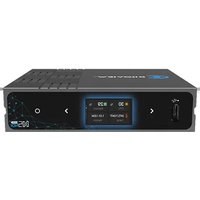
N5 for NDI - Audiovisual Equipment Kiloview - Free user manual and instructions
Find the device manual for free N5 for NDI Kiloview in PDF.


Pick your language and provide your email: we'll send you a specifically translated version.
| Product Type | NDI Encoder & Decoder |
| Video Input | HDMI (Type A) – up to 1080p60 |
| Video Output | HDMI (Type A) – up to 1080p60 |
| NDI Modes | Encoding (HDMI → NDI) & Decoding (NDI → HDMI) |
| Audio Support | Embedded HDMI audio; 48 kHz stereo |
| Network Interface | 1x Gigabit Ethernet (RJ45) |
| NDI Version | NDI® 5.x / HX2 |
| Power Supply | DC 5V/2A via USB-C connector |
| Power Consumption | < 10 W |
| Dimensions (W × D × H) | 110 × 72 × 25 mm |
| Weight | 150 g (without cables) |
| Cooling | Passive (no fan) |
| Mounting | 1/4" tripod screw hole |
| Firmware Update | Via microSD card or USB-C (DFU mode) |
| LED Indicators | Power, Network, NDI status |
| Operating Temperature | 0°C to 45°C |
| Storage Temperature | -10°C to 60°C |
| Material | Aluminum alloy chassis |
| Included Accessories | USB-C cable, quick start guide |
| Cleaning | Use a soft, dry cloth; avoid liquids |
| Safety | Do not expose to moisture or extreme temperatures |
| Spare Parts & Repairability | No user-serviceable parts; contact Kiloview support for service |
Frequently Asked Questions - N5 for NDI Kiloview
What is NDI and how does the N5 use it?
NDI (Network Device Interface) is a royalty-free standard for transmitting high-quality video over IP networks. The N5 can encode an HDMI source into an NDI stream or decode an NDI stream to output via HDMI.
How do I set up the N5 for encoding?
Connect an HDMI source (e.g., camera) to the HDMI input, then connect the N5 to your network via Ethernet. Power on the device; it will automatically appear as an NDI source on the network. No extra configuration is needed in most cases.
What video resolutions are supported?
The N5 supports input and output resolutions up to 1080p60, including 1080i, 720p, and standard EDID-compatible formats.
Can I use the N5 with NDI Studio Monitor or other NDI tools?
Yes. Once connected, the N5 appears as a standard NDI source that can be discovered by NDI Studio Monitor, OBS Studio (with NDI plugin), vMix, and many other NDI-compatible applications.
How is the N5 powered?
The device is powered via a USB-C port using 5V DC, 2A. You can use the included USB-C cable and a standard USB power adapter or a power bank.
How do I update the firmware?
Download the latest firmware from Kiloview's website onto a microSD card (FAT32). Insert the card into the N5, then power on while holding the reset button. Follow the on-screen instructions or refer to the official update guide.
Does the N5 support PoE (Power over Ethernet)?
No, the N5 does not support PoE. It requires a separate USB-C power connection. However, you can use a PoE splitter to inject power into the network cable if needed.
What should I do if there is no video output when decoding?
First, ensure the N5 is receiving the NDI stream by checking the network LED. Verify that the source device is sending an NDI stream. Try a different HDMI cable and display. If the issue persists, restart both the N5 and the network switch.
Can I use the N5 as a decoder only?
Yes. Simply connect the N5 to the network and select the desired NDI source from the internal web interface or using a compatible controller. The HDMI output will show the decoded video.
What is the warranty period for the N5?
Kiloview typically offers a 1-year limited warranty against manufacturing defects. Check the warranty policy included in the box or contact Kiloview support for confirmation.
User questions about N5 for NDI Kiloview
0 question about this device. Answer the ones you know or ask your own.
Ask a new question about this device
No questions yet. Be the first to ask one.
Download the instructions for your Audiovisual Equipment in PDF format for free! Find your manual N5 for NDI - Kiloview and take your electronic device back in hand. On this page are published all the documents necessary for the use of your device. N5 for NDI by Kiloview.
USER MANUAL N5 for NDI Kiloview
Manual assistant
Powered by Anthropic
Waiting for your message
Product information
Brand : Kiloview
Model : N5 for NDI
Category : Audiovisual Equipment