
JC800FEI1 - Educational electronic game console LEXIBOOK - Free user manual and instructions
Find the device manual for free JC800FEI1 LEXIBOOK in PDF.


| Product type | Educational electronic game console |
| Brand | LEXIBOOK |
| Model | JC800FEI1 |
| Power supply | 3 AA/LR6 1.5V batteries (included) |
| Activities | 60 bilingual French/English activities |
| Activity categories | Mother tongue, Mathematics, Logic, Foreign language, Games, Music |
| Languages | French and English, selectable during play |
| Levels | 2 difficulty levels with automatic progression |
| Screen | Adjustable brightness (Low, Medium, High) |
| Volume | Adjustable (Mute, Low, High) |
| Auto-off | After 3 minutes of inactivity |
| Package contents | 1 console, 1 instruction manual, 3 AA demo batteries |
| Recommended age | From 36 months (contains small parts) |
| Care and cleaning | Clean with a slightly damp cloth, without detergent |
| Safety | Do not expose to heat, humidity or direct sunlight; do not disassemble |
| Warranty | 2 years, covers material or assembly defects |
| Consumer service | 0892 23 27 26 (€0.34 incl. tax/min) |
| Reference | JC800FEI1 |
| Country of manufacture | China |
Frequently Asked Questions - JC800FEI1 LEXIBOOK
User questions about JC800FEI1 LEXIBOOK
0 question about this device. Answer the ones you know or ask your own.
Ask a new question about this device
Download the instructions for your Educational electronic game console in PDF format for free! Find your manual JC800FEI1 - LEXIBOOK and take your electronic device back in hand. On this page are published all the documents necessary for the use of your device. JC800FEI1 by LEXIBOOK.
USER MANUAL JC800FEI1 LEXIBOOK
Get into gear and enjoy 60 fun bilingual Ferrari activities in English and French! Sharpen all your skills and compete against your Ferrari™ Power Speed laptop to be a Ferrari™ Champion. Please read the following instructions to make the best use of your new Ferrari™ Power Speed learning laptop and ask the help of an adult to replace the batteries and read the safety markings.
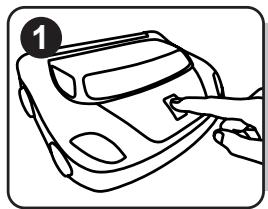
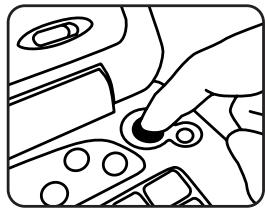
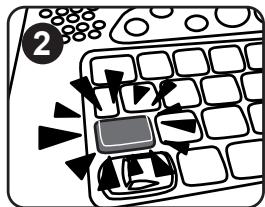
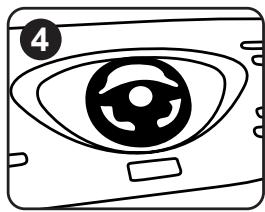
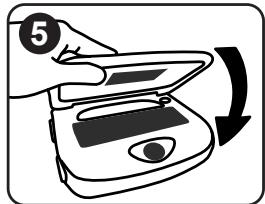
To open the laptop, press the Ferrari button car and then pull the screen up. The unit is when you open the lid. If the lid is already o
key ENGINE START to turn on the laptop.

on the hood of the
Your laptop is bilingual and all the activities can be played in French or English. Press the LANGUAGE key at anytime to toggle between the two languages.
The Ferrari™ Power Speed laptop includes activities divided in 6 categories: home language, mathematics, logic, foreign language, games and music. To select a category, press the desired category key.
Use the LEFT and RIGHT ARROW keys on the joystick wheel to select the activity you want to play. Press the ENTER key to start the activity.
Note: If you don't press the ENTER key, the laptop will ask you if there is, "Anyone behind the wheel?"
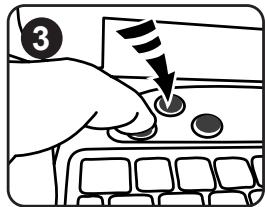
To switch the unit off, press the ON/OFF key the screen.
ENGINE
START
or close down
Note: For more details on how to play the various activities, please refer to the activity section on page 15.
Contents of the Packaging
One Ferrari™ Power Speed laptop One instruction manual
WARNING: All packaging materials, such as tape, plastic sheets, wire ties and tags are not part of this toy and should be discarded for your child's safety.
Battery Information
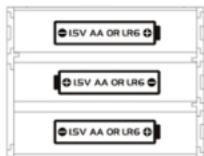
Your Ferrari™ Power Speed laptop works with 3 x 1,5V --- AA/LR6 type batteries (included).
Note: This product is supplied with batteries for demonstration purposes. They should be replaced with new batteries before use.
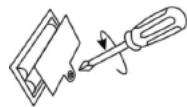
- Using a screwdriver, open the battery compartment cover located under the unit.
- Install the 3 AA/LR6 alkaline type batteries (included) observing the polarity indicated at the bottom of the battery compartment, and as per the diagram shown opposite.
- Close the battery compartment and tighten the screw.
Non-rechargeable batteries are not to be recharged. Rechargeable batteries are to be removed from the toy before being charged. Rechargeable batteries are only to be charged under adult supervision. Different types of batteries or new and used batteries are not to be mixed. Only batteries of the same or equivalent type as recommended are to be used. Batteries are to be inserted with the correct polarity. Exhausted batteries are to be removed from the toy. The supply terminals are not to be short circuited. Do not throw batteries into a fire. Remove the batteries if you are not going to use the game for a long period of time.
WARNING: Malfunction or loss of memory may be caused by strong frequency interference or electrostatic discharge. Should any abnormal function occur, reset the unit by pressing the RESET button located under the unit or remove the batteries and insert them again.
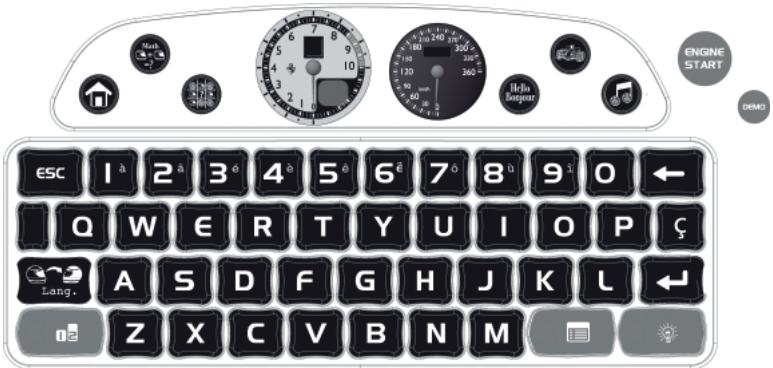
Keyboard Description


DEMO
Press the DEMO key at any time to launch a short demonstration of the Ferrari™ Power Speed laptop's features.

ON/OFF
Press to turn the laptop on or off. Note: The unit automatically turns off after 3 minutes of inactivity.
CATEGORY keys
Press to select a category.

Home Language

Maths

Logic

Foreign Language

Games

Music


10 numbers (1-0) to enter numbers in the maths activities.
Use this key to exit an activity.


26 letters (A-Z) to enter letters in the words and letters activities.
Note: To type accented letters, press and hold a letter until the right ccent is displayed.

LANGUAGE
Press the LANGUAGE key at anytime to toggle between French and English.
Level
Press this key to switch to level 1 or level 2. If you select level 1 the automatic level progression setting will activate and the unit will automatically switch to level 2 when you play well in an activity. If the questions in level 2 are too difficult, it will automatically go back to level 1.

JOYSTICK WHEEL
The 4 ARROW keys help you browse menus, move the cursor and play the activities. For more details on how to play the various activities, please refer to the activity section on page 15.
ACTIVITY
Press this key to input an activity number and go directly to it.
ANSWER
Press this key to display the answer to a question.

ENTER
Press this key to start an activity, confirm your answers or your selections.

This key is required when typing French words only.

BACKSPACE
Use this key to delete the last character entered.

VOLUME
Slide the switch to select Off, Low or High.

CONTRAST
To change the brightness of the screen, slide the switch to select Low, Medium or High.
Playing the Activities
Play the activities and see if you have the speed and skill to become a Ferrari champion!
After the welcome animation and message:
- Press the CATEGORY key of the activity you want to play.
- Use to browse through the activities of the category.
- When you see the activity you want to play, press to confirm and start the round.
- You can press esc at any time to back to the activity list.
- To go directly to another category, press a CATEGORY key.
- To go directly to an activity, press (ACTIVITY), type in the activity's number and press to confirm.
Racing tips
- Most activities have 6 questions in each round.
- You can select level 1 or level 2 for most activities by pressing 1 = 2 .
- You have 2 chances to find the correct answer.
- After 2 wrong answers, your Ferrari co-driver will show you the solution.
- If you get 6 correct answers in a row, the automatic level progression setting will advance you to level 2.
- When playing games, "PI" appears next to your score and "HI" shows what the highest score is.
Unlocking new games
There are 9 games available in the game category. When you first start using your laptop only 1 game is unlocked. The other 8 games are locked. To unlock a new game, you need to try and get 6 trophies. Once all the games are unlocked a congratulations picture will display.
Description of the Activities
Home language

1. Test your ABC
Listen to the letter or read it on the screen. Then press the same letter on your keyboard.
Level 1: Letter will sound and display.
Level 2: Only the letter will sound.
2. Spelling
Press a letter to reveal the spelling of a word that starts with this letter.
3. Word Dictation
Carefully listen to the word and then type it on your laptop.
Level 1: Listen to your Ferrari co-driver as he helps to spell out the word.
Level 2: Spell out the word without your Ferrari co-driver's help!
4. Enigma
Match the picture with the word. Use to select the correct word and press to confirm.
5. Flash word
Read the word and then retype the word in the space below. Make sure you press to confirm.
Level 1: The word stays on the screen while you type.
Level 2: The word vanishes and you have to type from memory.
Maths

6. Count the objects
Count the Ferrari objects on the screen. Type in the number you can see and press to confirm.
Level 1: Numbers from 0 to 10.
Level 2: Numbers from 10 to 20.
7.Add it
Add up the sums as accurately as you can. Then type in your answer and press to confirm.
Level 1: Countable objects appear next to the numbers to help with the adding up.
Level 2: Only the numbers display.
8. Take away
Work out the correct answer to the subtraction displayed onscreen. Then type in your answer and press to confirm.
Level 1: Answers are between 0 and 20.
Level 2: Answers are between 0 and 99.
9. Find the sign
An equation displays but the plus or minus sign is missing. Look at the answer and select the correct sign (+ or -) using . Press to confirm.
Level 1: Answers are between 0 and 20.
Level 2: Answers are between 0 and 100.
10. Which is more
Compare the number of Ferrari objects displayed on the left and the right of the screen.
Determine which number is greater , smaller or if they are equal . Use to choose the correct sign (comparator), and press to confirm.
Automatic level progression: Give 6 correct answers in a row to switch to level 2.
Level 1: Maximum number on each side is 9.
Level 2: Maximum number on each side is 20.
11. Comparison
Compare the numbers or equations on the left and the right of the screen. Determine which number is greater , smaller or if they are equal = . Use to choose the correct sign (comparator), and press to confirm.
Level 1: Compares numbers between 0 and 99.
Level 2: Compares equations with a value of 0 and 18.
Logic

12. Missing Objects
Complete the sequence by filling in the question mark with the correct Ferrari object. Use to choose the correct object, and press to confirm.
Level 1: The logical sequence is 3 objects long and then repeats.
Level 2: The logical sequence is the same as level 1 but you have more objects to choose from.
13. Spot the difference
Select the car that is different from the other cars. Use to choose the correct car, and press to confirm.
14. Match the tool
Match the shape of the nut so that it can fit into the tool (spanner). Use to choose the correct object, and press to confirm.
15. Squares
Add in the lines taking alternate goes with your Ferrari laptop. The aim is for you to finish more squares than your smart Ferrari laptop. Use to select where to place your line, and press to confirm. The person with the most squares wins!
Foreign language

16. Basic expressions
Use to browse the English expressions. Press to view the equivalent in French and vice-versa.
17. Numbers
Learn French or English numbers by looking at the number displayed and listen to your Ferrari co-driver's pronunciation. Press to view the next number.
18. Basic words
Learn new French words by watching the picture and then reading the matching French word.
Press to view a new picture and word.
19. Enigma
Match the picture with the word. Use to select the correct word and press to confirm.
Games

20. Grand Prix
Race your Ferrari to cover as many kilometres as possible. Press N and M alternately to increase your speed. Overtake other cars by pressing and collect time objects to get another 10 seconds on the clock.
21. Catch the objects
Catch the boxes in your truck to fill up your petrol meter. Use to move your truck. The game ends when your petrol meter is empty. There are 5 levels to try.
22. Pole position
Closely watch the 6 starting lights and press the numbers 1 to 6 as the lights appear. Then press to launch off the starting line. The faster you press the keys the better your starting time will be.
23. Typing race
Type the letters as they appear on the screen. The game ends when the car behind overtakes you.
24. Expert co-pilot
Follow your co-pilot's sequence by watching the wheel and the gears and copying the moves. Press to turn the wheel left or right and press to move the gear up or down. You need to wait for your co-pilot's action to come back to its central position before pressing the keys. The game ends when you make a mistake.
25. Car racing - rock-paper-scissors
Use the arrows to select left, right or up. Then watch the race (you are the top car) to see if your car beats the laptop's car.
At the pit stop, change the tires by typing in the letters as fast as you can.
27. Obstacle race
Race to the finish line using N for slow and M for fast. Press to jump over the obstacles.
28. Challenge race
Beat your Ferrari laptop by press N and M alternately as fast as you can. Your car is at the top of the screen. The first to the race line wins.
Music

29. Radio
Press any number from 1 to 8 to play a melody.
30. Sound library
Use or to select the sound and type a number from 1-9 next to the sound you want to play. Press to playback your composition.
Maintenance and Warranty
Only use a soft, slightly damp cloth to clean the unit. Do not use detergent. Do not to expose the unit to direct sunlight or any other heat source. Do not immerse the unit in water. Do not dismantle or drop the unit. Do not try to twist or bend the unit.
NOTE: Please keep this instruction manual, it contains important information.
This product is covered by our 2-year warranty. For any claim under the warranty or after sale service, please contact your distributor and present a valid proof of purchase. Our warranty covers any manufacturing material and workmanship defect, with the exception of any deterioration arising from the non-observance of the instruction manual or from any careless action implemented on this item (such as dismantling, exposition to heat and humidity, etc.). It is recommended to keep the packaging for any further reference. Not suitable for children under 36 months old, as it contains small detachable elements which could be swallowed.
In a bid to keep improving our services, we could implement modification on the colours and the details of the product shown on the packaging.
Reference: JC800FEi1
©2009 Ferrari S.p.A
©2009 LEXIBOOK®
Designed and developed in Europe - Made in China
Lexibook UK Ltd,
Unit 10 Petersfield Industrial Estate,
Bedford Road, Petersfield,
Hampshire, GU32 3QA, United Kingdom.
Helpline: 0808 1003015.
www.lexibook.com

Environmental Protection:
Unwanted electrical appliances can be recycled and should not be discarded along with regular household waste! Please actively support the conservation of resources and help protect the environment by returning this appliance to a collection centre (if available).


REF:JG800FEi1IM0259