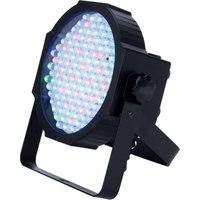
Mega Par Profile - LED spotlight American Audio - Free user manual and instructions
Find the device manual for free Mega Par Profile American Audio in PDF.


Pick your language and provide your email: we'll send you a specifically translated version.
| Product Type | LED PAR Can |
| Model | Mega Par Profile |
| Brand | American Audio |
| Light Source | 1 x 12W RGBW LED |
| Beam Angle | 25 degrees |
| DMX Channels | 4, 5, or 9 channels |
| Control Modes | DMX, Master/Slave, Sound Active, Auto |
| Power Supply | AC 100-240V, 50/60Hz |
| Power Consumption | 15W |
| Dimensions (L x W x H) | 10.2 x 10.2 x 11.5 inches |
| Weight | 4.5 lbs |
| Housing Material | Die-cast aluminum |
| Cooling System | Passive heat sink |
| Mounting Options | Floor standing or hanging bracket |
| Maintenance | Clean lens with soft, dry cloth |
| Safety Precautions | Use in dry location; avoid moisture; proper mounting |
| Spare Parts | LED module, power supply unit |
| Repairability | User-replaceable fuse; otherwise contact service center |
| Included Accessories | Mounting bracket, power cable, user manual |
Frequently Asked Questions - Mega Par Profile American Audio
How do I connect the Mega Par Profile to a DMX controller?
Use a 3-pin XLR cable to connect the DMX input of the fixture to the output of your controller. Set the DMX address using the DIP switches or LCD menu. Refer to the manual for DMX addressing details.
What does the 'Sound Active' mode do?
In Sound Active mode, the fixture changes color and pattern in response to ambient music or sound. The built-in microphone picks up the beat. You can adjust sensitivity via the control panel.
Can I use this fixture outdoors?
No, the Mega Par Profile is designed for indoor use only. It is not weatherproof and should be kept away from moisture, rain, and extreme temperatures.
How do I replace the LED if it fails?
The LED module is not user-replaceable. If it fails, contact American Audio customer service or an authorized technician for repair. Attempting replacement may void the warranty.
What is the maximum number of fixtures I can daisy-chain?
You can daisy-chain up to 32 fixtures on a single DMX line, but ensure proper termination and power distribution. Use a DMX terminator at the end to prevent signal issues.
How do I reset the fixture to factory defaults?
Press and hold the 'Menu' button for 5 seconds until the display shows 'Reset'. Confirm by pressing 'Enter'. All settings will return to factory defaults.
Does the fixture support RDM (Remote Device Management)?
The Mega Par Profile does not support RDM. It is a basic DMX fixture without RDM capabilities.
What is the recommended mounting height?
For optimum coverage, mount the fixture at a height of 6 to 10 feet. Ensure the mounting bracket is securely fastened to a truss or stand capable of supporting the weight.
How do I clean the lens?
Use a soft, lint-free cloth lightly dampened with water or a mild glass cleaner. Avoid abrasive cleaners that may scratch the lens. Clean only when the fixture is unplugged and cool.
What should I do if the fixture does not power on?
Check the power cable connection and ensure the outlet is live. Verify the fuse inside the power inlet is not blown. If the fuse is blown, replace it with the same rating (typically 1A 250V). If still not working, contact support.
User questions about Mega Par Profile American Audio
0 question about this device. Answer the ones you know or ask your own.
Ask a new question about this device
No questions yet. Be the first to ask one.
Download the instructions for your LED spotlight in PDF format for free! Find your manual Mega Par Profile - American Audio and take your electronic device back in hand. On this page are published all the documents necessary for the use of your device. Mega Par Profile by American Audio.
USER MANUAL Mega Par Profile American Audio
Manual assistant
Powered by Anthropic
Waiting for your message
Product information
Brand : American Audio
Model : Mega Par Profile
Category : LED spotlight