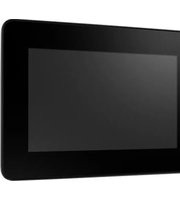
IDP31-070W - Monitor Advantech - Free user manual and instructions
Find the device manual for free IDP31-070W Advantech in PDF.


Pick your language and provide your email: we'll send you a specifically translated version.
| Product Type | Industrial LCD Monitor |
| Model | IDP31-070W |
| Brand | Advantech |
| Display Size | 7.0 inches (diagonal) |
| Display Type | TFT LCD |
| Resolution | 1024 x 600 pixels |
| Aspect Ratio | 16:9 |
| Brightness | 500 cd/m² (typical) |
| Contrast Ratio | 1000:1 (typical) |
| Viewing Angle | 170° (H) / 160° (V) |
| Touch Screen | Resistive touch (optional) |
| Input Connections | VGA, DVI-D, HDMI, USB (for touch) |
| Power Supply | DC 12V, 2.5A (max) |
| Power Consumption | 10W (typical) |
| Dimensions (W x H x D) | 190 x 140 x 45 mm (without mount) |
| Weight | 1.2 kg |
| Mounting | Panel mount, VESA 75x75 mm |
| Protection Rating | IP65 (front panel) |
| Operating Temperature | 0°C to 50°C |
| Storage Temperature | -20°C to 60°C |
| OS Support | Windows, Linux |
| Certifications | CE, FCC |
Frequently Asked Questions - IDP31-070W Advantech
How do I clean the monitor screen?
Use a soft, lint-free cloth slightly dampened with water or a mild glass cleaner. Avoid abrasive cleaners or solvents that may damage the screen coating. Always spray cleaner on the cloth, not directly on the screen.
Can I mount the monitor on a wall?
Yes, the monitor supports VESA 75x75 mm standard mounting. Use appropriate mounting hardware and ensure the wall can support the weight of the monitor.
What input voltages does the monitor support?
The monitor operates on a DC 12V power supply. An external power adapter is included. Ensure the voltage is stable and within the specified range to avoid damage.
Does the monitor have built-in speakers?
The standard model does not include built-in speakers. Audio can be output via HDMI or an external audio connector if available in your configuration.
How do I calibrate the touch screen?
Calibration can be performed through the operating system's touch settings. For Windows, go to 'Control Panel > Tablet PC Settings > Calibrate'. Follow the on-screen instructions to align the touch points.
What is the recommended ambient temperature for operation?
The monitor is designed to operate in temperatures from 0°C to 50°C (32°F to 122°F). Ensure adequate ventilation and avoid exposure to extreme heat or cold.
Can I use the monitor with Linux?
Yes, the monitor is compatible with Linux systems. However, touch screen drivers may need to be installed separately. Consult the manufacturer's website for appropriate drivers.
How do I reset the monitor to factory defaults?
Factory reset can be done through the on-screen display (OSD) menu. Press the Menu button, navigate to 'Reset' or 'Factory Default', and confirm the selection.
What is the lifespan of the backlight?
The LED backlight has a typical lifespan of 50,000 hours. This may vary based on usage conditions such as brightness settings and ambient temperature.
Is the monitor dust and water resistant?
The front panel is rated IP65, meaning it is dust-tight and protected against low-pressure water jets. The rear is not sealed, so avoid exposing the back to liquids.
User questions about IDP31-070W Advantech
0 question about this device. Answer the ones you know or ask your own.
Ask a new question about this device
No questions yet. Be the first to ask one.
Download the instructions for your Monitor in PDF format for free! Find your manual IDP31-070W - Advantech and take your electronic device back in hand. On this page are published all the documents necessary for the use of your device. IDP31-070W by Advantech.
USER MANUAL IDP31-070W Advantech
Manual assistant
Powered by Anthropic
Waiting for your message
Product information
Brand : Advantech
Model : IDP31-070W
Category : Monitor