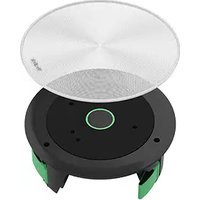
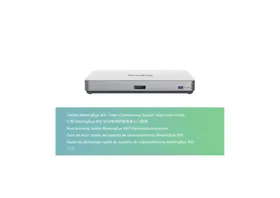
CM20 - Video Conferencing System Yealink - Free user manual and instructions
Find the device manual for free CM20 Yealink in PDF.


Pick your language and provide your email: we'll send you a specifically translated version.
| Product Type | USB Conference Speakerphone |
| Dimensions (W x D x H) | 22.0 cm x 22.0 cm x 6.5 cm |
| Weight | 0.85 kg (1.87 lb) |
| Power Supply | USB bus powered (5V, 500mA) |
| Speaker Output | 10W (peak) |
| Microphone Array | 360° omnidirectional, up to 6m range |
| Audio Features | Full-duplex, echo cancellation, noise reduction |
| Connectivity | USB 2.0 Type-A (cable included) |
| Compatible Platforms | Windows, macOS, Linux, Chrome OS |
| Certifications | Microsoft Teams, Zoom, Cisco Jabber |
| Cleaning Instructions | Wipe with a soft, dry cloth. Do not use liquids or abrasives. |
| Safety Precautions | Do not expose to water or extreme temperatures. Use only supplied cable. |
| Spare Parts Available | USB cable, quick start guide, warranty card |
| Repairability | Not user-serviceable. Contact Yealink support for issues. |
| Package Contents | CM20 unit, USB cable, quick start guide, warranty card |
| Warranty | 1 year limited |
Frequently Asked Questions - CM20 Yealink
How do I set up the Yealink CM20?
Connect the CM20 to your computer via the provided USB cable. It will be automatically recognized as a speaker and microphone. Select it as your audio device in your conferencing software.
Which platforms are compatible with the CM20?
The CM20 works with Windows, macOS, Linux, and Chrome OS. It is optimized for Microsoft Teams, Zoom, and Cisco Jabber.
How do I clean the CM20?
Use a soft, dry cloth to wipe the exterior. Avoid using liquids, aerosols, or abrasive cleaners.
What is the microphone range of the CM20?
The 360° omnidirectional microphone array captures voices up to 6 meters (20 feet) away.
Can I use the CM20 with my smartphone?
The CM20 is designed for computers via USB. It may not be directly compatible with smartphones unless they support USB audio.
For mobile use, consider a Bluetooth speakerphone.
For mobile use, consider a Bluetooth speakerphone.
How do I mute/unmute the CM20?
Press the mute button on the top of the device. The LED will turn red when muted and blue when active.
What should I do if the CM20 is not recognized?
Check the USB connection. Try a different USB port. Ensure your drivers are up to date. Restart your computer. If issues persist, contact Yealink support.
Is the CM20 suitable for large conference rooms?
The CM20 is ideal for small to medium rooms (up to 6 participants). For larger spaces, consider Yealink CP900 or CP960.
Does the CM20 require batteries?
No, the CM20 is USB bus powered. It draws power from your computer via the USB cable.
What is the warranty for the CM20?
Yealink offers a 1-year limited warranty against defects in materials and workmanship. Contact your reseller for details.
User questions about CM20 Yealink
0 question about this device. Answer the ones you know or ask your own.
Ask a new question about this device
No questions yet. Be the first to ask one.
Download the instructions for your Video Conferencing System in PDF format for free! Find your manual CM20 - Yealink and take your electronic device back in hand. On this page are published all the documents necessary for the use of your device. CM20 by Yealink.
USER MANUAL CM20 Yealink
Manual assistant
Powered by Anthropic
Waiting for your message
Product information
Brand : Yealink
Model : CM20
Category : Video Conferencing System