
TapDuo C - Electrical switch STEINEL - Free user manual and instructions
Find the device manual for free TapDuo C STEINEL in PDF.


| Product Type | Hot glue gun |
| Brand | Steinel |
| Model | TapDuo C |
| Dimensions (L x W x H) | Approx. 260 x 60 x 180 mm |
| Weight | Approx. 0.5 kg (without glue stick) |
| Power Rating | 100–240 V AC, 50/60 Hz, 40 W |
| Glue Stick Diameter | 11 mm |
| Heating Time | Approx. 7 minutes to operating temperature |
| Max. Temperature | 200 °C |
| Drip-Free Nozzle | Yes, for clean application |
| Standby Function | Yes, auto-standby after 30 minutes of inactivity |
| Maintenance | Clean nozzle with a damp cloth when hot; do not use abrasive cleaners |
| Safety Features | Overheat protection, auto shut-off, heat-resistant stand |
| Spare Parts Available | Nozzle set, glue stick guide, heat-resistant pad |
| Repairability | Limited; contact Steinel service for repairs |
| General Information | For indoor use only; suitable for bonding wood, plastic, fabric, and more |
Frequently Asked Questions - TapDuo C STEINEL
User questions about TapDuo C STEINEL
0 question about this device. Answer the ones you know or ask your own.
Ask a new question about this device
Download the instructions for your Electrical switch in PDF format for free! Find your manual TapDuo C - STEINEL and take your electronic device back in hand. On this page are published all the documents necessary for the use of your device. TapDuo C by STEINEL.
USER MANUAL TapDuo C STEINEL
FUNKSCHALTER / WIRELESS SWITCH
TAPDUO C
DE
Inhalt
1x

1x
Geräteübersicht
3.3 TAPDUO C

iOS

- About this document 19
- General safety precautions 19
- System description 20
- Electrical connection 23
- Installation 24
- Function 28
- Maintenance and care 29
- Disposal 29
- Declaration of Conformity 29
- Manufacturer's warranty 30
- Technical specifications 32
- Troubleshooting 33
1. About this document
Under copyright. Reproduction either in whole or in part only with our consent.
Subject to change in the interest of technical progress.

Hazard warning!

Warning of hazards from electricity!

Warning of hazards from water!
2. General safety precautions

Failure to observe these operating instructions presents hazards!
These instructions contain important information on the safe use of this product. Particular attention is drawn to potential hazards. Failure to observe this information may lead to death or serious injuries.
- Read instructions carefully.
- Follow safety advice.
- Keep instructions within easy reach.
- Working with electrical current may produce hazardous situations. Touching live parts can result in electrical shock, burns or death.
- Work on mains voltage must only be performed by qualified, skilled personnel.
- National wiring regulations and electrical operating conditions must be observed (e.g. DE: VDE 0100, AT: ÖVE-ÖNORM E8001-1, CH: SEV 1000).
- Only use genuine replacement parts.
3. System description
The TAPDUO C is a Bluetooth push button that enables wireless manual override of Steinel Bluetooth Mesh products as sensors or luminaires. The TAPDUO C is an energy harvesting device that needs no wired power supply or battery. A button push creates the energy that is needed, to sent out the Bluetooth signal to a connected product.
Package contents
3.1 TAPDUO C
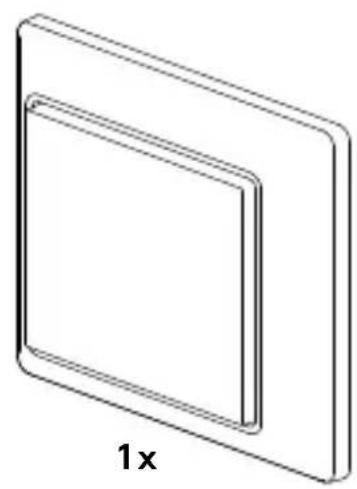
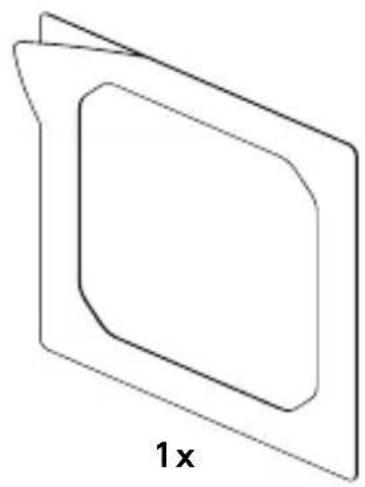

-1 TAPDUO C
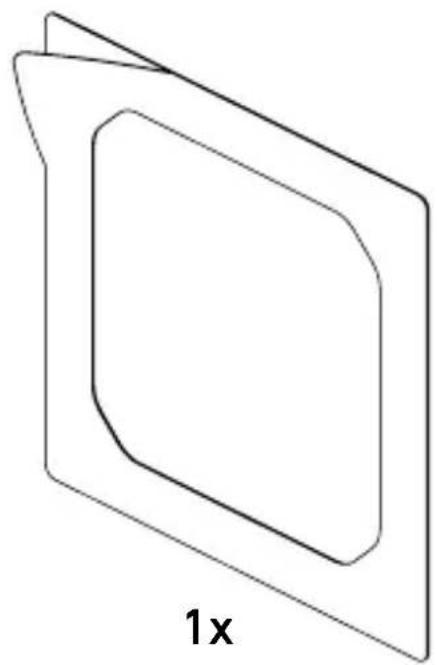
- 1 adhesive tape
- 1 quick-start
- 1 safety data sheet
3.2 TAPDUO C

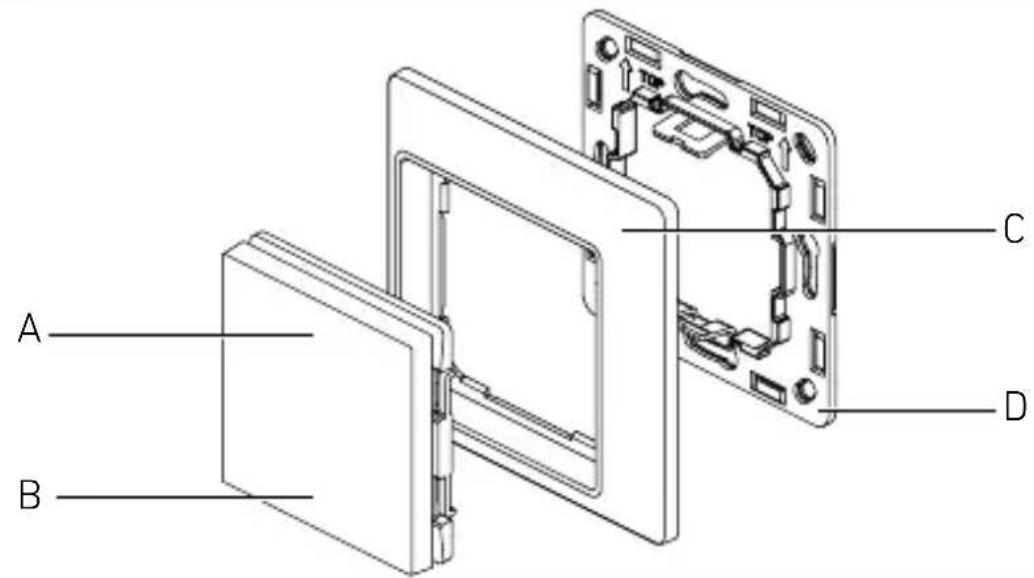
Product components
3.3 TAPDUO C
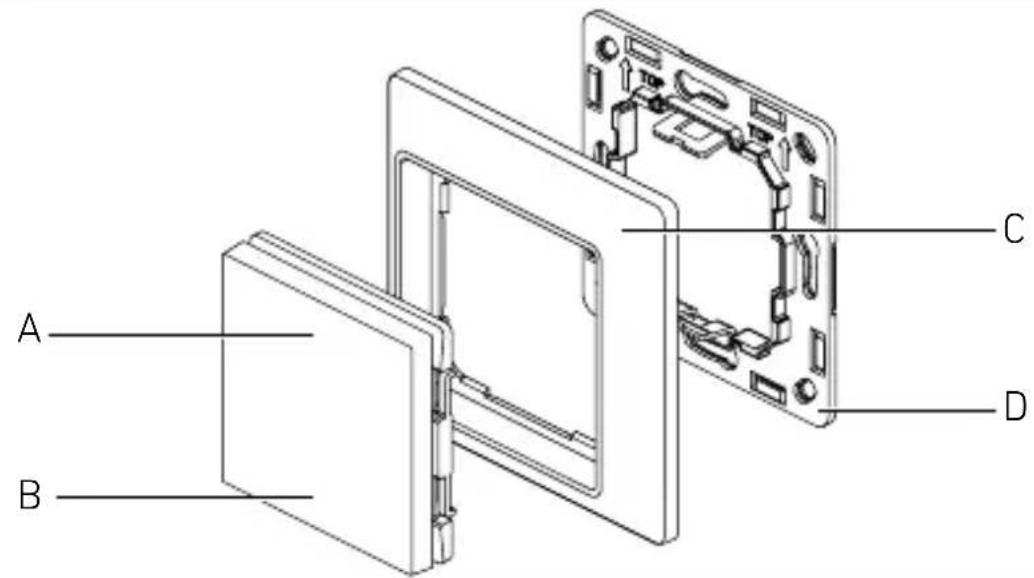
A Button 1
B Button 2
c Design frame
D Mounting frame
4. Electrical connection
4.1 TAPDUO C
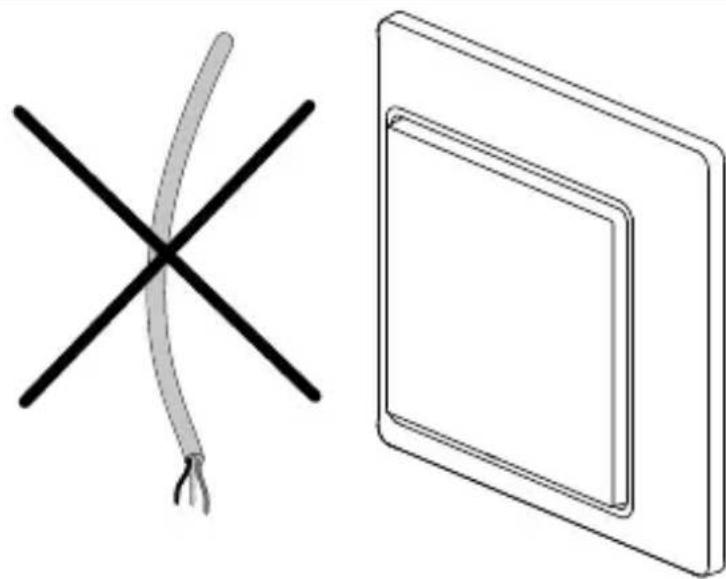

Energy harvesting device. The device doesn't require a wired power supply or battery.
• Power supply - energy harvesting (kinetic push button)
- Communication - wireless via Bluetooth
5. Installation

Hazard from electrical power.
Do not connect any wires!
Preparing for installation
- Check all components for damage. Do not use the product if it is damaged.
-
Select an appropriate site to install the product.
-
Take reach into consideration.
- Not in explosive atmospheres.
- Not on normally flammable surfaces.
Mounting procedure A:
- Mounting by screws

Put together the tools and material needed:
- Screwdriver - cross
5.1.A
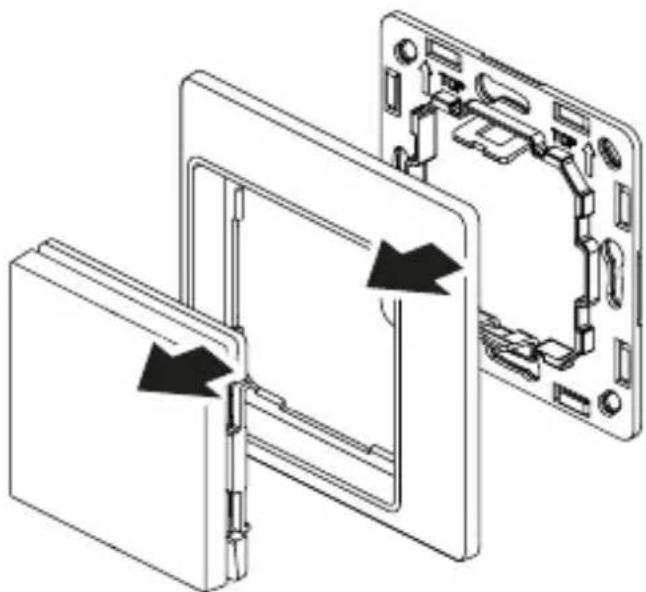
• Disassembly the product.
5.2.A

- Use the screws for the mounting frame fixation.
5.3.A
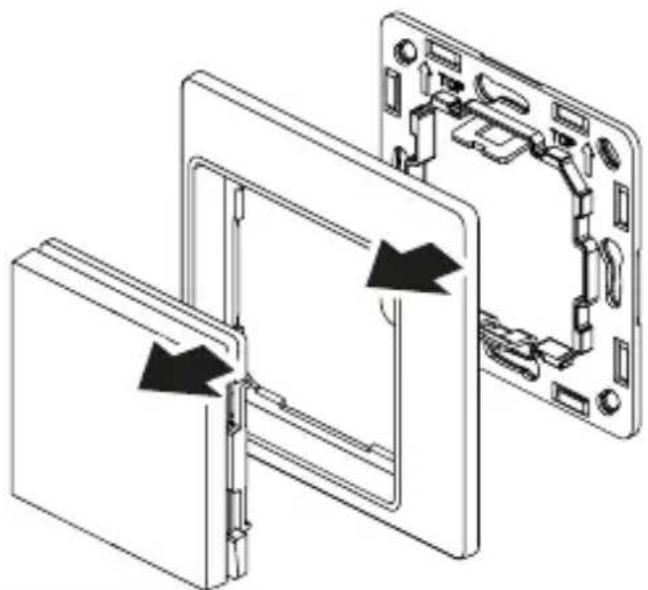
Mount the design frame and the buttons on the fixed mounting frame.
Mounting procedure B:
- Mounting by adhesive tape
5.2.B
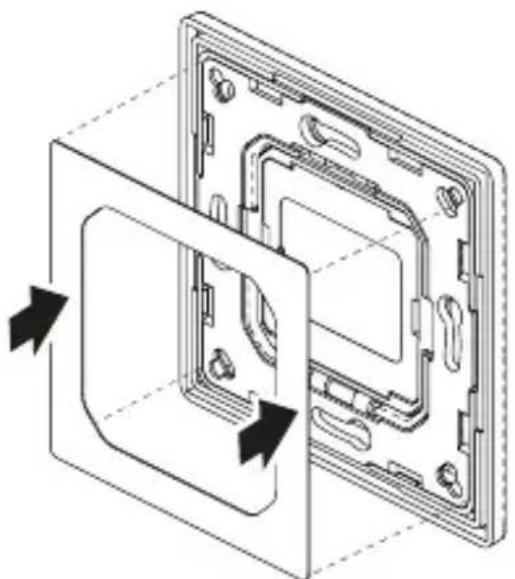
- Remove the protection foil from the double adhesive tape and place it on the mounting frame.
5.3.B

- Remove the second protection foil from the double adhesive tape.
5.4
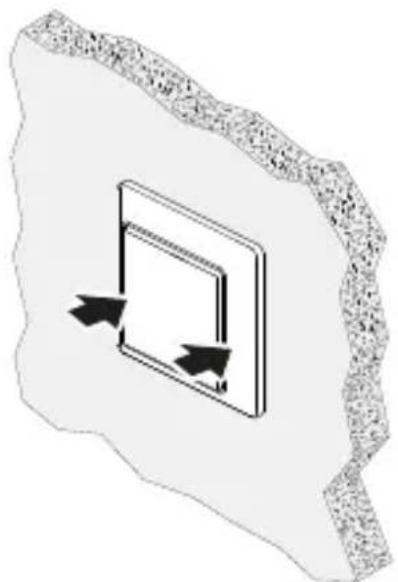
- Place the whole product on a flat surface. Make short press to stick the adhesive tape on the surface.
6. Function
Functions are set via the Steinel Connect app.
Steinel Connect app
To configure the push button with a Bluetooth Mesh product, you must download the STEINEL Connect app from your app store. You will need a Bluetooth-capable smartphone or tablet.
Android

iOS

The TAPDUO C can be commissioned with a Bluetooth Mesh product compatible with the Steinel Connect app (e.g sensors, luminiaries)
- Choose the product you would like to connect the TAPDUO C to in the Steinel Connect app.
- Make sure, that the product you would like to connect the TAPDUO C to is added to a group in the Steinel Connect app.
- Via the product settings select the grid "Push button module"
- The app will now guide you through the provisioning process of the wireless pushbutton.
Functions that can be set via the Steinel Connect app:
- Connecting the Push Button via Bluetooth to other Steinel Bluetooth Mesh products.
- Assign functions to each of the rockets for short and long push
- Functions are depending on connected product, e.g. ON, OFF, dim up, dim down, scene with set dimm level...
7. Maintenance and care
The device requires no maintenance.
Contact between water and live parts can result in electric shock, burns or death.
- Only clean device in a dry state.
Risk of damage to property!
Using the wrong cleaning product can damage the device.
- Clean device with a moist cloth without detergent.
8. Disposal
Electrical and electronic equipment, accessories and packaging must be recycled in an environmentally compatible manner.

Do not dispose of electrical and electronic equipment as domestic waste.
EU countries only:
Under the current European Directive on Waste Electrical and Electronic Equipment and its implementation in national law, electrical and electronic equipment no longer suitable for use must be collected separately and recycled in an environmentally compatible manner.
9. Declaration of Conformity
STEINEL GmbH hereby declares that the Wireless switch TAPDUO C radio equipment type conforms to Directive 2014/53/EU. The full wording of the EU Declaration of Conformity is available for downloading from the following internet address: www.steinel.de
10. Manufacturer's warranty
Manufacturer's warranty of STEINEL GmbH, Diesel-strasse 80-84, DE-33442 Herzebrock-Clarholz, Germany.
All STEINEL products meet the highest quality standards. For this reason, we, the manufacturer, are pleased to provide you, the consumer, with a warranty under the following terms and conditions:
The warranty covers the absence of deficiencies which are proven to be the result of a material defect or fault in manufacturing and which are reported to us immediately after detection and within the warranty period. The warranty shall apply to all STEINEL products sold and used in Germany - excluding STEINEL Professional products.
You can opt for warranty cover in the form of repair or replacement which will be provided free of charge (if applicable, in the form of a successor model of the same or higher quality) or in the form of a credit note.
The warranty period for the STEINEL product you have purchased is 3 years (5 years for products from the XLED home range) in each case from the date on which the product was purchased.
We shall bear the shipping costs but not the transport risks involved in return shipment.
Statutory rights accruing from defects, gratuitousness
The warranty cover described here shall be applicable in addition to the statutory rights of warranty – including special consumer protection provisions – and shall not restrict or replace them. Exercising your statutory rights in the event of defects is gratuitous.
Exemptions from the warranty
All replaceable lamps are expressly excluded from this warranty. In addition to this, the warranty shall not cover:
– any improper or non-intended use of the product or any GB failure to observe the operating instructions,
– any unauthorised additions, alterations or other modifications to the product or any deficiencies attributable to the use of accessory,
– supplementary or replacement parts which are not genuine STEINEL parts,
– any maintenance or care of products that is not carried out in accordance with the operating instructions,
– any attachment or installation that is not in accordance with STEINEL's installation instructions,
– any damage or loss occurring in transit.
Application of German law
The warranty shall be governed by German law excluding the United Nations Convention concerning the International Sale of Goods (CISG).
Making claims
If you wish to make a warranty claim, please send your product complete and carriage paid with the original receipt of purchase, which must show the date of purchase and product designation, either to your retailer or directly to us at STEINEL (UK) Ltd. – 25 Manasty Road, Axis Park, Orton Southgate, GB- Peterborough Cambs PE2 6UP United Kingdom.
For this reason, we recommend that you keep your receipt of purchase in a safe place until the warranty period expires.
11. Technical specifications
- Dimensions (H x W × D): 80.5 x 80.5 x 15 mm
- Dimensions without frame (H x W x D): 55 x 55 x 15 mm
- Power supply: self powered
- Protocol:
- Transmission frequency: 2.4 GHz
- Transmission range (open field): up to 30 m
- IP rating: IP20
- Ambient temperature: -20 °C to +50 °C
12. Troubleshooting
Bluetooth push button can't be connected to a product (e.g. sensor/luminaire).
– Product is not assigned to a group via app.
- Add the product to a group in the app.
- The push button is not within range of the product to which it is to be assigned.
- Bring the push button closer to the product to ensure BT connectivity.
- Bluetooth push button function is not supported by the selected product.
- Choose another product that supports the push button.
No function after push button press:
- Push button is not assigned to a product.
- Assign the push button to a BT Mesh product via app.
- No pushbutton function assigned to the rocker.
- Assign a function to the rocker via the app.
- Intended manually overwritten state is already present e.g. light is on and stays on when "on" is pressed on push button.
- Press another button or change the assigned rocker functions.
- No long push function is assigned, and button has been pressed to long.
- Press the button briefly to operate the short push function or assign a function to the long push of the button.
- The push button is not within range of the product it is assigned to.
- Bring the push button closer to the product to ensure BT connectivity.
STEINEL GmbH
Dieselstraße 80-84
33442 Herzebrock-Clarholz
Tel: +49/5245/448-188
www.steinel.de

Contact
www.steinel.de/contact




- DE
- INHALT
- GERÄTEÜBERSICHT
- 3.3 TAPDUO C
- ABOUT THIS DOCUMENT
- GENERAL SAFETY PRECAUTIONS
- SYSTEM DESCRIPTION
- PACKAGE CONTENTS
- 3.1 TAPDUO C
- 3.2 TAPDUO C
- PRODUCT COMPONENTS
- ELECTRICAL CONNECTION
- 4.1 TAPDUO C
- INSTALLATION
- HAZARD FROM ELECTRICAL POWER
- PREPARING FOR INSTALLATION
- MOUNTING PROCEDURE A
- 5.1.A
- 5.2.A
- 5.3.A
- MOUNTING PROCEDURE B
- 5.2.B
- 5.3.B
- 5.4
- FUNCTION
- STEINEL CONNECT APP
- MAINTENANCE AND CARE
- RISK OF DAMAGE TO PROPERTY
- DISPOSAL
- DO NOT DISPOSE OF ELECTRICAL AND ELECTRONIC EQUIPMENT AS DOMESTIC WASTE
- EU COUNTRIES ONLY
- DECLARATION OF CONFORMITY
- MANUFACTURER'S WARRANTY
- STATUTORY RIGHTS ACCRUING FROM DEFECTS, GRATUITOUSNESS
- EXEMPTIONS FROM THE WARRANTY
- APPLICATION OF GERMAN LAW
- MAKING CLAIMS
- TECHNICAL SPECIFICATIONS
- TROUBLESHOOTING
- STEINEL GMBH
Brand : STEINEL
Model : TapDuo C
Category : Electrical switch