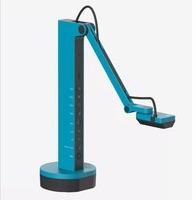
VZ-X - Document camera Ipevo - Free user manual and instructions
Find the device manual for free VZ-X Ipevo in PDF.


Pick your language and provide your email: we'll send you a specifically translated version.
| Product Type | Document Camera |
| Dimensions (L x W x H) | 10.8 x 6.5 x 17.5 cm (4.3 x 2.6 x 6.9 in) |
| Weight | 0.7 kg (1.5 lbs) |
| Power Supply | Rechargeable lithium-ion battery (3.7V, 2600mAh) and AC adapter (5V/2A) |
| Image Sensor | 8 MP CMOS |
| Resolution | Up to 4K UHD (3840x2160) at 30 fps |
| Connectivity | Wi-Fi 802.11 b/g/n/ac, USB-C port |
| Zoom | 2x digital zoom |
| Storage | MicroSD card slot (up to 32GB) |
| Frame Rate | 30 fps |
| Field of View | 80° |
| Focus | Autofocus |
| Lighting | Built-in LED light |
| Functions | Live video streaming, image capture, document and 3D object display, annotation software compatible |
| Maintenance and Cleaning | Use a soft, dry cloth to clean the lens and body; avoid liquids. |
| Safety | Do not disassemble; keep away from moisture; use only approved chargers. |
| Spare Parts and Repairability | Batteries are replaceable; contact Ipevo support for parts; device is not user-serviceable for internal components. |
| General Information | Compatible with Windows, macOS, Chrome OS; includes stand and USB cable. |
Frequently Asked Questions - VZ-X Ipevo
How do I connect the VZ-X to my computer via Wi-Fi?
Power on the camera and press the Wi-Fi button. Connect your computer to the camera's Wi-Fi network (default SSID: Ipevo_VZX_XXXX). Open the Ipevo Presenter app or web interface to start using.
How long does the battery last?
The built-in battery provides up to 2 hours of continuous use. Charging time is approximately 2.5 hours via the USB-C port.
Can I use the VZ-X without Wi-Fi?
Yes, you can connect it via USB-C for both power and data transfer. In USB mode, the camera acts as a wired webcam.
What is the maximum resolution and frame rate?
The VZ-X supports up to 4K UHD (3840x2160) at 30 fps. For smooth 30 fps, ensure good lighting and a stable connection.
How do I clean the lens?
Use a microfiber cloth to gently wipe the lens. Avoid abrasive materials or solvents. For the body, use a slightly damp cloth and dry immediately.
Can I use a microSD card to store images?
Yes, insert a microSD card (up to 32GB, Class 10 or higher) into the slot. The camera saves captured images and videos directly to the card.
Is the VZ-X compatible with Zoom or Teams?
Yes, it works as a standard USB camera or Wi-Fi streaming device, compatible with any video conferencing software like Zoom, Microsoft Teams, Google Meet, etc.
What should I do if the camera does not turn on?
Check the battery charge by connecting the USB-C charger. If it still doesn't turn on, try a different cable or power source. Contact support if issue persists.
How do I update the firmware?
Download the latest firmware from Ipevo's website. Connect the camera via USB, run the updater software, and follow on-screen instructions.
Can I mount the VZ-X on a tripod?
The camera has a standard 1/4-inch tripod mount at the base. It is compatible with most camera tripods.
User questions about VZ-X Ipevo
0 question about this device. Answer the ones you know or ask your own.
Ask a new question about this device
No questions yet. Be the first to ask one.
Download the instructions for your Document camera in PDF format for free! Find your manual VZ-X - Ipevo and take your electronic device back in hand. On this page are published all the documents necessary for the use of your device. VZ-X by Ipevo.
USER MANUAL VZ-X Ipevo

Manual assistant
Powered by Anthropic
Waiting for your message
Product information
Brand : Ipevo
Model : VZ-X
Category : Document camera