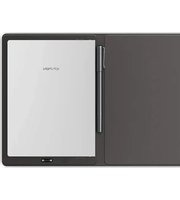
Note Plus - Graphic tablet XP-Pen - Free user manual and instructions
Find the device manual for free Note Plus XP-Pen in PDF.


Pick your language and provide your email: we'll send you a specifically translated version.
| Product Type | Graphic Tablet (Pen Input) |
| Model | Note Plus |
| Brand | XP-PEN |
| Active Area | 10.3 inches diagonal |
| Dimensions | 262 x 166 x 7.5 mm |
| Weight | 350 g (tablet only) |
| Pen Technology | Electromagnetic Resonance (EMR), battery-free |
| Pressure Sensitivity | 8192 levels |
| Report Rate | 266 PPS |
| Resolution | 5080 LPI |
| Connection | USB-C and Bluetooth 5.0 |
| Battery Capacity | 3700 mAh, rechargeable |
| Battery Life | Up to 16 hours continuous use |
| Operating Systems | Windows 7/8/10/11, macOS 10.12+, Android 6.0+ |
| Supported Apps | OneNote, Evernote, Bamboo Paper, etc. |
| Storage | 32 GB internal (for notes) |
| Maintenance | Clean with soft, dry cloth; avoid liquids |
| Safety Warnings | Keep away from water; not for children under 3 |
| Spare Parts | Replacement pen nibs (standard size) |
| Repairability | Battery and screen not user-replaceable; pen nibs replaceable |
| General Information | Paper-like surface for natural writing feel |
Frequently Asked Questions - Note Plus XP-Pen
How do I pair the Note Plus with my device via Bluetooth?
First, ensure Bluetooth is enabled on your device. Turn on the tablet by pressing and holding the power button. On your device, search for Bluetooth devices and select 'XP-PEN Note Plus'. Follow any on-screen pairing instructions.
Can I use the Note Plus without Bluetooth, using USB-C only?
Yes, you can connect the tablet to your computer using the included USB-C cable. This will both power the device and transfer data. Note that for mobile devices, Bluetooth is typically required.
How do I replace the pen nib?
Use the included nib remover tool to gently pull out the old nib. Insert a new nib into the pen tip until it clicks into place. Standard XP-PEN replacement nibs are compatible.
What apps are recommended for the Note Plus?
Popular apps include Microsoft OneNote, Evernote, Bamboo Paper, Nebo, and NoteShelf. The tablet works with any app that supports standard stylus input on your operating system.
How do I charge the Note Plus?
Connect the included USB-C cable to the tablet and a power source (e.g., USB port on a computer or a USB charger). The charging indicator lights up. A full charge takes about 2-3 hours.
Is the Note Plus compatible with Windows 11?
Yes, the Note Plus is fully compatible with Windows 11, as well as Windows 10, 8, and 7. Simply install the latest driver from XP-PEN's website for best performance.
Why is my pen not writing on the screen?
First, check that the tablet is turned on and connected. Ensure the pen tip is not worn out; replace if needed. Also, verify that you are using the correct app and that the pen is not hovering too far above the surface.
How do I transfer notes stored on the tablet to my computer?
You can transfer notes by connecting the tablet via USB-C to your computer. The internal storage will appear as a drive. Copy files manually, or use the XP-PEN Note app for wireless syncing.
What is the warranty period for the Note Plus?
Standard warranty is 1 year from the date of purchase, covering manufacturing defects. Extended warranty options may be available from retailers.
Can I use the Note Plus as an external monitor?
No, the Note Plus is a pen input tablet, not a display. It does not have a screen; you write on the paper-like surface while viewing on your computer or mobile device.
User questions about Note Plus XP-Pen
0 question about this device. Answer the ones you know or ask your own.
Ask a new question about this device
No questions yet. Be the first to ask one.
Download the instructions for your Graphic tablet in PDF format for free! Find your manual Note Plus - XP-Pen and take your electronic device back in hand. On this page are published all the documents necessary for the use of your device. Note Plus by XP-Pen.
USER MANUAL Note Plus XP-Pen
Manual assistant
Powered by Anthropic
Waiting for your message
Product information
Brand : XP-Pen
Model : Note Plus
Category : Graphic tablet