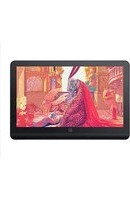
Artist Pro 19 (Gen 2) - Graphic tablet XP-Pen - Free user manual and instructions
Find the device manual for free Artist Pro 19 (Gen 2) XP-Pen in PDF.


Pick your language and provide your email: we'll send you a specifically translated version.
| Product Type | Graphics Tablet with Display |
| Model | Artist Pro 19 (Gen 2) |
| Brand | XP-Pen |
| Active Drawing Area | 19 inches diagonal (approx. 420 x 260 mm) |
| Resolution | 5080 LPI (Lines Per Inch) |
| Pressure Sensitivity | 8192 Levels |
| Pen Technology | Battery-free electromagnetic resonance |
| Pen Buttons | 2 customizable side buttons |
| Shortcut Keys | 8 customizable express keys + 1 touch scroll wheel |
| Display Type | IPS LCD with anti-glare coating |
| Display Resolution | 2560 x 1440 (QHD) |
| Refresh Rate | 60 Hz |
| Color Gamut | 99% sRGB, 85% Adobe RGB |
| Connectivity | USB-C (data + power), HDMI, 3.5 mm audio jack |
| Compatibility | Windows 7/8/10/11, macOS 10.12 or later, Android (USB OTG) |
| Dimensions (Tablet) | Approx. 450 x 300 x 15 mm |
| Weight | Approx. 2.5 kg |
| Power Supply | USB-C power delivery (5V/3A) or external power adapter (12V/2A) |
| Main Functions | Digital drawing, painting, photo editing, 3D modeling, note taking |
| Maintenance | Clean screen with microfiber cloth; avoid solvents; store pen in holder |
| Safety | Use supplied power adapter only; keep away from liquids; do not disassemble |
| Spare Parts & Repairability | Replacement pens, nibs, and cables available from XP-Pen; limited self-repair |
| General Information | Includes pen, pen holder, USB-C cable, HDMI cable, power adapter, quick guide |
Frequently Asked Questions - Artist Pro 19 (Gen 2) XP-Pen
How do I set up the XP-Pen Artist Pro 19 (Gen 2) for the first time?
Connect the tablet to your computer using the provided USB-C and HDMI cables. Install the latest driver from the XP-Pen website. Restart your computer, then the tablet should be recognized as a secondary display.
Does the Artist Pro 19 (Gen 2) work with Mac and Windows?
Yes, it supports Windows 7/8/10/11 and macOS 10.12 or later. For Android devices with USB OTG, limited functionality is available.
What should I do if the pen is not responding?
Check that the pen driver is installed and running. Replace the nib if worn. Ensure the pen is within 10 mm of the screen. Restart the tablet or reconnect the USB cable.
Can I use the tablet without installing drivers?
Basic functionality (as a monitor) works without drivers, but pressure sensitivity and express keys require the official XP-Pen driver.
How do I calibrate the pen cursor position?
Open the XP-Pen driver software, go to 'Pen Display' settings, and adjust the 'Cursor Alignment' or use the calibration tool to tap the crosshairs on screen.
What is the battery life of the pen?
The pen is battery-free, using electromagnetic resonance technology from the tablet. No charging or batteries needed.
How to clean the screen safely?
Turn off the tablet. Use a soft, slightly damp microfiber cloth (water only). Gently wipe the screen. Do not use alcohol or ammonia-based cleaners.
Are replacement nibs available?
Yes, XP-Pen offers replacement nibs in various textures (standard, felt, etc.). You can purchase them online or from authorized resellers.
Can I use the Artist Pro 19 as a standalone monitor?
Yes, it functions as a standard external monitor via HDMI. However, pen input and shortcuts require the driver for interaction.
The display has dead pixels, what should I do?
Check XP-Pen's warranty policy. Typically, a small number of dead pixels are acceptable. If excessive, contact customer support for replacement under warranty.
User questions about Artist Pro 19 (Gen 2) XP-Pen
0 question about this device. Answer the ones you know or ask your own.
Ask a new question about this device
No questions yet. Be the first to ask one.
Download the instructions for your Graphic tablet in PDF format for free! Find your manual Artist Pro 19 (Gen 2) - XP-Pen and take your electronic device back in hand. On this page are published all the documents necessary for the use of your device. Artist Pro 19 (Gen 2) by XP-Pen.
USER MANUAL Artist Pro 19 (Gen 2) XP-Pen
Manual assistant
Powered by Anthropic
Waiting for your message
Product information
Brand : XP-Pen
Model : Artist Pro 19 (Gen 2)
Category : Graphic tablet