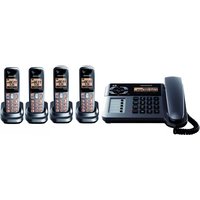
KX-TG1064 - Desk Phone PANASONIC - Free user manual and instructions
Find the device manual for free KX-TG1064 PANASONIC in PDF.


Pick your language and provide your email: we'll send you a specifically translated version.
| Product Type | DECT 6.0 Cordless Desk Phone with Answering System |
| Brand | Panasonic |
| Model | KX-TG1064 |
| Number of Handsets | 1 (expandable up to 6) |
| Frequency | DECT 6.0 (1920-1930 MHz) |
| Ringer Type | Polyphonic |
| Caller ID | Yes |
| Phonebook | Up to 100 entries |
| Speakerphone | Yes (handset and base) |
| Answering System | Digital, up to 18 minutes recording time |
| Display | Backlit LCD |
| Keypad | Backlit |
| Intercom | Between handsets |
| Power Supply (Base) | AC 120V 60Hz (adapter included) |
| Power Supply (Handset) | Ni-MH rechargeable battery (2.4V, 550mAh) |
| Dimensions (Base) | Approx. 5.7 x 4.7 x 2.2 in (145 x 120 x 55 mm) |
| Dimensions (Handset) | Approx. 6.8 x 1.9 x 1.1 in (173 x 49 x 29 mm) |
| Weight (Base) | Approx. 5.6 oz (160 g) |
| Weight (Handset) | Approx. 4.9 oz (140 g) |
| Range | Up to 1000 ft outdoors, 200 ft indoors |
| Maintenance | Clean with soft dry cloth; do not use abrasive cleaners |
| Safety | Do not expose to water or extreme heat; use only provided adapter |
| Parts and Repairability | Battery and handset available; base unit repair by authorized service |
| General Information | Includes user manual; wall-mountable base |
Frequently Asked Questions - KX-TG1064 PANASONIC
How do I install the battery in the handset?
Open the handset battery cover, insert the rechargeable battery with the correct polarity, then close the cover. Place the handset on the base to charge for 7 hours before first use.
What is the range of the phone?
The range is up to 1000 feet outdoors and up to 200 feet indoors, depending on building materials and layout.
How do I set up the answering system?
Press the ANSWER ON/OFF button on the base to turn on the answering system. You can record a greeting and set the number of rings via the menu. Default password is 0000.
Can I add more handsets to this system?
Yes, you can register up to 6 handsets total. Use the MENU button on the handset to find the registration option, then follow the instructions.
How do I store a phone number in the phonebook?
Press MENU, then select PHONEBOOK. Choose ADD ENTRY, enter the name and number, and save. You can store up to 100 entries.
What type of battery does the handset use?
It uses a Ni-MH rechargeable battery rated at 2.4V, 550mAh. Replacement battery model is usually HHR-55AAAB or equivalent.
How do I change the ringer tone?
Press MENU, navigate to RINGER SETTING, then select RINGER TONE. Choose from the available polyphonic tones and confirm.
The phone is not ringing when calls come in. What should I do?
Check if the RINGER OFF indicator is displayed. If so, press and hold the CANCEL button for 2 seconds to turn ringer back on. Also ensure the handset is not out of range and the ringer volume is not set to low.
How do I use the intercom feature?
Press the INTERCOM button on the handset, then enter the desired extension number (e.g., 1 for handset 1). The other handset will ring for intercom. You can also page all handsets by pressing INTERCOM and then 0.
Is the base wall-mountable?
Yes, the base has slots for wall mounting. Use screws appropriate for your wall type to secure the base. The handset can also be wall-mounted using an optional bracket.
User questions about KX-TG1064 PANASONIC
0 question about this device. Answer the ones you know or ask your own.
Ask a new question about this device
No questions yet. Be the first to ask one.
Download the instructions for your Desk Phone in PDF format for free! Find your manual KX-TG1064 - PANASONIC and take your electronic device back in hand. On this page are published all the documents necessary for the use of your device. KX-TG1064 by PANASONIC.
USER MANUAL KX-TG1064 PANASONIC
Manual assistant
Powered by Anthropic
Waiting for your message
Product information
Brand : PANASONIC
Model : KX-TG1064
Category : Desk Phone