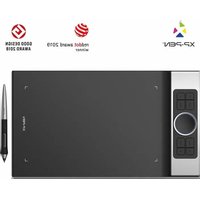
Deco Pro Medium - Graphic tablet XP-Pen - Free user manual and instructions
Find the device manual for free Deco Pro Medium XP-Pen in PDF.


Pick your language and provide your email: we'll send you a specifically translated version.
| Product Type | Graphics Drawing Tablet |
| Model | Deco Pro Medium |
| Brand | XP-Pen |
| Active Area | 10 x 6.25 inches (254 x 158.8 mm) |
| Pressure Levels | 8192 |
| Pen Technology | Battery-free electromagnetic resonance |
| Shortcut Keys | 8 customizable keys |
| Additional Controls | Touch ring for zoom/scroll |
| Connection Type | USB-C |
| Compatible Systems | Windows 7/8/10/11, macOS 10.10+, Android 6.0+, Linux |
| Dimensions (W x D x H) | 350 x 220 x 8 mm |
| Weight | Approx. 400 g |
| Power Supply | Via USB bus power |
| Included Pen | PA1 (battery-free, 2 side buttons) |
| Pen Nibs Included | 8 replacement nibs and a nib removal tool |
| Maintenance | Clean with soft, dry cloth. Do not use liquids or abrasives. |
| Safety Precautions | Keep away from water and heat sources. Do not disassemble. |
| Spare Parts | Pen nibs, USB cable, pen holder, and protective film available separately. |
| Repairability | Designed as sealed unit; no user-serviceable parts. Contact XP-Pen support for repairs. |
| Warranty | 1 year limited warranty |
Frequently Asked Questions - Deco Pro Medium XP-Pen
How do I install the driver for the XP-Pen Deco Pro Medium?
Download the latest driver from the official XP-Pen website (www.xp-pen.com/software). Uninstall any previous tablet drivers, then run the installer and follow the on-screen instructions. Restart your computer after installation.
Is the Deco Pro Medium compatible with Chromebook?
Yes, it works with Chromebooks that support USB devices and Android apps. For Chrome OS, you may need to enable developer mode or use a compatible drawing app. Check XP-Pen's website for specific compatibility notes.
Why is my pen not working or not responding?
First, ensure the driver is correctly installed. Try reconnecting the USB cable. If using a laptop, avoid USB hubs. Replace the pen nib if worn. You can also recalibrate the pen in the driver settings.
How do I customize the shortcut keys?
Open the XP-Pen driver interface. Go to the 'Shortcut Keys' tab. Click on a key icon, then assign a function (e.g., keyboard shortcut, application, or tool). Apply the changes. The touch ring can be configured similarly for zoom, scroll, or brush size.
Does the tablet work wirelessly?
No, the Deco Pro Medium is wired. It connects via USB-C cable, which also provides power. There is no battery inside the tablet; it relies on bus power from the computer.
How do I clean the tablet surface?
Use a soft, lint-free cloth slightly dampened with water (not wet). Gently wipe the surface. Do not use alcohol, solvents, or abrasive cleaners. For the pen, wipe with a dry cloth. Do not submerge any part in liquid.
Can I use the tablet with a monitor or as a screen?
No, the Deco Pro Medium is a pen tablet (without a screen), not a pen display. You draw while looking at your computer monitor. It does not have video output.
How do I replace the pen nib?
Use the included nib removal tool (metal ring with tweezers). Insert the hole of the tool over the nib, pinch, and pull straight out. Insert a new nib by pushing it into the pen until secure. Do not press too hard.
What is the pressure sensitivity and how do I adjust it?
The tablet has 8192 levels of pressure. In the driver settings, you can adjust the pressure curve to be softer or harder. Also, in your drawing software, ensure pressure sensitivity is enabled under brush settings.
Why is the tablet not detected by the system?
Try a different USB port or cable. Ensure the driver is properly installed. On Windows, check Device Manager for any yellow exclamation marks. On macOS, check System Report for USB devices. Restart your computer. If still not detected, reinstall the driver.
User questions about Deco Pro Medium XP-Pen
0 question about this device. Answer the ones you know or ask your own.
Ask a new question about this device
No questions yet. Be the first to ask one.
Download the instructions for your Graphic tablet in PDF format for free! Find your manual Deco Pro Medium - XP-Pen and take your electronic device back in hand. On this page are published all the documents necessary for the use of your device. Deco Pro Medium by XP-Pen.
USER MANUAL Deco Pro Medium XP-Pen
Manual assistant
Powered by Anthropic
Waiting for your message
Product information
Brand : XP-Pen
Model : Deco Pro Medium
Category : Graphic tablet