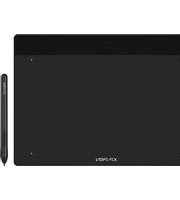
Deco Fun L - Graphic tablet XP-Pen - Free user manual and instructions
Find the device manual for free Deco Fun L XP-Pen in PDF.


Pick your language and provide your email: we'll send you a specifically translated version.
| Product Type | Graphics Tablet |
| Model | Deco Fun L |
| Brand | XP-Pen |
| Active Area | 10 x 6.25 inches (254 x 158.8 mm) |
| Dimensions | Approx. 14.1 x 8.7 x 0.3 inches (358 x 221 x 8 mm) |
| Weight | Approx. 0.77 lbs (350 g) |
| Pen Technology | Battery-Free Passive Pen |
| Pressure Levels | 8192 Levels |
| Resolution | 5080 LPI |
| Report Rate | ≥ 220 PPS |
| Connection | USB 2.0 (Type-C) |
| Compatibility | Windows 7/8/10/11, macOS 10.12+, Android 6.0+ |
| Power Supply | USB Bus Power |
| Power Consumption | ≤ 0.5W |
| Pen Buttons | 2 Side Buttons |
| Tablet Buttons | 6 Customizable Express Keys |
| Shortcut Wheel | No |
| Pen Nibs Replacement | Yes (Standard Nibs, 8 pcs included) |
| Pen Holder | Pen Holder Included |
| USB Cable Included | Yes (Braided, ~1.5m) |
| Standalone Use | No (Requires Computer) |
| Warranty | 1 Year Limited |
| Maintenance | Clean with soft, dry cloth. |
| Safety | Keep away from liquids and extreme temperatures. |
| Package Contents | Tablet, Stylus Pen, Pen Holder, USB Cable, Quick Guide, Warranty Card |
Frequently Asked Questions - Deco Fun L XP-Pen
How do I install the XP-Pen Deco Fun L driver?
Download the latest driver from the official XP-Pen website. Run the installer and follow on-screen instructions. After installation, restart your computer and connect the tablet via USB.
Does the Deco Fun L work with Chromebook?
Yes, the Deco Fun L is compatible with Chromebooks that support Android apps. Use the Android driver from XP-Pen's website. Note that some features like express keys may have limited functionality.
My pen is not working. What should I do?
First, check that the USB connection is secure. Try a different USB port. Ensure the driver is installed and up-to-date. If the pen still doesn't work, replace the nib. If using on a Chromebook, verify driver compatibility.
How do I change the pen nib?
Use the provided nib remover tool (usually a metal ring inside the pen holder). Gently pull out the old nib and insert a new one. Push firmly until it clicks into place.
Can I use the Deco Fun L with my smartphone?
Yes, it works with Android smartphones and tablets that support USB OTG. Connect the tablet to your phone using an OTG adapter. Install the XP-Pen driver app from the Google Play Store for full functionality.
What are the system requirements for the Deco Fun L?
Windows: Windows 7 or later, macOS 10.12 or later, Android 6.0 or later. Your computer should have an available USB port (Type-A or Type-C).
How do I customize the express keys?
Open the XP-Pen driver software. Under 'Express Keys' or 'Shortcut Keys', select a key and assign a function (e.g., undo, brush size). Apply changes.
Does the Deco Fun L have a screen?
No, the Deco Fun L is a pen tablet without an integrated display. You must look at your computer monitor while drawing on the tablet surface.
How to clean the tablet surface?
Use a soft, lint-free cloth slightly dampened with water. Gently wipe the surface. Do not use harsh chemicals or abrasive materials. Ensure the tablet is disconnected from power before cleaning.
What is the warranty period for XP-Pen Deco Fun L?
XP-Pen offers a 1-year limited warranty against manufacturing defects. Register your product on their website for extended warranty offers. Keep the receipt for proof of purchase.
User questions about Deco Fun L XP-Pen
0 question about this device. Answer the ones you know or ask your own.
Ask a new question about this device
No questions yet. Be the first to ask one.
Download the instructions for your Graphic tablet in PDF format for free! Find your manual Deco Fun L - XP-Pen and take your electronic device back in hand. On this page are published all the documents necessary for the use of your device. Deco Fun L by XP-Pen.
USER MANUAL Deco Fun L XP-Pen
Manual assistant
Powered by Anthropic
Waiting for your message
Product information
Brand : XP-Pen
Model : Deco Fun L
Category : Graphic tablet