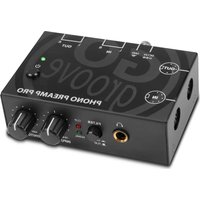
Phono Preamp Pro - DJ Equipment GOgroove - Free user manual and instructions
Find the device manual for free Phono Preamp Pro GOgroove in PDF.


Pick your language and provide your email: we'll send you a specifically translated version.
| Product Type | RIAA Phono Preamp |
| Brand | GOgroove |
| Model | Phono Preamp Pro |
| Category | DJ Equipment |
| Dimensions | 12 x 8 x 4 cm |
| Weight | 200 g |
| Power Supply | 12 V DC power adapter (included) or USB 5 V |
| Main Functions | RIAA amplification, RCA phono input, RCA line output, gain switch (35/40/45 dB), low-frequency attenuation, grounding |
| Inputs | 1x RCA (phono) with ground terminal |
| Outputs | 1x RCA (line) |
| Signal-to-Noise Ratio | > 80 dB |
| Frequency Response | 20 Hz - 20 kHz (±1 dB) |
| Maintenance and Cleaning | Unplug before cleaning. Use a soft, dry cloth. Do not use solvents. |
| Safety | Do not expose to moisture or extreme temperatures. Keep out of reach of children. |
| Spare Parts and Repairability | No user-serviceable parts. Contact customer service for repairs. |
| General Information | 1-year warranty. Suitable for moving magnet (MM) turntables. |
Frequently Asked Questions - Phono Preamp Pro GOgroove
How to connect the Phono Preamp Pro?
Connect the turntable to the preamp's RCA input (ground terminal if needed). Connect the RCA output to a line input on your amplifier or active speakers. Then, connect the power adapter or USB.
Why is there no sound after connection?
Check that the preamp is powered (LED on) and that the gain is sufficient (try 45 dB). Make sure the turntable is properly connected and that the amplifier volume is turned up. Test with another source.
What type of turntable is compatible?
This preamp is designed for turntables with moving magnet (MM) cartridges. It is not suitable for moving coil (MC) cartridges without a transformer.
Does the preamp have a headphone output?
No, the Phono Preamp Pro does not have a headphone output. It provides an RCA line output intended to be connected to an amplifier or speakers.
How to choose the right gain setting?
Use the gain switch (35/40/45 dB) according to your cartridge's output level. Start at 40 dB, then adjust. If the sound is distorted, lower the gain; if too quiet, increase it.
Is there a risk of hum?
To avoid hum, connect the turntable's ground terminal to the preamp's grounding screw. Use quality RCA cables and keep the device away from interference sources.
Can I use USB power and the power adapter at the same time?
No, use only one power source at a time. The device automatically selects the connected source. The power adapter is recommended for optimal performance.
What is the warranty for the Phono Preamp Pro?
GOgroove offers a limited 1-year warranty against manufacturing defects. Keep your proof of purchase.
How to clean the preamp?
Unplug the device before any cleaning. Use a soft, dry cloth. Do not use chemical or abrasive products.
Can the preamp work with a USB turntable?
If your USB turntable has a line output, you do not need a preamp. If it only has a phono output, you can connect it to the Phono Preamp Pro input.
User questions about Phono Preamp Pro GOgroove
0 question about this device. Answer the ones you know or ask your own.
Ask a new question about this device
No questions yet. Be the first to ask one.
Download the instructions for your DJ Equipment in PDF format for free! Find your manual Phono Preamp Pro - GOgroove and take your electronic device back in hand. On this page are published all the documents necessary for the use of your device. Phono Preamp Pro by GOgroove.
USER MANUAL Phono Preamp Pro GOgroove


Manual assistant
Powered by Anthropic
Waiting for your message
Product information
Brand : GOgroove
Model : Phono Preamp Pro
Category : DJ Equipment