
BlueVIBE ECX - Audio Equipment GOgroove - Free user manual and instructions
Find the device manual for free BlueVIBE ECX GOgroove in PDF.


| Product Type | Portable Bluetooth Speaker |
| Brand | GOgroove |
| Model | BlueVIBE ECX |
| Dimensions (approx.) | 3.0 x 3.0 x 3.0 inches |
| Weight | 0.5 lbs (227 g) |
| Power Source | Rechargeable lithium-ion battery |
| Battery Life | Up to 8 hours |
| Charging | USB-C (cable included) |
| Bluetooth Version | 5.0 |
| Bluetooth Range | Up to 33 ft (10 m) |
| Audio Input | Bluetooth, 3.5mm AUX |
| Speaker Output | 5W (mono) |
| Controls | Power, Volume +/-, Play/Pause, Next/Previous |
| Microphone | Built-in for hands-free calling |
| Water Resistance | IPX4 (splash-proof) |
| Color Options | Black, Blue, Red |
| Maintenance | Wipe with dry cloth; keep away from liquids |
| Safety | Avoid extreme temperatures; do not disassemble |
| Spare Parts & Repairability | Not user-serviceable; contact manufacturer for support |
| General Information | Compatible with most Bluetooth-enabled devices |
Frequently Asked Questions - BlueVIBE ECX GOgroove
User questions about BlueVIBE ECX GOgroove
0 question about this device. Answer the ones you know or ask your own.
Ask a new question about this device
Download the instructions for your Audio Equipment in PDF format for free! Find your manual BlueVIBE ECX - GOgroove and take your electronic device back in hand. On this page are published all the documents necessary for the use of your device. BlueVIBE ECX by GOgroove.
USER MANUAL BlueVIBE ECX GOgroove
BLUE VIBE
EXS

Bluetooth®
Your easy-to-use reference for getting the most out of your product
USER GUIDE
Enjoy
FREE REGISTRATION
FREE PRODUCT REGISTRATION
Protect your investment and take advantage of this free product warranty.
YOU MUST REGISTER WITHIN 30 DAYS
of purchase to receive full warranty coverage and access to special offers.
www.AccessoryPower.com/warranty
GOgroove® BlueSYNC® SLK

Bluetooth


natural_image
Close-up of a black audio amplifier speaker with three speakers and sound waves (no visible text or labels)
natural_image
Close-up of a black electronic speaker tower with three large lenses and control knobs (no visible text or symbols)
natural_image
Exterior view of a black rectangular electronic device with ports and leads (no visible text or symbols)


ReVIVE™ ReStore® 4000


natural_image
Illustration of a cartoon panda holding a circular object (no text or symbols)


Panda
See more exciting products at: Voir plus de produits passionnants sur: Para los productos mas fasinantes visitenos: Weitere interessante Produkte an: 查看更多精彩的产品: AccessoryPower.com/promo
Thank you for purchasing the
GOgroove® BlueVIBE™ EXS
Bluetooth fitness headset
Wirelessly stream Bluetooth audio from your tablet or smartphone, take hands-free calls, or even play MP3s directly from a MicroSD card. The side-loaded controls give you full-access to playlist navigation, volume adjustment and hands-free calling. Charge it, pair it, wear it and move with the music. Just follow these simple instructions to get started.
What's in the Box

Product Diagrams

Adjustable Sizing
The BlueVIBE EXS headband is adjustable. Try it on and guage your comfort.
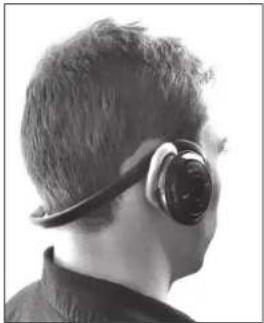
natural_image
Back view of a person wearing an earbuds and head covering, viewed from the side (no text or symbols visible)
For a tighter fit.
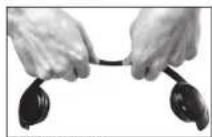
For a looser fit.
Button Functions
| Button | Action | Bluetooth Mode | MicroSD Mode |
| Press and hold for five seconds | ON/OFF, Enter Pairing Mode | ON/OFF | |
| Press and hold for two seconds | Reject Call, Redial Last Number | Enter Bluetooth Pairing Mode | |
| EQ | Press | No Function | 5 Different Styles |
| Press | Play/Pause Track | Play/Pause Track | |
| - + | Press | Volume Adjustment Previous/Next Track | Volume Adjustment Previous/Next Track |
| REP | Press | No Function | Repeat Single Repeat All |
Charging
Connect the BlueVIBE EXS to power using the included USB charging cable or AC charger. Allow 2-3 hours for a full charge. The LED indicator will be red for charging and blue for charged.


Power, Pairing and Auto-Connect
1) Make sure the BlueVIBE EXS is off. Enter "Pairing Mode" by pressing and holding the Power / Call button ○/○ for 5 seconds. The LED indicator will be solid blue, and the headset will beep twice.
2) On your audio device, find BlueVIBE EXS in your Bluetooth menu. Select it for pairing. If required, use PIN: 0000.

natural_image
Hand pointing at a black-framed ear device next to a smartphone (no visible text or symbols)3) Auto-Connect can be performed with the last paired audio device. Turn on BlueVIBE EXS by pressing and holding the Power / Call button ⬤/φ for two seconds. It will automatically reconnect with your audio device if Bluetooth is enabled.
4) Disconnect by using your Bluetooth device menu. You can turn off BlueVIBE EXS by pressing and holding the Power / Call button ○/○ for five seconds. It will beep twice and the LED indicator will blink six times before turning off.
Micro SD MP3 Playback
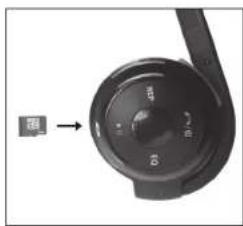
1) Make sure the BlueVIBE EXS is not paired to a Bluetooth device. Insert your MP3 MicroSD card into the MicroSD card slot. Press and hold the ▶II button for 3 seconds until the LED indicator glows green.
2) Press the ▶ I button and the music will start to play. Use the BlueVIBE EXS controls to navigate your MP3 playlist. PLEASE NOTE: Remove your MicroSD card if you want to use Bluetooth.
Useful Tips
-Make sure that BlueVIBE EXS is fully charged before use.
-Pairing instructions may vary by device.
-Adjust volume settings on your audio source in addition to BlueVIBE EXS.
-Adjust the headband for a comfortable fit. The headband is sturdy, but bendable.
-Remove the MicroSD card when using Bluetooth.
Tech Specs
Bluetooth version: 3.0+ EDR
Bluetooth profile: A2DP, HFP, AVRCP
Bluetooth frequency range: 2.4GHz - 2.48GHz
Operating distance: 60 feet
Charging time: 2-3 hours
Audio playback: 10 hours
Standby time: 260+ hours per charge
Power: AC 100-240v, USB 5v
Dimensions: 4.5 x 2.5 x 0.9 inches
Weight: 3.4 ounces
Learn more about this and other quality Accessory Power products


www.AccessoryPower.com
Facebook.com/AccessoryPower
Twitter.com/AccessoryPower
For more on the BlueVIBE EXS + tips and tricks please visit AccessoryPower.com/videos

ACCESSORY POWER
The Bluetooth word mark and logos are registered trademarks owned by Bluetooth SIG, Inc. and any use of such marks by Bright Ideas, Inc. is under license.
© 2013 Accessory Power. All rights reserved. Accessory Power, the Accessory Power logo, and GOgroove and the GOgroove logo, and BlueVIBE are registered trademarks of Bright Ideas, Inc. in the United States and/or other countries. All other trademarks are the property of their respective owners.
Manufactured in China. Designed in California.

Please Always Recycle

Brand : GOgroove
Model : BlueVIBE ECX
Category : Audio Equipment