
CML175SXW - Monitor HITACHI - Free user manual and instructions
Find the device manual for free CML175SXW HITACHI in PDF.

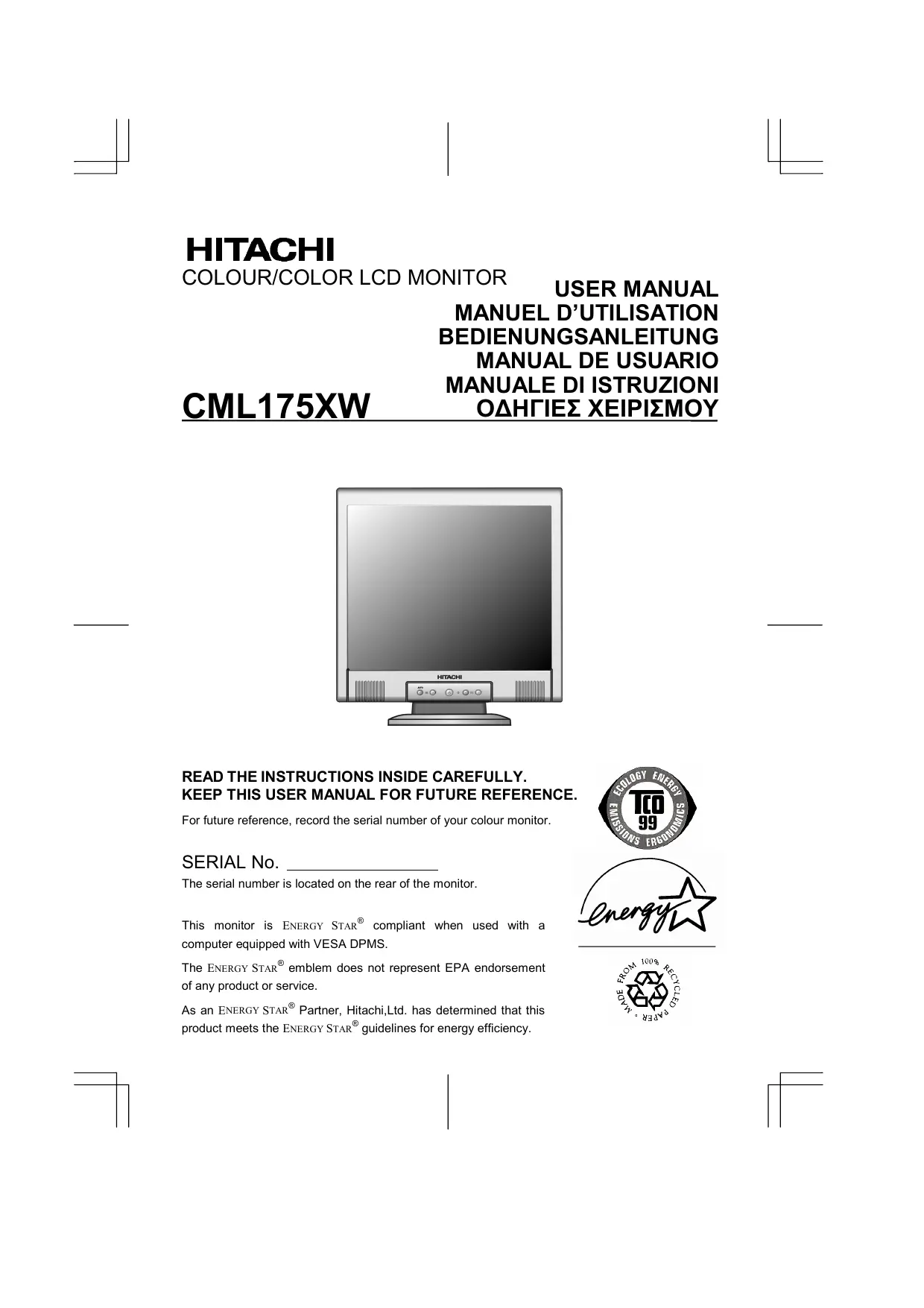

| Product type | 17-inch LCD monitor |
| Brand | Hitachi |
| Model | CML175SXW |
| Screen diagonal | 17 inches (43.2 cm) |
| Native resolution | 1280 x 1024 pixels |
| Aspect ratio | 5:4 |
| Panel technology | TN (Twisted Nematic) |
| Brightness | 250 cd/m² |
| Contrast ratio | 500:1 |
| Response time | 8 ms |
| Horizontal viewing angle | 160° |
| Vertical viewing angle | 140° |
| Connectivity | VGA (D-Sub), DVI-D |
| Power supply | 100-240 V, 50/60 Hz |
| Power consumption | 35 W (max), <1 W (standby) |
| Dimensions (with stand) | 389 x 400 x 205 mm |
| Weight (with stand) | 4.5 kg |
| Adjustments | Brightness, contrast, position, phase, clock, color temperature |
| Maintenance and cleaning | Clean with a soft, dry cloth, do not use abrasive products |
| Safety | Do not expose to moisture, do not open the casing |
| Spare parts and repairability | Contact Hitachi customer service |
| General information | User manual available for download |
Frequently Asked Questions - CML175SXW HITACHI
User questions about CML175SXW HITACHI
0 question about this device. Answer the ones you know or ask your own.
Ask a new question about this device
Download the instructions for your Monitor in PDF format for free! Find your manual CML175SXW - HITACHI and take your electronic device back in hand. On this page are published all the documents necessary for the use of your device. CML175SXW by HITACHI.
USER MANUAL CML175SXW HITACHI
READ THE INSTRUCTIONS INSIDE CAREFULLY. KEEP THIS USER MANUAL FOR FUTURE REFERENCE.
For future reference, record the serial number of your colour monitor.
SERIAL No.
The serial number is located on the rear of the monitor.
This monitor is ENERGY STAR® compliant when used with a computer equipped with VESA DPMS.
The ENERGY STAR® emblem does not represent EPA endorsement of any product or service.
As an ENERGY STAR® Partner, Hitachi,Ltd. has determined that this product meets the ENERGY STAR® guidelines for energy efficiency.



FOR HITACHI MODELS STARTING WITH "CM":
Hitachi America, Ltd. warrants our "CM" Hitachi CRT color monitor models to be free from defects in material and workmanship for 36 months from the date you purchased it if your purchase was made prior to 1/31/01 or 60 months if your purchase was made after 1/31/01 from your authorized Hitachi America, Ltd. monitor dealer. If you purchase a Hitachi "CML" Liquid Crystal Display (LCD) color monitor, Hitachi provides a warranty of 36 months for the panel and 12 months for the backlight if purchased before 1/31/01 or 36 months for both panel and backlight if purchased after 1/31/01. In the event of a defect during this 12 month, 36 month or 60 month period, Hitachi America, Ltd. will, at its option, repair or replace the monitor at no charge except as set forth below. If owner cannot provide proof of purchase, the warranty period will start to run from the date of manufacture.
FOR HITACHI VALUE LINE MODELS STARTING WITH "V":
Hitachi America, Ltd. warrants our Value line “V” series of color monitors to be free from defects in material and workmanship for a 36 month period from the date your purchase was made from an authorized Hitachi America, Ltd. monitor dealer. In the event of a defect during the first 12 months, Hitachi will, at its option, repair or replace the monitor at no charge except as set forth below. From the 13th month through the 36th month after purchase, Hitachi will provide parts ONLY free of charge through its Authorized Monitor Service Center. All additional charges – INCLUDING ANY & ALL
MANDATORY LABOR CHARGES TO REPLACE ANY COVERED PARTS – will be your responsibility.
You will be responsible for paying Hitachi's authorized service center directly for all labor and associated shipping charges.
FOR ALL HITACHI MONITORS:
Hitachi America, Ltd. may repair your monitor with new or reconditioned parts or replace it with a new or reconditioned monitor of the same or similar kind, and any replaced monitors or parts become Hitachi America, Ltd.'s property.
Exclusions from this warranty: It is normal for Cathode Ray Tube (CRT) monitors and LCD display backlights to decrease in brightness as they age. This is a natural process in CRTs & LCDs due to the degradation of the LCD backlight and the degradation of the CRT phosphors that create the image and is not covered by this warranty. THIS WARRANTY EXCLUDES DECREASED IMAGE CLARITY OR REDUCED BRIGHTNESS DUE TO NATURAL AGING OF THE MONITOR/DISPLAY. IN ADDITION, THIS WARRANTY DOES NOT COVER PHOSPHOR BURN. Phosphor burn can occur when a monitor is left with one static image for extended periods of time during which the image may become burned into the phosphors.
This limited warranty does not cover damage occurring in shipping or in storage after you purchase the monitor or damage caused by abuse, accident, disaster, misuse, mishandling, mispackaging or shipping, improper installation, unauthorized repair or modification, or failure to follow the manufacturer's instruction with respect to the proper handling, operation, installation, service and maintenance of the monitor. This warranty is
for the benefit of the original owner only in accordance with all terms stated in this warranty. Warranty is not transferable.
To obtain warranty service, call 1-800-562-2552 to obtain a return authorization number and the location of your Hitachi service center. If a problem occurs within the first 30 days after purchase AND IF CONSISTENT WITH YOUR DEALER'S RETURN POLICY, you can return the monitor to the dealer from whom you bought it. Returns through dealer are subject to all dealer return policies and possible charges. Not all dealers accept returns. For warranty service, if you choose to ship the monitor rather than delivering it in person, you must assume the risk of damage or loss in transit. You must also use the original shipping container (or equivalent packaging), pay shipping charges and insurance, and enclose a copy of the proof of purchase date with the monitor. DO NOT return your monitor without a return authorization number or the shipment will be refused and returned to you at your expense.
NEVER open the monitor cabinet. If the monitor is not operating properly, contact Hitachi America Ltd. service center (Call 1-800-562-2552). DO NOT OPEN THE MONITOR HOUSING UNDER ANY CIRCUMSTANCES. BY OPENING THE MONITOR HOUSING YOU WILL EXPOSE YOURSELF TO HIGH VOLTAGE AND POSSIBLE SEVERE ELECTRICAL SHOCKS AND Void ALL WARRANTYES.
ANY IMPLIED WARRANTY OF MERCHANTABILITY OR FITNESS FOR A PARTICULAR PURPOSE ON THIS MONITOR IS LIMITED TO THE 12, 36 or 60 MONTH DURATION OF THIS WRITTEN WARRANTY, AS APPLICABLE. ALL WARRANTYES SET FORTH IN THIS WARRANTY ARE LIMITED TO 12, 36 OR 60 MONTHS FROM THE DATE OF PURCHASE AS INDICATED IN THIS WARRANTY. NO WARRANTYES WHATSOEVER WILL COVER THIS MONITOR BEYOND THE STATED 12, 36 OR 60 MONTHS. HOWEVER, SOME STATES DO NOT ALLOW LIMITATIONS ON HOW LONG AN IMPLIED WARRANTY LASTS, SO THE ABOVE LIMITATION MAY NOT APPLY TO YOU.
IF THIS MONITOR IS DEFECTIVE, YOUR ONLY REMEDY IS REPAIR OR REPLACEMENT, AS DESCRIBED ABOVE. UNDER NO CIRCUMSTANCES WILL HITACHI AMERICA, LTD. BE LIABLE FOR INCIDENTAL OR CONSEQUENTIAL DAMAGES, INCLUDING ANY LOST SAVINGS, LOST PROFITS, OR ANY OTHER DAMAGES CAUSED BY THE USE OF THIS MONITOR OR INABILITY TO USE IT, EVEN IF THE DEALER OR HITACHI AMERICA, LTD. HAS BEEN ADVISED OF SUCH LIABILITY OR OTHER CLAIMS.
SOME STATES DO NOT ALLOW THE EXCLUSION OR LIMITATION OF INCIDENTAL OR CONSEQUENTIAL DAMAGES SO THE ABOVE LIMITATION OR EXCLUSION MAY NOT APPLY TO YOU. THIS WARRANTY GIVES YOU SPECIFIC LEGAL RIGHTS, AND YOU MAY HAVE OTHER RIGHTS WHICH VARY STATE TO STATE.
THIS WARRANTY APPLIES TO NEW, CURRENT, PRODUCTS SOLD THROUGH AUTHORIZED HITACHI RESELLERS ONLY AND DOES NOT APPLY TO PRODUCTS SOLD AFTER THEY ARE DISCONTINUED OR REFURBISHED OR BOUGHT FROM ANYONE OTHER THAN AN AUTHORIZED HITACHI RESELLER.
HITACHI
Colour/Color Monitor
CML175SXW
USER MANUAL
Congratulations on your selection of the HITACHI Colour Monitor.
Read the instructions inside carefully, and keep this user manual for future reference.
NOTE:
- The information in this manual is subject to change without notice. The manufacturer assumes no responsibility for any errors that may appear in this manual.
- The reproduction, transmission or use of this documents or contents is not permitted without express written authority.
TRADEMARK ACKNOWLEDGEMENT:
VGA is a registered trademark of International Business Machines Corporation.
VESA is a trademark of a nonprofit organization, Video Electronics Standard Association.
ENERGY STAR® is a trademark of Environmental Protection Agency (EPA).
CONTENTS
Using this Display Safely 5
Warning 6
Caution. 9
FCC Statement Warning 11
For the Customers in CANADA. 11
For the Customers in the UK. 12
Chapter 1 Installation 13
Unpacking 13
Viewing Angle Adjustment 13
Connecting the Display to your Computer 13
Connecting the AC Power 14
Connecting the Audio Cable. 14
Setting Up the LCD Monitor 14
Power Management System 14
Chapter 2 Display Controls 15
User Controls. 15
Adjusting the Monitor's Display. 15
Function Descriptions 16
Chapter 3 Technical Information 18
Specifications 18
Standard Timing Table 21
Troubleshooting 22
Common Safety Precautions
Please read carefully and make sure you fully understand the following safety precautions:
- Operations should be done according to instructions and procedures described in this manual.
- Make sure to heed all warnings displayed on the device and manual. Neglecting to do so may result in fire or damage the device.
Symbols
Safety notifications are presented as shown below. These are indicated by "Warning" and "Caution" in combination with a caution symbol (graphic symbol). Additionally, details are depicted within the graphic symbols.

Warning
This symbol is used to indicate a hazard that may result in death or grave injury.

Caution
This symbol is used to indicate a hazard that may result in minor injury or significant damage to the product

[Notice example 1] Shock Caution
This () symbol indicates that caution should be taken and within the triangle () is a picture depicting "Shock caution".
![HITACHI CML175SXW - [Notice example 1] Shock Caution - 1](/content/2025/01/143054/images/eb55138fe7c02d3c65700a3ef3364c79a757b75af14ecc3042a8a30e32301009.jpg)
[Notice Example 2] Disassembly Prohibited
In the () barred circle is an action that must not be done and the picture in this () one depicts "Disassembly Prohibited".
![HITACHI CML175SXW - [Notice Example 2] Disassembly Prohibited - 1](/content/2025/01/143054/images/7da6ecb4488cca1b58df5ba0e7d75c879a7e47f4f83e8373ba4fe4fe5fc5d1a2.jpg)
[Notice Example 3] Unplug power Cord from
Socket
In the () symbol is an action that should be taken. This () one is a picture depicting "Unplug Power Cord from Socket" and other mandatory actions.
Handling and Operation
Do not handle or operate in ways other than what is depicted in the manual. If there are any problems with the device, turn OFF the power, unplug the cord then notify the dealer where the product was purchased or call a service person.
Taking ample care
The cautions noted on the device and manual have been carefully considered. Even so, unforeseen incidents may happen. When operating the device, in addition to following instructions, takes ample care during handling and operation.

Abnormal heat, smoke, sounds or smells.
If anything abnormal should happen, turn OFF the power and unplug the power cord. Continued use in this condition may lead to electrical shock or fire. The area around the cord should be clear to allow the cord to be easily unplugged.

Repair, Modification, Disassembly
DO NOT attempt to repair, modify or disassemble the product. This may result in fire or electrical shock.

Air vents
- The air vents are to prevent the internal temperature from rising. To not place items on or so that they block the air vents. Also do not place in racks where the air vents will be blocked. This will cause the internal temperature to rise and result in fire or malfunction.
- Do place on racks that fix the display in leaning position. This will change the flow of air through the air vents and cause the internal temperature to rise resulting in fire or malfunction.

Placing Objects in Device
DO NOT put paper clips, pins, metallic objects or combustible items in the ventilation holes. Using the device in this condition may result in electrical shock or fire.

Removing the Case Cover
DO NOT remove the case cover. There are many high voltage parts inside and are very dangerous.

Placing Objects on the Device
DO NOT put flower vases, planters, vessels containing water, pins and paper clips or other metal items on the device. If anything should fall in, using the product in this condition may result in electrical shock.
Use the power cord supplied with the product and be careful of the following during use. If handled improperly, the cord may be damaged resulting in electrical shock or fire.
Never place objects on it.
-DO NOT pull
-DO NOT apply pressure
-DO NOT fold
-DO NOT wrap
DO NOT use next to heating device

Plugging and Unplugging
- When plugging or unplugging the power cord in the socket, make sure to hold the plug. Pulling on the power cord may cause a partial breakage resulting in fire.
- When taking a holiday or vacation and leaving the device unused for prolonged periods, unplug the power cord. Leaving it plugged in may result in fire.
- When unplugging or plugging in the power cord, insure that your hands are dry. Handling with wet hands may result in electrical shock.

Poor Electrical Contact in Electric Plug, etc.
The following must be done to prevent bad contact in the electrical plug that may result in fire.
- Insure that electric plug is inserted in fully.
- Check to see if there is no dust accumulated on the plug before plugging in.
- DO NOT use a socket that is loose or wobbles.

Impact from Dropping
To not drop, bang or subject to physical shock. Using after such incidents may result in electrical shock or fire.

Power Usage
The usable voltage is 100-120V / 200-240VAC. DO NOT use any other voltage. This may result in electrical shock or fire.
TO not attach multiple extension plugs into one outlet. This may result in fire and overloading lines will activate the circuit breakers causing data loss or damage to the product.

Usage in Humid or Dusty Areas
DO NOT use or store in areas that are humid, dusty or have abundant moisture such as a bathroom. This may cause fire or electrical shock.

Moving to Areas of Different Temperature
Moving the device to areas that are very different in temperature may cause condensation on the outside and internally. Using the device in this condition may result in fire or electrical shock. Leave the device at the location for a few hours before using.

Aluminium Electrolysis Condenser
The electrolyte condenser used in the AC adapter has a limited life. If used past the life span (approximately 5 years), replace the AC adapter. Leakage or drying up of the electrolyte liquid may result in fire, electrical shock. This may also cause the device itself to malfunction.

Damage to the Display Unit
- Liquid may leak out of the display when damaged. DO NOT touch the liquid. If you should touch the liquid, wash your hands thoroughly with water. If the liquid should get into your mouth or eyes, gargle or rinse your eyes and promptly see a doctor for treatment.
- The display unit is made of glass. If the display unit should break, avoid handling the glass fragments. The fragments are dangerous and can cause injury.
Warning for Mercury
Hg-- THE LAMP IN THIS PRODUCT CONTAINS MERCURY. RECYCLE OR DISPOSE OF ACCORDING TO APPLICABLE ENVIRONMENTAL LAWS.
For Recycling and Disposal information, contact your government agency, the Electronic Industries Alliance at www.eiae.org, and/or www.lamprecycle.org (in the US), or the Electronic Product Stewardship Canada at www.epsc.ca (in Canada). For more information, call 1-800-HITACHI (1-800-448-2244) (in the US).

Contact with Metal and Other Edges
When moving the computer be careful when coming in contact with the plastic and metal edges. It is possible to be injured.

Use in Unstable Places
DO NOT place on sloping or narrow areas that are unstable. The device may drop or fall and cause injury.

Display Cable
- Arrange the cables so that they are out of the way. If a cable is tripped on, it may cause injury and damage to the connected devices.
- DO NOT place heavy objects on the cable. Additionally, do not place objects that generate heat near the cables. The cable casing may break and cause damage to the devices that are connected.

Stand
- When adjusting the angle, hold the top left and right edges with both hands and move slowly. Using only one hand may cause it to fall.
- DO NOT place your hand near the stand when adjusting the LCD forward or back. Your fingers may get caught and cause injury.

Eyestrain
When continuously looking at the display while working, keep the work area lighted at 300 - 1000 Lexes. Additionally, for every hour of work, rest 10 to 15 minutes. Continuously looking at the display for prolonged periods will cause accumulated eye fatigue.

Disposal of this Product
When disposing of this product, confer with the dealer where this product was purchased or refer to laws of the local government or regulations regarding disposal.
Electronic Interference
If used in the vicinity of other electronic devices, they may interfere with each other's performances. Especially for devices such as radios and televisions, noise may enter their sound reception. If this should happen, try the following:
- Place in a location as far away from radios and televisions as possible.
- Change the facing of the antenna on the radio or television.
- Use a different electrical socket.

Storing the Plastic Bag
Keep the plastic bag used to wrap the display away from young children. The bag may cause suffocation.
FCC Statement Warning
WARNING: This equipment has been tested and found to comply with the limits for a Class B digital device, pursuant to Part 15 of the FCC Rules. These limits are designed to provide reasonable protection against harmful interference in a residential installation. This equipment generates, uses, and can radiate radio frequency energy and, if not installed and used in accordance with the instructions, may cause harmful interference to radio communications. However, there is no guarantee that interference will not occur in a particular installation. If this equipment does cause harmful interference to radio or television reception, which can be determined by turning the equipment off and on, the user is encouraged to try to correct the interference by one or more of the following measures:
- Reorient or relocate the receiving antenna.
- Increase the separation between the equipment and receiver.
- Connect the equipment into an outlet on a circuit different from that to which the receiver is connected.
- Consult the dealer or an experienced radio / TV technician for help.
INSTRUCTIONS TO USERS: This equipment complies with the requirements of FCC (Federal Communication Commission) equipments provided that following conditions are met.
(1) Power cord: Unshielded power cord must be used.
(2) Video inputs: The input signal amplitude must not exceed the specified level.
Declaration of Conformity
According to 47CFR, Part 2 and 15 for
Class B Personal Computers and
Peripherals; and / or
CPU Boards and Power Supplies used
with Class B Personal Computers:
We: Hitachi America, Ltd.
Located at: 2000 Sierra Point Parkway, Brisbane,CA 94005-1835 U.S.A.
Declare under sole responsibility that the product identified herein, complies with 47CFR Part 2 and 15 of the FCC rules as a Class B digital device. Each product marketed, is identical to the representative unit tested and found to be compliant with the standards. Records maintained continue to reflect the equipment being produced can be expected to be within the variation accepted, due to quantity production and testing on a statistical basis as required by 47CFR § 2.909. Operation is subject to the following two conditions: (1) This device may not cause harmful interference, and (2) This device must accept any interference received, including interference that may cause undesired operation. The above named party is responsible for ensuring that the equipment complies with the standards of 47CFR § 15.101 to 15.109.
Trade name: LCD Color Monitor
Model Number: CML175SXW/CML175SXJ
Signature of Party Responsible:
Printed name of Party Responsible: Hideaki Kusaba
Executed on (Date), at (Place): December 25, 2002 CA, U.S.A.
CAUTION: Changes or modifications not expressly approved by the party responsible for compliance could void the user's authority to operate the equipment.
For the Customers in CANADA
NOTICE: This Class B digital apparatus complies with Canadian ICES-003.
THIS PRODUCT IS SUPPLIED WITH A TWO-PIN MAINS PLUG FOR USE IN MAINLAND EUROPE. FOR THE UK PLEASE REFER TO THE NOTES ON THIS PAGE.
IMPORTANT FOR UNITED KINGDOM
WORDING FOR CLASS I EQUIPMENT INSTRUCTION BOOKS AND LABELS
The mains lead on this equipment is supplied with a moulded plug incorporating a fuse, the value of which is indicated on the pin face of the plug. Should the fuse need to be replaced, an ASTA or BSI approved BS 1362 fuse must be used of the same rating. If the fuse cover is detachable never use the plug with the cover omitted. If a replacement fuse cover is required, ensure it is of the same colour as that visible on the pin face of the plug. Fuse covers are available from your dealer.
DO NOT cut off the mains plug from this equipment. If the plug fitted is not suitable for the power outlets in your home or the cable is too short to reach a power outlet, then obtain an appropriate safety approved extension lead or consult your dealer.
Should it be necessary to change the mains plugs, this must be carried out by a competent person, preferably a qualified electrician.
If there is no alternative to cutting off the mains plug, ensure that you dispose of it immediately, having first removed the fuse, to avoid a possible shock hazard by inadvertent connection to the mains supply.
WARNING: THIS EQUIPMENT MUST BE EARTHED
IMPORTANT
The wires in the mains lead are coloured in accordance with the following code:
Green and Yellow = Earth, Blue = Neutral, Brown = Live.
As these colours may not correspond with the coloured markings identifying the terminals in your plug, proceed as follows:
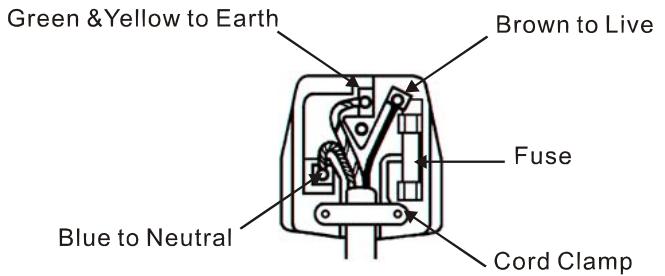
The wire which is coloured GREEN and YELLOW must be connected to the terminal in the plug which is marked with the letter E or by the earth symbol 12 or coloured GREEN or GREEN and YELLOW.
The wire coloured BLUE must be connected to the terminal marked with the letter N or coloured BLUE or BLACK. The wire coloured BROWN must be connected to the terminal marked with the letter L or coloured BROWN or RED.
Unpacking
Before unpacking the LCD Monitor, prepare a suitable workspace for your Monitor and computer. You need a stable and clean surface near a wall power outlet. Make sure that the LCD Monitor has enough space around it for sufficient airflow. Though the LCD Monitor uses very little power, some ventilation is needed to ensure that the Monitor does not become too hot.
After you unpack the LCD Monitor, make sure that the following items were included in the box:
- LCD Monitor
- 1.8M Monitor-to-PC DVI-D Cable
-
User's Manual
-
1.8M Monitor-to-PC VGA Cable
- 1.8M Power Cord
- 1.5M Stereo Jack Audio Cable
If you find that any of these items is missing or appears damaged, contact your dealer immediately.
Viewing Angle Adjustment
The LCD Monitor is designed to allow the users to have a comfortable viewing angle. The viewing angle can be adjusted as follows: Top (-5^ +30^) .
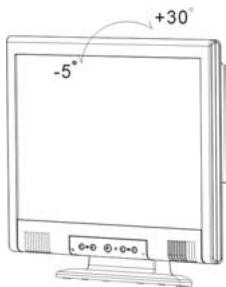
Figure 1-1
WARNING
Do not force the LCD Monitor over the maximum viewing angle settings as stated above. In such an event, you will damage the Monitor and a Monitor stand.
Connecting the Display to your Computer
- Power off your computer.
- Connect one end of the signal cable to the LCD Monitor's VGA port or DVI port. (See Fig. 1-2)
- Connect the other end of the signal cable to the VGA port or DVI port on your PC.
- Make sure both connections are secure.
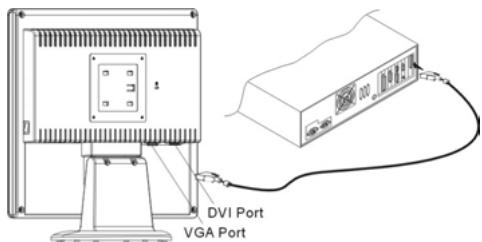
Figure 1-2
ATTENTION
This device must be connected to an off-the-shelf video cable in order to comply with FCC regulations. A ferrite-loaded interface cable is included in the LCD Monitor package. This device will not be in compliance with FCC regulations when a non-ferrite-core video cable is used.
Connecting the AC Power
- Connect the power cord to the LCD Monitor.(See Fig. 1-3)
- Connect the power cord to an AC power source.
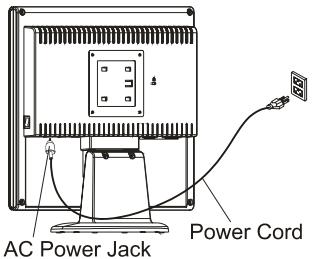
Figure 1-3
WARNING
Please install a "Surge Protector" device between the Power Cord and the electrical wall outlet for added protection against power surges to prevent the effects of sudden voltage variations from reaching the LCD Monitor. Sudden power surges may damage your monitor.
Connecting the Audio Cable
- Connect the audio cable to the "LINE OUT" jack on your PC's audio card or to the front panel's "AUDIO OUT" jack of your CD ROM drive. (See Fig. 1-4)
- Connect the other end of the audio cable to the LCD Monitor's "LINE IN" jack.
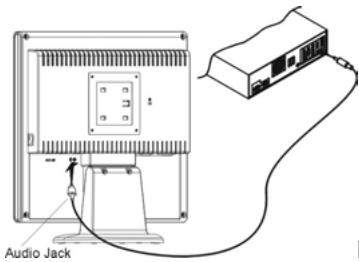
Figure 1-4
Setting Up the LCD Monitor
- Turn on the LCD monitor's hard power switch, located on the back of the monitor (See Fig. 1-5)
- Turn on the LCD Monitor's soft power switch, located on the bezel of the monitor.
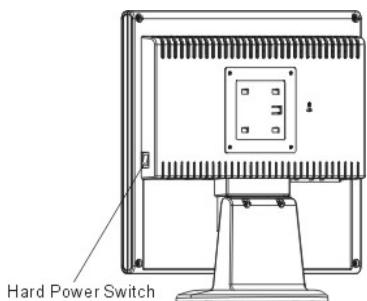
Figure 1-5
Power Management System
This LCD Monitor complies with the VESA DPMS (version 1.0) Power Management guidelines. The VESA DPMS provides four power saving modes through detecting a horizontal or vertical sync. signal.
When the LCD Monitor is in power saving mode, the monitor screen will be blank and the power LED indicator color shows.
Chapter 2 Display Controls
User Controls
A brief description and the location of all LCD Monitor function controls and indicators:
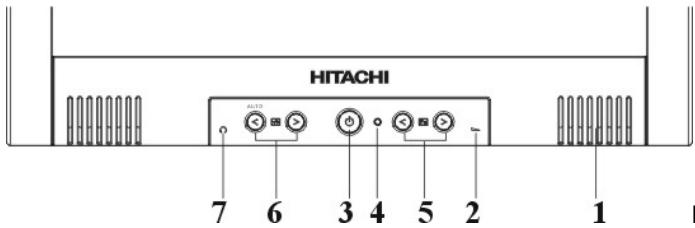
Figure 2-1
| 1 | Stereo Speakers | PC Audio Stereo output. |
| 2 | Speaker Volume Control | Increase Volume - Turn knob clockwise. Decrease Volume - Turn knob counter clockwise |
| 3 | Soft Power Switch | Press the soft power switch to switch the monitor ON/OFF. |
| 4 | DC Power-On Indicator | LED displays Green color --- Power is ON. LED displays Dark color --- Power is OFF. LED displays Yellow color --- Monitor is in "Power Saving Mode". |
| 5 | Function Select Buttons | Press either the left or right control button for the OSD (On Screen Display) menu selection. |
| 6 | Adjustment Control Buttons | Press the left button to decrease the value or the right button to increase the value of the chosen OSD setting. Press the left button for one second, then "Auto Adjustment" will be active. |
| 7 | External Headphone Jack | The monitor speakers will be disabled when using an external headphone or external speakers. |
Adjusting the Monitor's Display
The monitor has four function control keys among the functions shown on the OSD menu, designed to create an easy user-viewing environment.
OSD Function Menu
To access the OSD Main menu, simply press one of the Function Select Control buttons, and the menu dialog box will pop up on the screen as shown below:
Continue pressing the Function Selection Control buttons to scroll through all menu items.
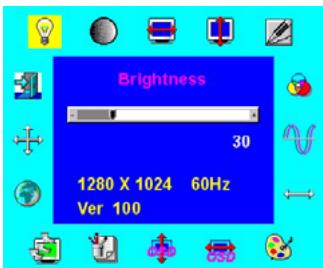
ATTENTION
Firmware revisions may have been updated to a later version, the version number shown on all OSD menus in this manual however will remain as Ver. 1.00
Function Descriptions
| Icon | Function | Function Description |
| Brightness | 101 scales of brightness are available to choose from (0 to 100). | |
| Contrast | 101 scales of contrast are available to choose from (0 to 100). | |
| H. Position | This function let's you adjust the display's horizontal position | |
| V. Position | This function let's you adjust the display's vertical position. | |
| Sharpness | This function let's you select the images sharpness. Three selections are available. A smoother setting is more suitable for pictures, while a sharper setting is more suitable for text. | |
| OSD Transparency | This function let's you set the transparency of the OSD menu. The transparency is adjustable from 0 to 10. 11 scales are available. | |
| Phase | A total of 256 scales (0 to 255) are available to adjust the focus and clarity of the display. | |
| Clock | This function carries a frequency-tracking feature that offers users better stability and clarity. 101 scales (from -50 to +50) are available on the mode that is currently running. The adjustable range can be variable in different modes. This function records the deviated number of clock period between input timing and supported timing. The clock value may not be"0" after Auto Adjustment when the input timing is different from supported timing. | |
| Color Temperature | Push the ( ) button to select a different color temperature. Please see the diagram below for function and description. | |
| OSD H. Position | This function moves the OSD menu window horizontally. | |
| OSD V. Position | This function moves the OSD menu window vertically. | |
| Graph / Text | Because the H and V-Frequencies of both 640 x 400 70Hz, and 720 x 400 70Hz, are the same, this function let's you manually select either 640 x 400 (graphics mode), or 720 x 400 (text mode). | |
| Recall | The recall function will return all adjusted parameters to factory preset values. | |
| Language | Five OSD language options are available: English, German, French, Spanish, and Italian. Press the left or right adjustment control button to select other language. | |
| Auto and Input Select | Press " " button to activate the selected function, Auto Adjustment, Use Analog Input or Use Digital Input. The Auto Adjustment function let you adjust the display size, clock and phase to obtain the best viewing settings. This process will take 3 ~ 5 seconds to complete. Attention : After Auto Adjustment, the display might display wrong position or size, if it has received a pattern which has no screen border. You may select either Analog or Digital Input video when VGA input or/and DVI Input is/are available. | |
| Exit | Saves the values of this setting and exits the OSD menu function. | |
| Icon | Function | Description |
| 9300 | CIE coordinate Color Temperature of 9300K | Sets the CIE coordinate color temperature to 9300K |
| 7500 | CIE coordinated Color Temperature of 7500K | Sets the CIE coordinate color temperature to 7500K |
| 6500 | CIE coordinated Color Temperature of 6500K | Sets the CIE coordinate color temperature to 6500K |
| User | Three colors (Red, Green, Blue) can be adjusted from the OSD menu | Sets the settings to a by user defined CIE Temperature. |
Chapter 3 Technical Information
Specifications
LCD Panel
Size
17" (43 cm)
Display Type
Active matrix color TFT LCD
Resolution
1280 × 1024
Display Dot
1280 x (RGB) x 1024
Display Area (mm)
337.92 x 270.336 (H x V)
Display Color
16.7M
Brightness
260 cd/m² (typical)
Contrast Ratio
400:1 (typical)
Response Time
Ta=25°C Tr=12ms Tf=4ms
Lamp Voltage
700 Vrms (typical)
Lamp Current
7.0 mA rms. (typical)
Viewing Angle (CR ≥ 5)
Vertical: -80^ +80^
Horizontal: -80^ +80^
ISO 13406-2
Pixel fault class: Class II
Video
Input Signal
Analog RGB 0.7Vp-p
Digital TMDS
Input Impedance
75 Ohm ±2%
Polarity
Positive
Amplitude
0 - 0.7 ± 0.05 Vp
Multi-mode Supported
Horizontal Frequency: 24 80KHz
Vertical Frequency: 56 75Hz
Control
Power switch (hard and soft types)
ON/OFF switch with LED indicator.
OSD
Brightness
Digital
Contrast
Digital
Horizontal Position
Digital
Vertical Position
Digital
Phase
Digital
Clock
Digital
Display Mode Setup
Uses EEPROM to save settings in memory
OSD Format
20 characters x 9 rows
Power Management
| Mode | Power Consumption* | AC Input | LED Color |
| ON | 48W maximum | 240 VAC | Green |
| OFF | 3W maximum | 240 VAC | Yellow |
| Soft switch off | 3W maximum | 240 VAC | Dark |
| Disconnected | 3W maximum | 240 VAC | Yellow: Standby, Suspend, OFF Off: DC Power OFF |
| Hard switch off | 1W maximum | 120 VAC | Dark |
| 2W maximum | 240 VAC |
- Meeting VESA DPMS requirements measured from AC Input.
| Sync Input | Analog | Digital |
| Signal | Separate TTL compatible horizontal and vertical synchronization | TMDS |
| Polarity | Positive and negative | — |
| Plug & Play | Supports VESA DDC1 and DDC2B functions | |
| External Connection | ||
| Power Input | AC socket | |
| Video Cable | 1.8M with 15-pin D-sub connector | |
| 1.8M with 24-pin DVI-D connector | ||
| Audio Cable | 1.5M with Stereo Jack | |
| Environment | ||
| Operating | ||
| Temperature | 5°C to 40°C/41°F to 104°F | |
| Relative Humidity | 20 to 80%(non-condensing) | |
| Storage or Shipping | ||
| Temperature | -20°C to 60°C/-4°F to140°F | |
| Relative Humidity | 5% to 85%(non-condensing) | |
| Power Supply | ||
| Input Voltage | Single phase, 100 ~ 240VAC, 50 / 60 Hz | |
| Input Current | 1.2 A maximum | |
| Size and Weight | ||
| Dimensions | 374 (W) x 394.5 (H) x 204 (D) mm | |
| Net Weight | 5 kg ± 0.3 kg | |
| Gross Weight | 7 kg ± 0.3 kg | |
For Analog D-sub connector
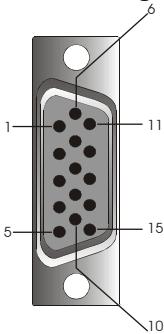
| Signal | Signal | Signal | |||
| PIN | Description | PIN | Description | PIN | Description |
| 1 | Red | 6 | Red Rtn | 11 | NC |
| 2 | Green | 7 | Green Rtn | 12 | SDA |
| 3 | Blue | 8 | Blue Rtn | 13 | H. Sync. / C. Sync. |
| 4 | Digital GND | 9 | +5V | 14 | V. Sync. |
| 5 | Digital GND | 10 | Hot Plug Detect | 15 | SCL |
For Digital DVI-D connector
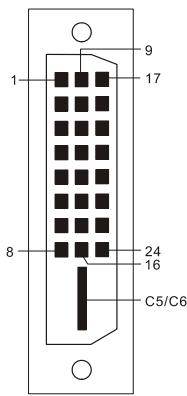
| Signal | Signal | Signal | |||
| PIN | Description | PIN | Description | PIN | Description |
| 1 | RX2- | 10 | RX1+ | 19 | Shield for TMDS Channel 0 |
| 2 | RX2+ | 11 | Shield for TMDS Channel 1 | 20 | NC |
| 3 | Shield for TMDS Channel 2 | 12 | NC | 21 | NC |
| 4 | NC | 13 | NC | 22 | Shield for TMDS Channel clock |
| 5 | NC | 14 | +5V | 23 | RXC+ |
| 6 | SCL | 15 | Hot Plug Detect | 24 | RXC- |
| 7 | SDA | 16 | HPD | C5 | NC |
| 8 | NC | 17 | RX0- | C6 | NC |
| 9 | RX1- | 18 | RX0+ | ||
Standard Timing Table
If the selected timing is NOT included in table below, this LCD monitor will use the most suitable available timing.
| Resolution | H - Freq. (KHz) | V. Freq. (Hz) | Pixel Freq. (MHz) | H/V Sync. Polarity | Mode |
| 640 x 350 | 31.469 | 70.087 | 25.175 | +/- | VGA-350 |
| 640 x 400 | 24.83 | 56.42 | 21.05 | -/- | NEC PC 9801 |
| 640 x 400 | 31.469 | 70.087 | 25.175 | -/+ | VGA-400-GRAPH. |
| 640 x 400 | 31.50 | 70.15 | 25.197 | -/- | NEC PC9821 |
| 640 x 480 | 31.469 | 59.940 | 25.175 | -/- | VGA 480 |
| 640 x 480 | 35.000 | 66.670 | 30.240 | -/- | APPLE MAC - 480 |
| 640 x 480 | 37.861 | 72.809 | 31.500 | -/- | VESA - 480 - 72Hz |
| 640 x 480 | 37.500 | 75.000 | 31.500 | -/- | VESA - 480 - 75Hz |
| 720 x 400 | 31.469 | 70.087 | 28.322 | -/+ | VESA-400-TEXT |
| 800 x 600 | 35.156 | 56.250 | 36.000 | +/+ | SVGA |
| 800 x 600 | 37.879 | 60.317 | 40.000 | +/+ | VESA-600-60 Hz |
| 800 x 600 | 48.077 | 72.188 | 50.000 | +/+ | VESA-600-72 Hz |
| 800 x 600 | 46.875 | 75.000 | 49.500 | +/+ | VESA-600-75 Hz |
| 832 x 624 | 49.725 | 74.55 | 57.283 | -/- | APPLE MAC-800 |
| 1024 x 768 | 48.363 | 60.004 | 65.000 | -/- | XGA |
| 1024 x 768 | 53.964 | 66.132 | 71.664 | +/+ | COMPAQ-XGA |
| 1024 x 768 | 56.476 | 70.069 | 75.000 | -/- | VESA-600-70 Hz |
| 1024 x 768 | 60.023 | 75.029 | 78.750 | +/+ | VESA-768-75 Hz |
| 1024 x 768 | 60.04 | 75.02 | 80.00 | -/- | APPLE MAC-768 |
| 1280 x 1024 | 64.0 | 60 | 108 | +/+ | SXGA |
| 1280 x 1024 | 80.0 | 75 | 135 | +/+ | SXGA |
NOTE:
- When the input display mode is not 1280 × 1024 , the image is smoothly expanded to 1280 × 1024 dots with the GM5120 scaling engine. After expansion from 650 × 350 , 640 × 400 , 640 × 480 , 720 × 400 , 832 × 624 , 800 × 600 , and 1024 × 768 resolution, the text may look not so sharp, and the Graphics may look not so proportional.
- 640x400 56Hz and 1024x768 66Hz modes cannot be supported when Digital (TMDS) input.
Troubleshooting
This LCD Monitor has pre-adjusted using factory to standard VGA timings. Due to the output timing differences among various VGA cards in the market, users may initially experience an unstable or unclear display whenever a new display mode or new VGA card is selected.
ATTENTION
This LCD Monitor Supports Multiple VGA Modes.
Refer to the Standard Timing Table for a listing of modes supported by this LCD Monitor.
PROBLEM Picture is unclear and unstable or new colorized
The picture is unclear and unstable, please perform the following steps:
- Enter PC to "Shut Down Windows" status while you're in a MS-Windows environment.
- Check the screen to see if any black vertical stripes appear. If there are, use the "Clock" function in OSD menu and adjust (by increment or decrement numbers) until those bars disappear.
- Move to "phase" function in OSD menu again and adjust the monitor screen to its clearest display.
- Click "No" on "Shut Down Windows" and return to the normal PC operating environment.
PROBLEM There is no picture on LCD Monitor
If there's no picture on the LCD Monitor, please perform the following steps:
- Make sure the power indicator on the LCD Monitor is ON, all connections are secured, and the system is running on the correct timing. Refer to Chapter 3 for information on timing.
- Turn off the LCD Monitor and then turn it back on again. Press the right Function Select Control button once and then press either the left or right Adjustment Control button several times. If there is still no picture, press the other Adjustment Control button several times.
- If step 2 doesn't work, connect your PC system to another external CRT. If your PC system Functions properly with a CRT Monitor but it does not function with the LCD Monitor, the output timing of the VGA card may be out of the LCD's synchronous range. Please change to an alternative mode listed in the Standard Timing Table or replace the VGA card, and then repeat steps 1 and 2.
PROBLEM There is no picture on LCD Monitor
If you have chosen an output timing that is outside of the LCD Monitor's synchronous range (Horizontal: 24 80KHz and Vertical: 56 75Hz ), the OSD will display an "Input Signal Out of Range" message. Choose a mode that is supported by the LCD Monitor.
If there is no signal input or you get a DPMS power saving signal from the PC, the monitor will display the message "No Input Signal", and then go into the POWER OFF mode.
If the signal cable is not connected to the monitor, the monitor will display the message "Check Video Cable", and then go into POWER OFF mode.
HITACHI
Hitachi, Ltd. Tokyo, Japan
International Sales Division
THE HITACHI ATAGO BUILDING,
No. 15-12 Nishi Shinbashi, 2 - Chome, Minato - Ku, Tokyo 105-8430, Japan.
Tel: 03 35022111
HITACHI EUROPE LTD,
Whitebrook Park
Lower Cookham Road
Maidenhead
Berkshire
SL6 8YA
UNITED KINGDOM
Tel: 01628 643000
Fax: 01628 643400
Email: consumer-service@hitachi-eu.com
HITACHI EUROPE S.A.
364 Kifissias Ave. & 1, Delfon Str.
152 33 Chalandri
Athens
GREECE
Tel: 1-6837200
Fax: 1-6835964
Email: service.hellas@hitachi-eu.com
HITACHI EUROPE GmbH
Munich Office
Dornacher Strasse 3
Email: HSE-DUS.service@hitachi-eu.com
HITACHI EUROPE S.A.
Gran Via Carlos III, 101-1
08028 Barcelona
SPAIN
Tel: 93 409 2550
Fax: 934913513
Email: atencion.cliente@hitachi-eu.com
HITACHI EUROPE srl
Via Tommaso Gulli N.39, 20147
Milano, Italia
ITALY
Tel: +39 02 487861
Tel: +39 02 38073415 Servizio Clienti
Fax: +39 02 48786381/2
Email: customerservice.italy@hitachi-eu.com
HITACHI Europe AB
Box 77 S-164 94 Kista
SWEDEN
Tel: +46 (0) 856271100
Fax: +46 (0) 8562711 13
Email: csgswe@hitachi-eu.com
HITACHI EUROPE S.A.S
Lyon Office
B.P. 45, 69671 BRON CEDEX
FRANCE
Tel: 04 72 14 29 70
Fax: 04 72 14 29 99
HITACHI EUROPE LTD (Norway) AB
STRANDVEIEN 18
1366 Lysaker
NORWAY
Tel: 67 5190 30
Fax:67519032
Email: csgnor@hitachi-eu.com
HITACHI EUROPE AB
Egebaekgård
Egebækvej 98
DK-2850 Nærum
DENMARK
Tel: +45 43 43 6050
Fax: +45 43 60 51
Email: csgnor@hitachi-eu.com
HITACHI EUROPE AB
Neopoli / Niemenkatu 73
FIN-15140 Lahti
FINLAND
Tel: +358 3 8858 271
Fax: +358 3 8858 272
Email: csgnor@hitachi-eu.com
Hitachi Europe Ltd
Bergensesteenweg 421
1600 Sint-Pieters-Leeuw
BELGIUM
Tel: +32 2 363 99 01
Fax: +32 2 363 99 00
Email: sofie.van.bom@hitachi-eu.com
HITACHI EUROPE LTD
Na Sychrove 975/8
101 27 Praha 10 - Bohdalec
CZECH REPUBLIC
Tel: +420 267 212 383
Fax: +420 267 212 385
Email: csgnor@hitachi-eu.com