
SNC-EM520 - Surveillance Camera SONY - Free user manual and instructions
Find the device manual for free SNC-EM520 SONY in PDF.
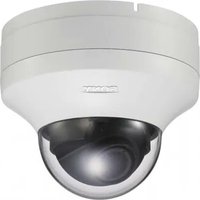


Pick your language and provide your email: we'll send you a specifically translated version.
| Product Type | Surveillance Camera |
| Image Sensor | 1/2.8-inch progressive scan CMOS |
| Resolution | 5 Megapixels (2592 x 1944) |
| Lens | Fixed focal, 3.0 mm (F2.0) |
| Minimum Illumination | 0.05 lux (color) / 0 lux (IR on) |
| IR Distance | Up to 20 m (66 ft) |
| Video Compression | H.264, JPEG |
| Network Interface | 10BASE-T/100BASE-TX (RJ-45) |
| Power Supply | PoE (IEEE 802.3af) or DC 12 V |
| Power Consumption | Max. 6.5 W |
| Operating Temperature | -10°C to +50°C (14°F to 122°F) |
| Dimensions (Φ x H) | 118 x 75 mm (4.65 x 2.95 in) |
| Weight | Approx. 480 g (1.06 lb) |
| Supported Protocols | IPv4, IPv6, TCP, UDP, HTTP, HTTPS, RTP, RTSP, ONVIF Profile S |
| Security | User authentication, IP filtering, HTTPS encryption |
| Storage | MicroSD slot (up to 256 GB) |
| Installation | Indoor, ceiling mount included |
| Maintenance | Clean lens with dry cloth; keep ventilation clear |
| Accessories Included | Quick start guide, installation template, screws |
| Compliance | CE, FCC, RoHS |
Frequently Asked Questions - SNC-EM520 SONY
How do I reset the camera to factory defaults?
Press and hold the reset button on the camera for 10 seconds using a pointed object. The camera will reboot with default settings. The default IP address is 192.168.0.100.
What is the default IP address and login credentials?
Default IP address is 192.168.0.100. Default username is admin and password is admin. It is strongly recommended to change the password during initial setup.
How can I access the camera via web browser?
Enter the camera's IP address in a web browser. For first-time access, you may need to install a plugin (ActiveX for Internet Explorer or use an ONVIF-compatible viewer). Use HTTPS for encrypted connection.
What are the power requirements for PoE?
The camera supports Power over Ethernet (IEEE 802.3af). Ensure your PoE switch or injector provides at least 8 W per port. Alternatively, you can use a DC 12 V power supply (not included).
How do I connect the camera to a network?
Connect the Ethernet cable to the camera and to a PoE switch or router. If using DC power, connect the power adapter. The camera will automatically obtain an IP via DHCP; if not, use the default IP.
Can I use the camera with a third-party NVR?
Yes, the camera supports ONVIF Profile S, so it works with most third-party NVRs and video management software that are ONVIF compliant. You may need to manually set streaming parameters.
How do I record video to a MicroSD card?
Insert a MicroSD card (class 10, up to 256 GB) into the slot. Configure recording via the web interface under Storage settings. You can set continuous, scheduled, or motion-triggered recording.
What mobile app is compatible with this camera?
Use the Sony Imaging Edge Mobile app or any ONVIF-compatible app (e.g., IP Cam Viewer, VMS Mobile). Scan the QR code on the camera or enter the IP address manually.
How do I adjust the camera focus and zoom?
The SNC-EM520 has a fixed lens with no motorized zoom. Focus is pre-calibrated. For fine adjustments, use the web interface to enable Focus control if available, or physically adjust the lens ring by removing the dome cover.
What should I do if the camera stops responding?
First, check the Ethernet LED indicators. If off, verify PoE power. Try a power cycle by unplugging for 30 seconds. If still unresponsive, perform a factory reset using the reset button. If the problem persists, contact Sony support.
User questions about SNC-EM520 SONY
0 question about this device. Answer the ones you know or ask your own.
Ask a new question about this device
No questions yet. Be the first to ask one.
Download the instructions for your Surveillance Camera in PDF format for free! Find your manual SNC-EM520 - SONY and take your electronic device back in hand. On this page are published all the documents necessary for the use of your device. SNC-EM520 by SONY.
USER MANUAL SNC-EM520 SONY


Manual assistant
Powered by Anthropic
Waiting for your message
Product information
Brand : SONY
Model : SNC-EM520
Category : Surveillance Camera