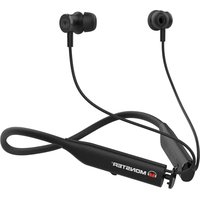
Flex - Headphones MONSTER - Free user manual and instructions
Find the device manual for free Flex MONSTER in PDF.


Pick your language and provide your email: we'll send you a specifically translated version.
| Product Type | Wireless Headphones |
| Dimensions (folded) | 17 x 15 x 7 cm |
| Weight | 250 g |
| Power Source | Rechargeable lithium-ion battery |
| Battery Life | 20 hours |
| Charging Time | 2 hours |
| Connectivity | Bluetooth 5.0 |
| Main Features | Audio player, hands-free calling, active noise cancellation |
| Controls | Touch and physical buttons |
| Care and Cleaning | Wipe with a soft, dry cloth. Do not use chemicals. |
| Safety | Sound pressure level below 85 dB |
| Spare Parts and Repairability | Replaceable ear cushions and charging cable |
| General Information | Brand: Monster - Model: Flex |
Frequently Asked Questions - Flex MONSTER
How to turn on and pair the Monster Flex headset?
Press the power button for 3 seconds until the LED flashes. Enable Bluetooth on your device and select "Monster Flex" from the list of devices.
What to do if the headset does not connect?
Make sure the headset is in pairing mode (flashing LED) and that your device's Bluetooth is on. If the problem persists, forget the device in Bluetooth settings and try again.
How to charge the Monster Flex headset?
Use the provided USB-C cable and plug it into a suitable charger (5V/1A). The red LED indicates charging, it turns off when fully charged.
What is the battery life?
Battery life is approximately 20 hours of continuous playback with active noise cancellation. Full charge takes about 2 hours.
How to activate active noise cancellation?
Press the dedicated button once (usually on the left earcup) to turn noise cancellation on or off. A green LED confirms activation.
Can I use the headset while charging?
Yes, the headset can be used in wired mode (with the included audio cable) even when empty. While charging, you can also use it wirelessly, but this may lengthen charging time.
How to clean the Monster Flex headset?
Use a soft, dry cloth to wipe the surfaces. For the ear cushions, remove them if possible and clean with a slightly damp cloth, then let dry completely before reattaching.
Is the headset compatible with all smartphones?
Yes, the Monster Flex uses standard Bluetooth and is compatible with most smartphones, tablets, and computers that support the A2DP profile.
How to reset the headset to factory settings?
Press and hold the power and volume + buttons simultaneously for 10 seconds until the LED flashes red and blue. The headset will restart and be ready for a new pairing.
Where to find replacement ear cushions?
Ear cushions are available on the official Monster website or from authorized dealers. Check compatibility with the Flex model before purchasing.
User questions about Flex MONSTER
0 question about this device. Answer the ones you know or ask your own.
Ask a new question about this device
No questions yet. Be the first to ask one.
Download the instructions for your Headphones in PDF format for free! Find your manual Flex - MONSTER and take your electronic device back in hand. On this page are published all the documents necessary for the use of your device. Flex by MONSTER.
USER MANUAL Flex MONSTER


Manual assistant
Powered by Anthropic
Waiting for your message
Product information
Brand : MONSTER
Model : Flex
Category : Headphones