
NC - Headphones MONSTER - Free user manual and instructions
Find the device manual for free NC MONSTER in PDF.

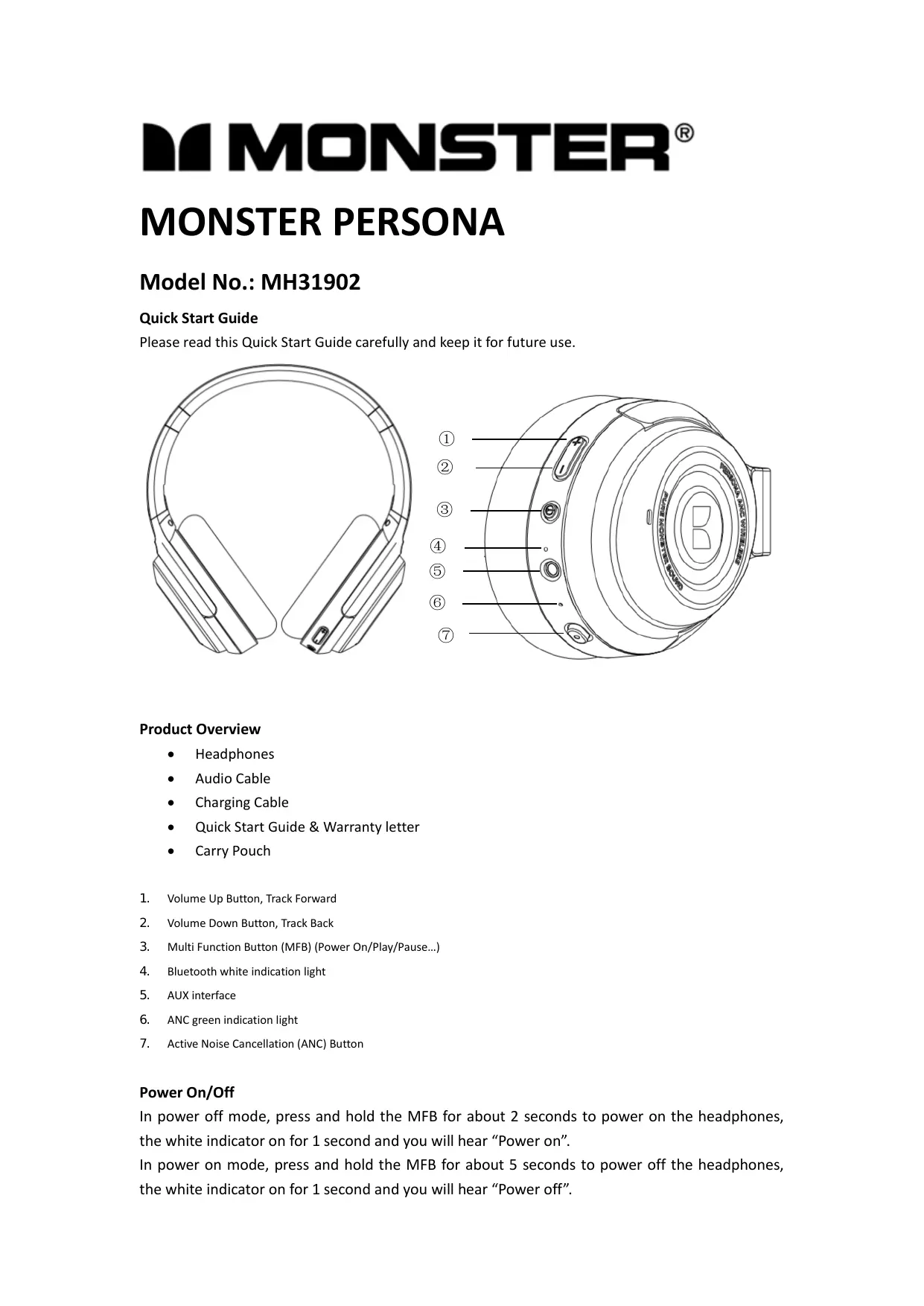

| Product Type | Wireless Headset |
| Brand | Monster |
| Model | NC (MH31902) |
| Connectivity | Bluetooth |
| Active Noise Cancellation | Yes (ANC) |
| Estimated Battery Life | 20 hours (with ANC) |
| Power Source | Rechargeable battery via USB cable |
| Main Functions | Pairing, volume control, call management, music controls, ANC |
| Controls | Volume buttons (+/-), multi-function button (MFB), ANC button |
| Package Contents | Headset, audio cable, charging cable, quick start guide, carrying pouch |
| Estimated Weight | 250 g |
| Safety | Responsible listening: avoid prolonged exposure to high volumes |
| Care and Cleaning | Wipe with a soft, dry cloth |
Frequently Asked Questions - NC MONSTER
User questions about NC MONSTER
0 question about this device. Answer the ones you know or ask your own.
Ask a new question about this device
Download the instructions for your Headphones in PDF format for free! Find your manual NC - MONSTER and take your electronic device back in hand. On this page are published all the documents necessary for the use of your device. NC by MONSTER.
USER MANUAL NC MONSTER
Please read this Quick Start Guide carefully and keep it for future use.
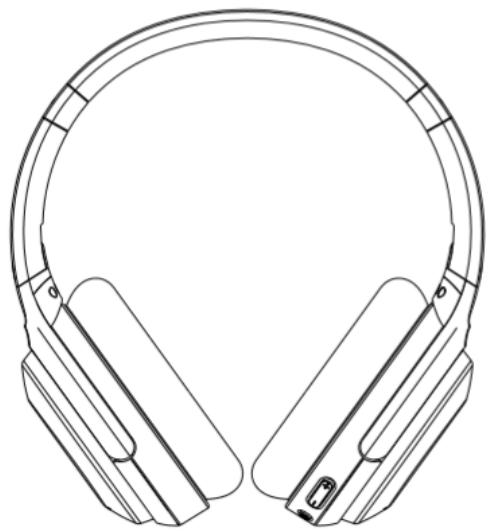

Product Overview
- Headphones
Audio Cable - Charging Cable
Quick Start Guide & Warranty letter -
Carry Pouch
-
Volume Up Button, Track Forward
- Volume Down Button, Track Back
- Multi Function Button (MFB) (Power On/Play/Pause...)
- Bluetooth white indication light
- AUX interface
- ANC green indication light
- Active Noise Cancellation (ANC) Button
Power On/Off
In power off mode, press and hold the MFB for about 2 seconds to power on the headphones, the white indicator on for 1 second and you will hear "Power on".
In power on mode, press and hold the MFB for about 5 seconds to power off the headphones, the white indicator on for 1 second and you will hear "Power off".
Pairing
In power off mode, press and hold the MFB for about 5 seconds until indicator light flashes white, you hear "Power on"..."Pairing". Now headphones are in pairing mode. Activate Bluetooth on your equipment and set it to search for new devices (new Monster device). When the headphones are paired successfully, "Paired. Your device is connected" will be heard.
Note: When you unbox the headphones and power it on for the first time, it will enter to pairing mode automatically.
Volume Control
Short press the Volume Up or Down Button to turn volume up or down, you hear tone once you reach the maximum volume or minimum volume.
Call
Answer/End Call: short press the MFB
Reject Call: long press the MFB about 2 seconds
Redial: quickly double press the MFB for radial the last dialed phone number
Music
Play/Pause: In the music playback mode, press the MFB to play/pause music.
Track back: In the music playback mode, press and hold the Volume Down Button for 2 seconds for previous song.
Track forward: In the music playback mode, press and hold the Volume Up Button for 2 seconds for next song.
Active Noise Cancellation (ANC)
Turn on ANC function: When ANC is off, short press ANC button to activate the active noise cancellation function. When ANC is on, indicator stays green, You will hear the "ANC ON".
Turn off ANC function: When ANC is on, short press ANC button to deactivate the active noise cancellation function, You will hear the "ANC OFF".
Reset Paired Device List
After power on, no Bluetooth device is connected, press and hold the MFB and Volume Up Button simultaneously for about 5 seconds.
LED Guide to Indicator Lights
| Mode | Description | Indication |
| Power On | White LED indicator lights for about 1 second | “Power On” |
| Power Off | White LED indicator lights for about 1 second | “Power Off” |
| Pairing | White LED flashes quickly | “Pairing” |
| Connected | No function operation, the indicator light is off | “Paired, Your device is connected” |
| ANC On | Green light is on | “ANC ON” |
| ANC Off | The green indicator is off | “ANC OFF” |
Listen Responsibly
To avoid hearing damage, make sure that the volume on your music player is turned down before connecting your headphones. After placing headphones in/on your ears, gradually turn up the volume until you reach a comfortable listening level.
Noise levels are measured in decibels (dB), exposure to any noise at or above 85 dB can cause gradual hearing loss.
Monitor your use; hearing loss is a function of loudness versus time. The louder it is, the less time you can be exposed to it. The softer it is, the more time you can listen to it.
Get the most out of your equipment and enjoy great audio performance even at safe levels. Our headphones will allow you to hear more details at lower volume levels than ever before.
Learn how to establish a safe listening level and review other important safety guidelines from the Consumer Electronics Association at www.ce.org. Important information on how to prevent Noise-Induced Hearing Loss (NIHL) and a comprehensive list of which noises can cause damage can be found on the Deafness Research Foundation's website, www.drf.org.
FCC Statement
Changes or modifications not expressly approved by the party responsible for compliance could void the user's authority to operate the equipment.
This equipment has been tested and found to comply with the limits for a Class B digital device, pursuant to Part 15 of the FCC Rules. These limits are designed to provide reasonable protection against harmful interference in a residential installation. This equipment generates uses and can radiate radio frequency energy and, if not installed and used in accordance with the instructions, may cause harmful interference to radio communications. However, there is no guarantee that interference will not occur in a particular installation. If this equipment does cause harmful interference to radio or television reception, which can be determined by turning the equipment off and on, the user is encouraged to try to correct the interference by one or more of the following measures:
Reorient or relocate the receiving antenna.
- Increase the separation between the equipment and receiver.
- Connect the equipment into an outlet on a circuit different from that to which the receiver is connected.
- Consult the dealer or an experienced radio/TV technician for help
This device complies with part 15 of the FCC rules. Operation is subject to the following two conditions (1) this device may not cause harmful interference, and (2) this device must accept any interference received, including interference that may cause undesired operation.

Brand : MONSTER
Model : NC
Category : Headphones