PerfectSurface 180 Delta - Sander CECOTEC - Free user manual and instructions
Find the device manual for free PerfectSurface 180 Delta CECOTEC in PDF.


Pick your language and provide your email: we'll send you a specifically translated version.
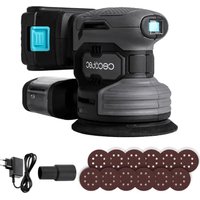
| Product type | Delta sander |
| Brand | Cecotec |
| Model | PerfectSurface 180 Delta |
| Power | 180 W |
| Power supply | 220-240 V ~ 50/60 Hz |
| No-load speed | 6000 - 12000 rpm |
| Sanding surface | Delta shape (triangular) |
| Abrasive attachment system | Self-gripping (Velcro) |
| Dimensions (L x W x H) | 20 x 10 x 15 cm |
| Weight | 1.2 kg |
| Noise level | 84 dB(A) |
| Vibrations | < 2.5 m/s² |
| Dust extraction system | Integrated dust collection bag |
| Variable speed | Yes |
| Ergonomic handle | With rubber coating |
| Double safety insulation | Yes |
| Automatic shut-off in case of overheating | Yes |
| Cleaning | Regularly dust off ventilation slots |
| Abrasive paper replacement | Peel off and reposition on the pad |
| Included accessories | 3 abrasive papers of different grits, dust bag |
| Warranty | 2 years |
| Repairability | Repairability index not communicated |
Frequently Asked Questions - PerfectSurface 180 Delta CECOTEC
How to change the abrasive paper of the PerfectSurface 180 Delta sander?
Remove the used paper from the self-gripping pad. Position the new abrasive paper aligning the dust extraction holes, then press firmly.
What is the power of the Cecotec PerfectSurface 180 Delta sander?
The sander has a power of 180 W, suitable for finishing and precision sanding work.
How to adjust the speed of the sander?
Use the speed control wheel located on top of the device. Turn it to vary the speed from 6000 to 12000 rpm depending on the material.
Can I use the sander without the dust bag?
Yes, but it reduces suction efficiency. It is recommended to always use the collection bag to limit dust.
How to clean the PerfectSurface 180 Delta sander?
Unplug the device. Clean the housing with a damp cloth and dust off the ventilation slots. Empty the dust bag regularly.
What types of abrasive paper can I use?
Use delta-shaped (triangular) abrasive paper with self-gripping attachment. The sander is compatible with grits from 80 to 240.
Does the sander have overheating protection?
Yes, the device automatically shuts off in case of overheating. Wait for it to cool down before using again.
What accessories are included with the sander?
The sander comes with 3 abrasive papers of different grits (P80, P120, P240) and a dust collection bag.
How to empty the dust bag?
Open the bag closure over a trash can, empty the contents, then close. You can wash the bag with soapy water and dry it before reuse.
Is the PerfectSurface 180 Delta sander suitable for corners?
Yes, its delta shape allows reaching corners and hard-to-reach areas, ideal for finishes.
User questions about PerfectSurface 180 Delta CECOTEC
0 question about this device. Answer the ones you know or ask your own.
Ask a new question about this device
No questions yet. Be the first to ask one.
Download the instructions for your Sander in PDF format for free! Find your manual PerfectSurface 180 Delta - CECOTEC and take your electronic device back in hand. On this page are published all the documents necessary for the use of your device. PerfectSurface 180 Delta by CECOTEC.
USER MANUAL PerfectSurface 180 Delta CECOTEC
Manual assistant
Powered by Anthropic
Waiting for your message
Product information
Brand : CECOTEC
Model : PerfectSurface 180 Delta
Category : Sander