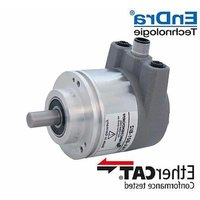
WDGA 58B - Industrial sensor Wachendorff - Free user manual and instructions
Find the device manual for free WDGA 58B Wachendorff in PDF.


Pick your language and provide your email: we'll send you a specifically translated version.
| Product Type | Absolute Rotary Encoder |
| Model Number | WDGA 58B |
| Brand | Wachendorff |
| Diameter | 58 mm |
| Housing Material | Aluminum |
| Shaft Type | Solid or Hollow Shaft (depending on variant) |
| Resolution | Up to 17 bit (131072 steps per revolution) |
| Output Interface | SSI, BiSS, CANopen, or other fieldbus options |
| Supply Voltage | 10-30 VDC |
| Max Speed | 6000 rpm |
| Protection Class | IP65 (shaft side), IP67 (housing) |
| Operating Temperature | -40°C to +85°C |
| Weight | Approximately 200 g |
| Connection Type | M12 connector or cable outlet |
| Features | Multiturn, diagnostics, programmable parameters |
| Cleaning Instructions | Wipe with dry cloth; do not use solvents |
| Safety Notes | Disconnect power before installation; avoid mechanical shock |
| Spare Parts Availability | Replacement flanges, cables, connectors (contact manufacturer) |
Frequently Asked Questions - WDGA 58B Wachendorff
How do I install the WDGA 58B encoder?
Mount the encoder securely using the provided flange or clamping hub. Ensure the shaft alignment is within 0.2 mm. Connect the power and signal wires according to the pinout diagram in the manual. Tighten the connector to IP67 rating if required.
What is the maximum resolution of this encoder?
The WDGA 58B supports resolutions up to 17 bits, offering 131072 steps per revolution for precise angular measurement.
Can I use this encoder in outdoor or wet environments?
Yes, the encoder has an IP65 protection on the shaft side and IP67 on the housing, making it suitable for dusty and wet conditions. Avoid direct submersion unless specified.
What output interfaces are available?
Common interfaces include SSI, BiSS, CANopen, and other fieldbus protocols. Check the specific model variant for compatibility.
How do I configure the encoder parameters?
Parameters such as resolution, direction, and offset can be set via the fieldbus interface using a suitable configuration tool, or by using the Wachendorff proprietary software.
Is there a way to reset the encoder to factory settings?
Yes, you can reset to factory defaults by sending a specific command via the interface or by using a magnetic tool on the reset contact (see manual for details).
What is the recommended cleaning procedure?
For cleaning, use a soft, dry cloth. If necessary, slightly dampen with water. Do not use abrasive cleaners, solvents, or high-pressure jets.
How do I check if the encoder is working?
Monitor the output signals (e.g., SSI or CANopen) using a diagnostic tool. The encoder also provides status bits that indicate operational health. Refer to the manual for expected values.
What spare parts are available for this model?
Spare parts include replacement flanges, cables with connectors, and mounting accessories. Contact Wachendorff support for specific part numbers.
Can I daisy-chain multiple WDGA 58B encoders?
Yes, if using a fieldbus interface like CANopen, multiple encoders can be connected in a daisy-chain topology. Ensure proper termination and node addressing.
User questions about WDGA 58B Wachendorff
0 question about this device. Answer the ones you know or ask your own.
Ask a new question about this device
No questions yet. Be the first to ask one.
Download the instructions for your Industrial sensor in PDF format for free! Find your manual WDGA 58B - Wachendorff and take your electronic device back in hand. On this page are published all the documents necessary for the use of your device. WDGA 58B by Wachendorff.
USER MANUAL WDGA 58B Wachendorff



Manual assistant
Powered by Anthropic
Waiting for your message
Product information
Brand : Wachendorff
Model : WDGA 58B
Category : Industrial sensor