CO-200 - Lock Schlage - Free user manual and instructions
Find the device manual for free CO-200 Schlage in PDF.


Pick your language and provide your email: we'll send you a specifically translated version.
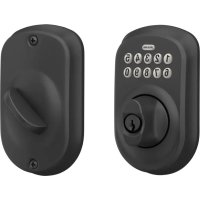
| Product Type | Electronic Deadbolt |
| Model | CO-200 |
| Brand | Schlage |
| Door Thickness | 1-3/8" to 1-3/4" |
| Backset | 2-3/8" or 2-3/4" adjustable |
| Weight | 2.2 lbs (1.0 kg) |
| Power Source | 4 AA alkaline batteries (not included) |
| Battery Life | Approximately 1 year under normal use |
| Locking Mechanism | Motorized deadbolt with backup key override |
| Key Override | Schlage C keyway (2 keys included) |
| User Codes | Up to 19 unique codes (1 master, 18 user) |
| Code Length | 6 digits |
| Auto-Lock | Programmable from 10 to 60 seconds |
| Interior Lock/Unlock | Turn knob with push button privacy lock |
| Security Grade | ANSI/BHMA Grade 2 |
| Finish | Available in Bright Brass, Satin Nickel, Aged Bronze (varies) |
| Operating Temperature | -14°F to 140°F (-10°C to 60°C) |
| Compliance | UL listed |
| Installation | Easy DIY with screwdriver and drill (optional) |
| Warranty | Limited lifetime on mechanical parts, 3 years on electronics |
Frequently Asked Questions - CO-200 Schlage
How do I replace the batteries in my Schlage CO-200?
Remove the interior cover, replace the 4 AA batteries with fresh alkalines, then replace the cover. Test the lock before closing the door.
How do I add a new user code?
Press the Schlage button on the keypad, enter your master code, press the Schlage button again, enter the new 6-digit user code, then press the Schlage button to confirm.
What do I do if my Schlage CO-200 is not responding?
First, check the batteries. If the keypad flashes red or beeps, the batteries are low. Replace them. If still not working, use the backup key to unlock and check wiring or contact support.
Can I use the CO-200 with a smart home system?
The standard CO-200 is not Wi-Fi or Bluetooth enabled. It is a standalone keypad lock. For smart capabilities, consider Schlage Connect models.
How do I reset my Schlage CO-200 to factory defaults?
Remove the interior cover, press and hold the reset button for 3 seconds. All codes will be erased. You will need to reprogram a new master code.
What door thickness is required for installation?
The lock fits standard doors with a thickness of 1-3/8" to 1-3/4". For thicker or thinner doors, optional trim kits are available.
How do I enable the auto-lock feature?
Press the Schlage button, enter your master code, press the Schlage button again, then press '3' for auto-lock. Press '1' to enable, enter the delay (10-60 seconds), and confirm by pressing the Schlage button.
What does the low battery indicator look like?
When the battery is low, the keypad will flash red 3 times and beep when you enter a code. The code will still unlock, but you should change batteries soon.
How do I clean my Schlage CO-200?
Use a soft, damp cloth with mild soap and water. Do not use abrasive cleaners or solvents as they may damage the finish. Dry thoroughly.
What is the difference between the master code and a user code?
The master code is the primary administrative code (default 123456) used to add/delete user codes and change settings. User codes only lock/unlock the door and have no programming privileges.
User questions about CO-200 Schlage
0 question about this device. Answer the ones you know or ask your own.
Ask a new question about this device
No questions yet. Be the first to ask one.
Download the instructions for your Lock in PDF format for free! Find your manual CO-200 - Schlage and take your electronic device back in hand. On this page are published all the documents necessary for the use of your device. CO-200 by Schlage.
USER MANUAL CO-200 Schlage
Manual assistant
Powered by Anthropic
Waiting for your message
Product information
Brand : Schlage
Model : CO-200
Category : Lock