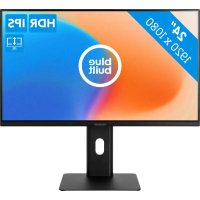
BBQHM2710HC - Monitor BlueBuilt - Free user manual and instructions
Find the device manual for free BBQHM2710HC BlueBuilt in PDF.


Pick your language and provide your email: we'll send you a specifically translated version.
| Product type | 27-inch monitor |
| Brand | BlueBuilt |
| Model | BBQHM2710HC |
| Screen resolution | 1920 x 1080 pixels (Full HD) |
| Refresh rate | 60 Hz |
| Connectivity | HDMI, VGA, headphone jack |
| Power supply | External power adapter 19 V |
| Typical power consumption | 30 W |
| Dimensions with stand | 614 x 453 x 200 mm |
| Dimensions without stand | 614 x 367 x 50 mm |
| Weight with stand | 4.5 kg |
| Weight without stand | 3.5 kg |
| Viewing angle | 178° horizontal / 178° vertical |
| Typical brightness | 250 cd/m² |
| Static contrast ratio | 1000:1 |
| Operating temperature | 0 °C to 40 °C |
| Operating humidity | 20% to 80% (non-condensing) |
| Maintenance and cleaning | Clean with a soft, dry cloth. Do not use abrasive products or solvents. |
| Safety | Use the supplied power adapter. Do not expose to rain or moisture. Disconnect before cleaning. |
| Spare parts and repairability | Power adapter available. Repairability index: 6.5/10 |
| Standards and certifications | CE, RoHS |
Frequently Asked Questions - BBQHM2710HC BlueBuilt
How to clean the screen of the BlueBuilt BBQHM2710HC monitor?
Use a soft, dry cloth (microfiber) to wipe the screen. Never use abrasive products, ammonia, or solvents. If necessary, slightly dampen the cloth with water.
What cables are included with the monitor?
The monitor is usually supplied with an HDMI cable and a power cable (power adapter). Check the package contents.
How to adjust the screen brightness?
Use the buttons on the bezel of the monitor or the navigation wheel to access the OSD menu. Navigate to the 'Brightness' option and adjust as desired.
Does the monitor support a resolution higher than 1920x1080?
No, the native resolution is 1920x1080 (Full HD). Using a higher resolution may result in a distorted or no image.
How to connect external speakers to the monitor?
Plug your speakers into the headphone jack (3.5 mm jack) located at the back of the monitor. Volume can be adjusted via the OSD menu or monitor buttons.
What to do if the screen remains black at startup?
First check that the power cable is plugged in and the outlet works. Make sure the video cable is properly connected to both the monitor and the computer. Try a different cable if possible.
Is the BlueBuilt BBQHM2710HC monitor compatible with a wall mount?
Yes, it has a VESA 100x100 mm standard on the back. You can use a compatible arm or wall mount.
How to reset to factory settings?
Access the OSD menu via the monitor buttons, go to 'Configuration' or 'Others' and select 'Reset' or 'Reset'. Confirm to restore factory settings.
Does the monitor have built-in speakers?
No, this model does not have built-in speakers. You must use external speakers or headphones via the jack.
What is the power consumption in standby?
Standby power consumption is less than 0.5 W, in accordance with energy-saving standards.
User questions about BBQHM2710HC BlueBuilt
0 question about this device. Answer the ones you know or ask your own.
Ask a new question about this device
No questions yet. Be the first to ask one.
Download the instructions for your Monitor in PDF format for free! Find your manual BBQHM2710HC - BlueBuilt and take your electronic device back in hand. On this page are published all the documents necessary for the use of your device. BBQHM2710HC by BlueBuilt.
USER MANUAL BBQHM2710HC BlueBuilt
Manual assistant
Powered by Anthropic
Waiting for your message
Product information
Brand : BlueBuilt
Model : BBQHM2710HC
Category : Monitor