VT7010 - Fan Concept - Free user manual and instructions
Find the device manual for free VT7010 Concept in PDF.


Pick your language and provide your email: we'll send you a specifically translated version.
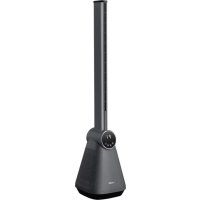
| Product type | Tower fan |
| Brand | Concept |
| Model | VT7010 |
| Dimensions (L x W x H) | 30 x 30 x 100 cm |
| Weight | 4.2 kg |
| Power supply | 220-240 V ~ 50 Hz |
| Rated power | 50 W |
| Number of speeds | 3 |
| Automatic oscillation | Yes, 90° |
| Timer | Yes, up to 8 hours |
| Remote control | Yes, included |
| Maximum noise level | 45 dB |
| Main material | ABS plastic |
| Color | White |
| Control type | Touch buttons and remote control |
| LED display | Yes, for temperature and timer |
| Natural breeze function | Yes |
| Sleep function | Yes, gradual decrease |
| Stable base | Yes, with anti-tip |
| Removable protective grille | Yes, for cleaning |
| Warranty | 2 years |
Frequently Asked Questions - VT7010 Concept
How to assemble the Concept VT7010 fan?
Assemble the base by screwing the central pole, then attach the fan body. Refer to the assembly diagram in the manual for more details.
How to use the remote control?
Insert two AAA batteries (not included) into the remote. Point it at the receiver on the column. Use the buttons to turn on/off, adjust speed and timer.
How to clean the fan?
Unplug the appliance. Remove the front grille by turning it. Clean the blades and grille with a damp cloth. Do not use abrasive products.
The fan is noisy, what to do?
Check that all screws are tight and the fan is on a flat surface. Abnormal noise may indicate unbalanced blades; contact customer service if needed.
How to set the timer?
Press the Timer button to select a duration from 1 to 8 hours. The LED display flashes then stays fixed. The fan will turn off automatically.
Can I use the fan outdoors?
No, this fan is designed for indoor use only. Do not expose it to rain or moisture.
How to activate oscillation?
Press the Oscillation button on the control panel or remote control. The fan will sweep an angle of about 90 degrees.
What to do if the remote control does not work?
Check the batteries, orientation, and that there is no obstacle between the remote and the receiver. If the problem persists, use the buttons on the device.
What is the power consumption?
The rated power is 50 W, which corresponds to a consumption of about 0.05 kWh per hour at full speed.
Where to find spare parts?
Contact Concept customer service or visit their website. Parts such as the grille, blades, and remote control are available.
User questions about VT7010 Concept
0 question about this device. Answer the ones you know or ask your own.
Ask a new question about this device
No questions yet. Be the first to ask one.
Download the instructions for your Fan in PDF format for free! Find your manual VT7010 - Concept and take your electronic device back in hand. On this page are published all the documents necessary for the use of your device. VT7010 by Concept.
USER MANUAL VT7010 Concept
Manual assistant
Powered by Anthropic
Waiting for your message
Product information
Brand : Concept
Model : VT7010
Category : Fan