
Venture TableMIC - Microphone Vaddio - Free user manual and instructions
Find the device manual for free Venture TableMIC Vaddio in PDF.


Pick your language and provide your email: we'll send you a specifically translated version.
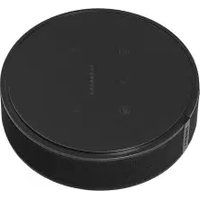
| Product Type | Tabletop Conferencing Microphone |
| Brand | Vaddio |
| Model | Venture TableMIC |
| Dimensions (Diameter x Height) | 4.5 in x 2.0 in (11.4 cm x 5.1 cm) |
| Weight | 0.5 lb (227 g) |
| Power Source | USB-C (bus-powered) |
| Pickup Pattern | Omnidirectional |
| Frequency Response | 100 Hz – 16 kHz |
| Key Functions | Mute/unmute, LED status indicator, plug-and-play |
| Connectivity | USB-C (max 5 m cable length) |
| Compatibility | Windows, macOS, Chrome OS, Linux |
| Cable Length | 1.5 m (integrated) |
| Cleaning Instructions | Wipe with a soft, dry cloth |
| Safety Precautions | Do not expose to liquids; avoid extreme temperatures |
| Spare Parts / Repairability | No user-serviceable parts; contact Vaddio support |
| Included Accessories | Microphone, USB-C cable, quick start guide |
Frequently Asked Questions - Venture TableMIC Vaddio
How do I connect the Venture TableMIC to my computer?
Connect the USB-C cable to your computer. It is plug-and-play and requires no additional drivers for Windows, macOS, Chrome OS, or Linux.
Does the microphone have a mute function?
Yes, press the mute button on the top of the TableMIC. The LED indicator will turn red when muted and white when active.
What is the pickup range of this microphone?
The TableMIC has an omnidirectional pickup pattern and can capture sounds up to 3 meters (10 feet) away in typical conference room conditions.
Can I use this microphone with a video conferencing app like Zoom or Teams?
Yes, the TableMIC is recognized as a standard USB audio device, so it works seamlessly with Zoom, Microsoft Teams, Google Meet, and other softphones.
Is the Venture TableMIC compatible with gaming consoles?
It works with PC and Mac. Console compatibility varies; it may function as a USB audio device on PS4/PS5 and Xbox (with adapter), but features like mute may not be supported.
How do I clean the microphone?
Wipe the surface gently with a soft, lint-free cloth slightly dampened with water or mild soap. Avoid getting moisture into the ports or openings.
What should I do if the microphone is not working?
Check that the USB cable is securely connected. Try a different USB port. If the LED does not light up, the device may not be receiving power. Restart your computer.
Can I extend the cable length?
Yes, you can use a USB extension cable (up to 5 m total) or a USB hub. For longer distances, consider an active extension or USB over Ethernet.
Does the TableMIC require any software?
No, it is plug-and-play. However, you can adjust input volume and noise suppression through your operating system's sound settings.
What is the warranty for this product?
Vaddio offers a limited 2-year warranty. Contact Vaddio support or your distributor for more details.
User questions about Venture TableMIC Vaddio
0 question about this device. Answer the ones you know or ask your own.
Ask a new question about this device
No questions yet. Be the first to ask one.
Download the instructions for your Microphone in PDF format for free! Find your manual Venture TableMIC - Vaddio and take your electronic device back in hand. On this page are published all the documents necessary for the use of your device. Venture TableMIC by Vaddio.
USER MANUAL Venture TableMIC Vaddio

Manual assistant
Powered by Anthropic
Waiting for your message
Product information
Brand : Vaddio
Model : Venture TableMIC
Category : Microphone