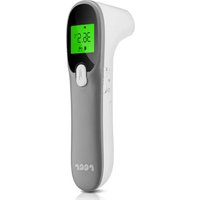
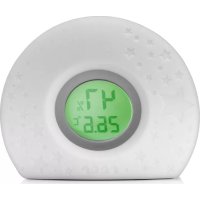
4in1 Colour MaxTemp A202D - Thermometer Reer - Free user manual and instructions
Find the device manual for free 4in1 Colour MaxTemp A202D Reer in PDF.


Pick your language and provide your email: we'll send you a specifically translated version.
| Product Type | Non-contact infrared thermometer |
| Model | 4in1 Colour MaxTemp A202D |
| Brand | Reer |
| Main functions | Measurement of body temperature, ambient temperature, surface temperature, and fever mode |
| Display | Backlit colour screen with colour code (green, yellow, red) |
| Body measurement range | 32.0°C to 42.9°C (89.6°F to 109.2°F) |
| Accuracy | ±0.2°C (body mode) |
| Measurement distance | 3 to 5 cm |
| Memory | Up to 25 measurements with date and time |
| Power supply | 2 AAA batteries (1.5V) included |
| Dimensions | 150 x 40 x 40 mm |
| Weight | 80 g (with batteries) |
| Housing material | ABS plastic |
| Auto-off | Yes, after 30 seconds of inactivity |
| Measurement units | °C / °F selectable |
| Safety | Suitable for children and adults, non-contact, no harmful rays |
| Maintenance and cleaning | Clean the probe with a soft cloth dampened with 70% alcohol, do not immerse in water |
| Spare parts and repairability | Replace batteries if necessary; no other spare parts available |
Frequently Asked Questions - 4in1 Colour MaxTemp A202D Reer
How to use the Reer 4in1 Colour MaxTemp thermometer?
Turn on the device with the ON button. Point the sensor at the forehead from 3-5 cm away, then press the measurement button. The temperature appears within seconds.
How to change the unit from °C to °F?
Press the MODE button while holding the ON button for 3 seconds. The unit changes and displays on the screen.
What do the screen colors mean?
Green: normal temperature (<37.5°C). Yellow: mild fever (37.5-38.5°C). Red: high fever (>38.5°C).
How to clean the thermometer probe?
Use a soft cloth dampened with 70% alcohol to wipe the lens and sensor. Do not use abrasive products or immerse the device.
What type of batteries to use?
The thermometer operates with 2 AAA 1.5V batteries. Use alkaline batteries for optimal lifespan.
Why does the device display an error?
Possible errors: low battery (battery symbol blinking), ambient temperature too high (>40°C) or too low (<10°C), or incorrect measurement distance. Refer to the manual for detailed error codes.
How many measurements can I store?
The device stores up to 25 measurements with date and time. To access history, press the MEM button.
Can I use this thermometer for ambient temperature?
Yes, in ambient mode, you can measure the temperature of air or objects (non-contact) up to 100°C.
Is the thermometer suitable for infants?
Yes, it is suitable for the whole family, including infants and children, because the measurement is non-contact and fast.
How to turn off the device?
The device turns off automatically after 30 seconds of inactivity. You can also hold the ON button to turn it off manually.
User questions about 4in1 Colour MaxTemp A202D Reer
0 question about this device. Answer the ones you know or ask your own.
Ask a new question about this device
No questions yet. Be the first to ask one.
Download the instructions for your Thermometer in PDF format for free! Find your manual 4in1 Colour MaxTemp A202D - Reer and take your electronic device back in hand. On this page are published all the documents necessary for the use of your device. 4in1 Colour MaxTemp A202D by Reer.
USER MANUAL 4in1 Colour MaxTemp A202D Reer

Manual assistant
Powered by Anthropic
Waiting for your message
Product information
Brand : Reer
Model : 4in1 Colour MaxTemp A202D
Category : Thermometer