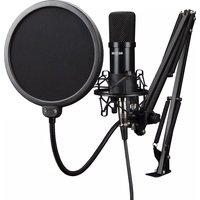
GMC302 - Microphone Mad Dog - Free user manual and instructions
Find the device manual for free GMC302 Mad Dog in PDF.


Pick your language and provide your email: we'll send you a specifically translated version.
| Product Type | Dynamic microphone |
| Frequency Response | 50 Hz – 15 kHz |
| Impedance | 600 Ω |
| Sensitivity | -54 dBV/Pa |
| Connector | XLR (3-pin) |
| Dimensions | 180 mm (L) × 50 mm (diameter) |
| Weight | 250 g |
| Power Requirement | None (passive) |
| Cable Length (included) | 5 m |
| On/Off Switch | Yes |
| Included Accessories | Microphone clip, carrying pouch |
| Body Material | Metal |
| Finish | Black matte |
| Primary Use | Vocal, speech, live performance |
| Maintenance | Wipe with a dry cloth |
| Safety Precautions | Avoid moisture and drops |
| Spare Parts Availability | Not individually sold |
| Repairability | Non-serviceable by user |
Frequently Asked Questions - GMC302 Mad Dog
How do I connect the GMC302 microphone?
Connect the XLR cable to the microphone and the other end to a mixer, audio interface, or PA system with an XLR input. Ensure the device is powered on.
Why is there no sound from the microphone?
Check that the XLR cable is fully inserted. Verify that the mixer or interface channel is unmuted and the gain is turned up. Also, ensure the microphone's on/off switch is set to ON.
How can I reduce microphone feedback?
Position the microphone away from speakers. Lower the gain and adjust EQ to cut frequencies that feed back. Use a directional mic pattern (cardioid) and avoid pointing the mic at monitors.
Can I use this microphone with a computer?
Yes, but you will need an audio interface with an XLR input or an XLR-to-USB adapter. The microphone itself does not connect directly to a computer's microphone jack.
How do I clean and maintain the microphone?
Wipe the metal body with a soft dry cloth. For the grille, use a gentle brush to remove dust. Avoid moisture and do not use harsh chemicals.
What is the frequency response of the GMC302?
The frequency response is 50 Hz to 15 kHz, which covers the typical vocal range well.
Does this microphone require phantom power?
No, the GMC302 is a dynamic microphone and does not need phantom power. It works passively with an XLR connection.
What type of polar pattern does it have?
It has a cardioid polar pattern, which picks up sound from the front and rejects noise from the back and sides.
Is the microphone suitable for recording instruments?
Yes, it can be used for recording guitar amps, drums (as overhead or snare), and other instruments with its cardioid pattern and tailored frequency response.
What is the warranty period for the Mad Dog GMC302?
The manufacturer's warranty typically covers defects for 1 year from the date of purchase. Check your local dealer for specific warranty terms.
User questions about GMC302 Mad Dog
0 question about this device. Answer the ones you know or ask your own.
Ask a new question about this device
No questions yet. Be the first to ask one.
Download the instructions for your Microphone in PDF format for free! Find your manual GMC302 - Mad Dog and take your electronic device back in hand. On this page are published all the documents necessary for the use of your device. GMC302 by Mad Dog.
USER MANUAL GMC302 Mad Dog
Manual assistant
Powered by Anthropic
Waiting for your message
Product information
Brand : Mad Dog
Model : GMC302
Category : Microphone