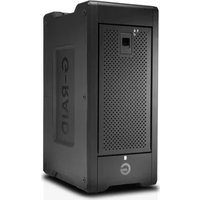
G-RAID Shuttle 8 - Disk array SANDISK - Free user manual and instructions
Find the device manual for free G-RAID Shuttle 8 SANDISK in PDF.


Pick your language and provide your email: we'll send you a specifically translated version.
| Product Type | Disk Array |
| Brand | SanDisk |
| Model | G-RAID Shuttle 8 |
| Number of Drive Bays | 8 |
| Supported Drive Form Factors | 3.5" SATA or 2.5" SATA SSD |
| RAID Levels Supported | 0, 1, 5, 6, 10, JBOD |
| Interface | Thunderbolt 3 (USB-C) ×2 |
| Data Transfer Rate | Up to 2,800 MB/s (reads) |
| Maximum Storage Capacity | Up to 160 TB (with 20TB drives) |
| Dimensions (H × W × D) | 16.0 × 12.0 × 8.0 inches (40.6 × 30.5 × 20.3 cm) |
| Weight | 20 lbs (9.1 kg) without drives |
| Power Supply | AC 100-240V, 50/60Hz, 350W (external) |
| Cooling | Two 120mm fans (variable speed) |
| LED Indicators | Power, drive activity, RAID status |
| Operating Temperature | 5°C to 40°C (41°F to 104°F) |
| Compatible Operating Systems | macOS 10.15+; Windows 10/11 (via driver) |
| Software | G-RAID Manager (RAID configuration, monitoring) |
| Drive Hot-Swap Support | Yes |
| Maintenance & Cleaning | Wipe exterior with dry, lint-free cloth. Do not use liquids or solvents. Ensure airflow vents are unobstructed. |
| Safety Precautions | Do not expose to water or excessive heat. Use only the provided power adapter. Ensure proper grounding. |
| Spare Parts & Repairability | Spare drive caddies, power supply, and fan modules available. Drives are user-replaceable. Other repairs should be done by authorized service. |
Frequently Asked Questions - G-RAID Shuttle 8 SANDISK
How do I set up the G-RAID Shuttle 8?
Connect the unit to your computer via Thunderbolt 3, power on, install G-RAID Manager software, and follow the prompts to configure RAID.
What RAID levels are supported?
Supports RAID 0, 1, 5, 6, 10, and JBOD. Use G-RAID Manager to select and manage the array.
Can I use this with a Windows PC?
Yes, but a Thunderbolt 3 driver may be required for Windows. It is natively supported on macOS.
How do I replace a failed hard drive?
Locate the failed drive via the LED indicator, safely remove it, insert a new compatible drive, and rebuild the array using G-RAID Manager.
What is the maximum capacity?
The G-RAID Shuttle 8 supports up to 8 drives. Using 20TB drives, total raw capacity is 160TB. Supports both HDD and SSD.
Does it support daisy-chaining?
Yes, with two Thunderbolt 3 ports, you can daisy-chain up to 6 additional Thunderbolt devices.
How do I clean the device?
Shut down and disconnect power. Wipe the exterior with a dry, lint-free cloth. Avoid liquids and ensure vents stay clear.
What is the warranty period?
SanDisk typically offers a 3-year limited warranty. Check your purchase documentation for details.
Can I mix SSDs and HDDs?
Mixing is possible but not recommended for optimal performance and RAID reliability. Use same type and speed for best results.
How do I update the firmware?
Use the G-RAID Manager software. It will notify you of available updates; follow on-screen instructions to install.
User questions about G-RAID Shuttle 8 SANDISK
0 question about this device. Answer the ones you know or ask your own.
Ask a new question about this device
No questions yet. Be the first to ask one.
Download the instructions for your Disk array in PDF format for free! Find your manual G-RAID Shuttle 8 - SANDISK and take your electronic device back in hand. On this page are published all the documents necessary for the use of your device. G-RAID Shuttle 8 by SANDISK.
USER MANUAL G-RAID Shuttle 8 SANDISK
Manual assistant
Powered by Anthropic
Waiting for your message
Product information
Brand : SANDISK
Model : G-RAID Shuttle 8
Category : Disk array