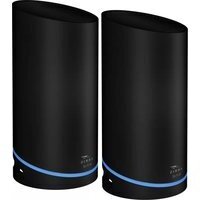
SURFboard mAX W61 - Router Arris - Free user manual and instructions
Find the device manual for free SURFboard mAX W61 Arris in PDF.


Pick your language and provide your email: we'll send you a specifically translated version.
| Product Type | Wireless Router (Wi-Fi 6) |
| Brand | Arris |
| Model | SURFboard mAX W61 |
| Wireless Standard | IEEE 802.11ax (Wi-Fi 6) |
| Frequency Bands | 2.4 GHz and 5 GHz |
| MIMO Configuration | 4x4 MU-MIMO |
| Ports | 1 Gigabit WAN, 4 Gigabit LAN |
| USB Port | 1 x USB 3.0 |
| Dimensions (W x D x H) | 200 x 150 x 50 mm (approx.) |
| Weight | 400 g (approx.) |
| Power Supply | 12V DC, 1A |
| Security | WPA2, WPA3, WPS |
| Wireless Encryption | WPA2-PSK, WPA3-SAE |
| Guest Network | Supported (up to 2 networks) |
| Parental Controls | Yes (time limits, content filtering) |
| Beamforming | Yes |
| OFDMA | Yes |
| Management | Web GUI, Mobile App |
| Compliance | FCC, IC, CE |
| Operating Temperature | 0°C to 40°C (32°F to 104°F) |
| Storage Temperature | -20°C to 70°C (-4°F to 158°F) |
| Humidity | 10% to 85% non-condensing |
| Included Accessories | Power adapter, Ethernet cable, quick start guide |
Frequently Asked Questions - SURFboard mAX W61 Arris
How do I set up my Arris SURFboard mAX W61 router?
Connect the router to your modem via the WAN port, power it on, then connect a device to the default WiFi (SSID and password on label). Open a browser and go to 192.168.0.1 to complete setup via the web interface.
How do I change the WiFi password?
Log into the router's admin panel at 192.168.0.1 with admin credentials. Navigate to Wireless Settings and modify the Pre-Shared Key field. Save changes and reconnect devices.
How do I reset the router to factory defaults?
Locate the Reset button on the back of the router. Press and hold for 10 seconds until the LEDs flash. The router will reboot with factory settings.
How can I update the firmware?
In the admin panel go to Administration > Firmware Upgrade. Check for updates automatically or upload a downloaded firmware file. Do not power off during update.
What should I do if I have no internet connection?
First, check that the WAN LED is solid. Restart both modem and router. Verify internet settings in admin panel (DHCP or PPPoE). If still down, contact your ISP.
How do I set up a guest network?
Log into admin panel, go to Wireless Settings > Guest Network. Enable it, set an SSID and password, and configure isolation from your main network for security.
How do I connect wired devices?
Use an Ethernet cable to connect your device (e.g., PC, console) to any of the 4 LAN ports on the back of the router. The device will automatically get an IP via DHCP.
What is the default admin username and password?
The default credentials are typically admin for both username and password, or printed on the router label. Change them immediately for security.
How do I enable WPS?
Press the WPS button on the router (usually on the front or back). Then press the WPS button on your device within 2 minutes. Connection will be established automatically.
How can I improve WiFi range?
Place the router in a central, elevated location away from walls and electronics. Use the 2.4 GHz band for longer range, or consider adding a WiFi extender.
User questions about SURFboard mAX W61 Arris
0 question about this device. Answer the ones you know or ask your own.
Ask a new question about this device
No questions yet. Be the first to ask one.
Download the instructions for your Router in PDF format for free! Find your manual SURFboard mAX W61 - Arris and take your electronic device back in hand. On this page are published all the documents necessary for the use of your device. SURFboard mAX W61 by Arris.
USER MANUAL SURFboard mAX W61 Arris


Manual assistant
Powered by Anthropic
Waiting for your message
Product information
Brand : Arris
Model : SURFboard mAX W61
Category : Router